
BUSMUST now supports INCA: XCP calibration and UDS diagnostics
BUSMUST hardware now connects to INCA. Install the BMJ2534 support package and select BUSMUST CAN/CAN FD channels in INCA for native XCP measurement and calibration, UDS diagnostics and flashing.
The package targets INCA 7.X.X. Validated combinations are 7.3.7 on Windows 10 and 7.4.3 on Windows 10 and Windows 11. Other 7.X versions may also work but have not all been tested.
Download and install
Section titled “Download and install”Get the latest installation ZIP from GitHub Releases or Gitee Releases. A BUSMUST-hosted offline package, v1.0.1.1, is also available. The ZIP includes an illustrated Chinese guide and Chinese/English README files.
Exit INCA, extract the complete ZIP, run Install.cmd, follow the installer, and start INCA using its usual shortcut.
Select BUSMUST in INCA
Section titled “Select BUSMUST in INCA”Open the workspace hardware configuration with Ctrl+F3 and add a J2534 system. On the J2534 Parameters page for J2534:1, select BUSMUST - BUSMUST - BMJ2534, retain API 0404, and select Apply.
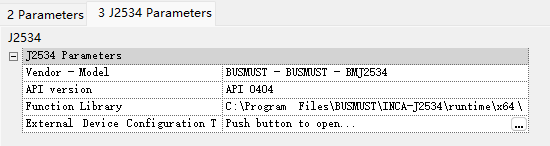
Use the “…” button at the right of External Device Configuration Tool to open the BUSMUST configuration window. The default automatic mode requires exactly one available physical CAN/CAN FD channel. With multiple channels, choose manual mode and select the wired device and CH port. Set termination and sample points in the same window, then save.
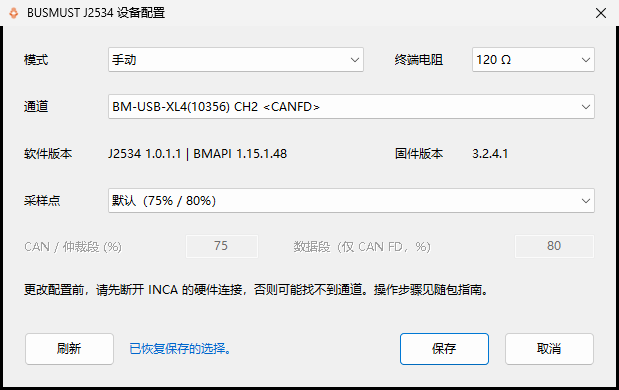
Complete this setup before hardware initialization. Set communication rates in INCA, check data-phase rate and BRS for CAN FD, and initialize with F3.
Use native XCP and UDS workflows
Section titled “Use native XCP and UDS workflows”XCP measurement, calibration, A2L setup and acquisition use INCA’s native workflows. Standard INCA calibration tutorials provide further operating guidance.
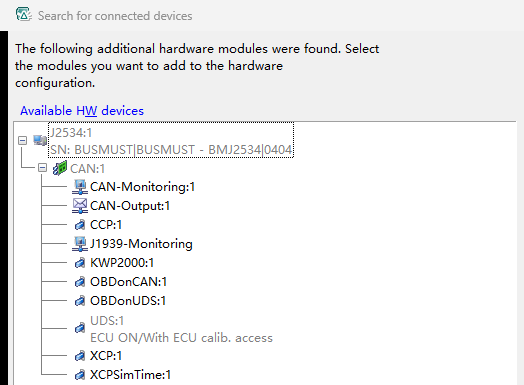
Use existing ODX-LINK projects for UDS sessions and DID reads/writes. Flashing uses the target ECU’s ProF configuration and firmware. The following hardware status was captured with BUSMUST connected to a real ECU.
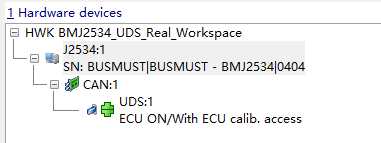
Projects with an existing CANoe security-algorithm DLL can also use the open-source INCA–CANoe SeedKey Bridge to adapt its algorithm interface for INCA UDS security access.
BUSMUST hardware brings a cost-effective connection to INCA’s established software ecosystem. For assistance or requests to support another ecosystem, contact BUSMUST technical support.