
BUSMUST Advanced Features
Some BUSMUST devices support device-side features that continue to work with reduced PC involvement, or even after the device has been configured and disconnected from BUSMASTER. Availability depends on the product model and firmware version.
Message Routing
Section titled “Message Routing”Message Routing forwards or transforms messages between channels. Typical routing modes include broadcast, direct routing, type mapping, ID mapping, and ID plus type mapping. Routing rules may match source channel, target channel, ID value, ID mask, frame type, FD, BRS, or RTR conditions.
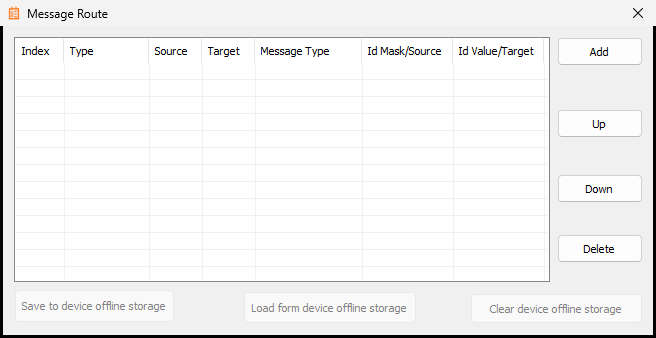 BUSMUST message routing configuration
The routing list contains one row for each rule. The main columns are:
- Type: selects the routing mode, such as direct forwarding, message-type mapping, ID mapping, or ID plus type mapping.
- Source: the source channel or source condition for the rule.
- Target: the target channel or target value used by the rule.
- Message Type: limits or converts the frame type, including classic CAN, CAN FD, BRS, RTR, standard ID, or extended ID where supported.
- Id Mask/Source: a mask or source ID value used to match incoming messages.
- Id Value/Target: the ID value to match or the target ID value to write after mapping.
Use Add to create a new rule, Up and Down to adjust rule order, and Delete to remove a rule. The device-side storage buttons save, load, or clear the routing configuration in the device offline storage when the selected device supports it.
Use routing when the device must bridge two CAN/CAN FD networks, forward selected frames, or translate selected message identifiers. Test routing with a small rule set before enabling broad forwarding on a live bus.### Offline Logging
Offline logging records bus traffic to device-side storage without requiring BUSMASTER to stay connected. Depending on the device, configuration can include mode, direction, file format, path mode, start trigger, stop trigger, and segmentation rules.
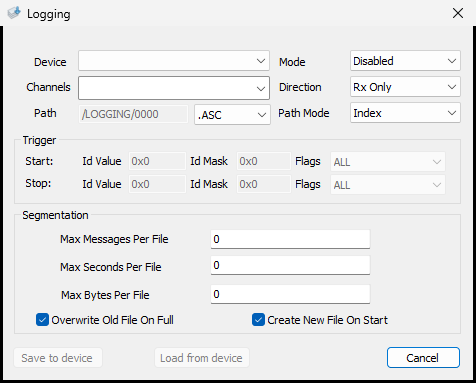 BUSMUST offline logging configuration
The offline logging window contains these key fields:
- Device: selects the BUSMUST device that will execute the logging task.
- Channels: selects the hardware channels to record.
- Mode: enables or disables the offline logging task.
- Direction: selects received messages, transmitted messages, or both depending on device capability.
- Path: sets the device-side storage path and file index.
- File format: selects the stored log format, such as ASC, when supported.
- Path Mode: controls how the file path or file index is generated.
- Trigger Start/Stop: starts or stops recording when a matching ID, ID mask, and frame flag condition is observed.
- Segmentation: limits each log file by message count, duration, or file size.
- Overwrite Old File On Full: allows old files to be overwritten when storage is full.
- Create New File On Start: starts a new log file each time the task starts.
Use offline logging for long-duration tests, road tests, or environments where a PC cannot remain connected. Confirm storage capacity and file format before starting the test.### Offline Replay
Offline replay sends messages from device-side storage or memory to the bus. Configuration can include replay file, channel, trigger, cyclic mode, force-zero timestamp behavior, and timing options.
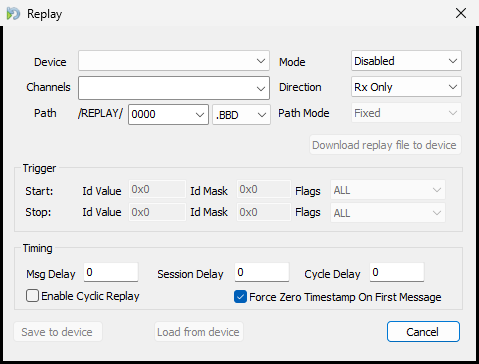 BUSMUST offline replay configuration
The offline replay window contains these key fields:
- Device: selects the BUSMUST device that will execute the replay task.
- Channels: selects the output channel or channel group.
- Mode: enables or disables the replay task.
- Direction: selects which direction of messages in the replay file should be used when the file contains direction information.
- Path: selects the device-side replay folder, file index, and file format such as BBD.
- Download replay file to device: transfers the selected replay file to the device before offline execution.
- Trigger Start/Stop: starts or stops replay when a matching ID, ID mask, and frame flag condition is observed.
- Msg Delay: inserts or overrides the delay between messages.
- Session Delay: inserts a delay before the replay session starts.
- Cycle Delay: inserts a delay between repeated replay cycles.
- Enable Cyclic Replay: repeats the replay task cyclically.
- Force Zero Timestamp On First Message: treats the first replayed frame as the zero-time reference.
Use offline replay when the BUSMUST device must reproduce traffic without continuous PC control. Always confirm that the replay traffic is safe for the connected ECU or network.### Device-Side Timed Transmit Tasks
Newer BUSMUST devices can execute timed transmit tasks at the hardware or firmware level. In BUSMASTER this is exposed through the normal transmit window workflow, so users normally do not need to choose between hardware and software timers manually.
When device-side timed task resources are available, BUSMASTER uses them to improve timing accuracy. If those resources are exhausted or not supported, BUSMASTER can fall back to software-driven transmission where applicable.
Authoritative source: BUSMASTER DITA help source BUSMUST_Advanced_Features.dita, compiled into BUSMASTER.CHM with the application.