
Software and Firmware Update
BUSMASTER includes update entry points for the PC application and for supported BUSMUST device firmware. Use these functions when BUSMUST support asks you to upgrade, or when a new version provides a required feature or compatibility fix.
BUSMASTER Application Update
Section titled “BUSMASTER Application Update”The application update function starts the BUSMASTER update tool. Depending on the installed version, BUSMASTER may also support automatic update checks. If automatic checks are disabled, use the manual check entry from the Help or update menu.
 Update entry points on the Help ribbon
Close active measurements before installing an application update. Save the current configuration file first if the session contains important channel, logging, replay, or diagnostics settings.### BUSMUST Device Firmware Update
The firmware update entry starts the BUSMUST firmware update tool for supported devices. Firmware update support depends on product model, hardware generation, connection type, and current firmware.
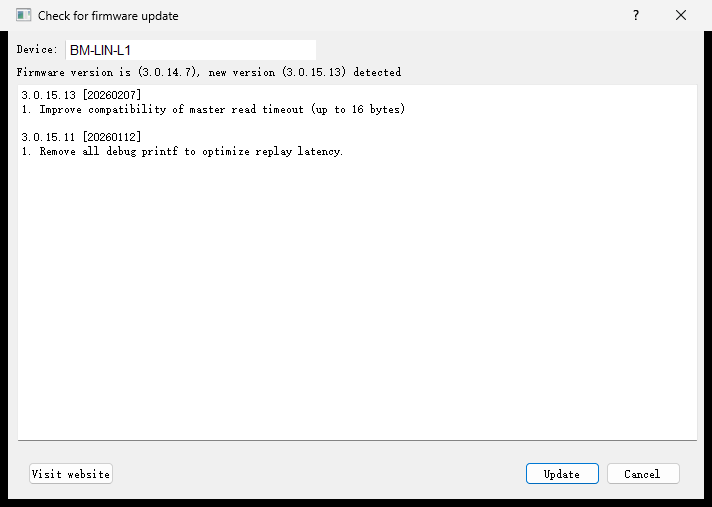 BUSMUST firmware update window
Before updating firmware, disconnect the device from critical ECUs, stop logging or replay tasks, ensure stable USB or network connection, and keep the PC powered during the process. Do not unplug the device during firmware update unless BUSMUST support instructs you to do so.### When to Update
Update the PC application when you need a new software feature, file-format compatibility, diagnostics improvement, or UI fix. Update device firmware when the feature depends on device-side support, such as newer offline logging, offline replay, routing, PTP timestamp, LIN, or remote-device behavior.
Authoritative source: BUSMASTER DITA help source Software_Firmware_Update.dita, compiled into BUSMASTER.CHM with the application.