CAN FD channel configuration
Applicable devices
Section titled “Applicable devices”This workflow applies to BUSMUST USB-CAN, USB-CAN FD, and Ethernet CAN FD interfaces recognized by BUSMASTER.
Configuration workflow
Section titled “Configuration workflow”- Open
CAN -> Driver Selectionin BUSMASTER. - Select
BUSMUST USB-CAN(FD). - Scan for devices and map each physical hardware channel to a BUSMASTER logical channel.
- Open
CAN -> Channel Configurationand set the channel parameters. - After confirming the configuration, select
CAN -> Connectto connect to the bus.
CAN FD parameters to verify
Section titled “CAN FD parameters to verify”- Arbitration-phase bitrate, for example 500 kbit/s.
- Data-phase bitrate, for example 2, 4, or 5 Mbit/s.
- Whether bit-rate switching (BRS) is enabled.
- Standard or extended identifiers.
- Advanced timing parameters such as sample point and SJW, when required by the network.
- Whether the device-side termination resistor is required. A CAN bus normally uses 120-ohm termination at both physical ends.
- Whether the selected logical channel matches the physical wiring.
Hardware selection fields
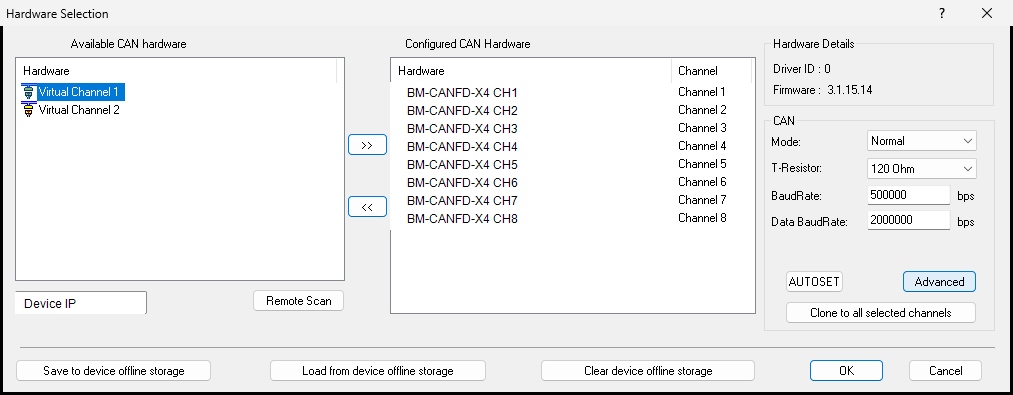
Section titled “Hardware selection fields”The BUSMUST CAN/CAN FD hardware selection window normally includes:
Available CAN hardware: detected physical channels available for selection.Configured CAN Hardware: channels already mapped to BUSMASTER logical channels.Mode: normally Normal; supported devices may also offer listen-only, loopback, or CAN FD modes.T-Resistor: controls the device-side 120-ohm termination resistor.BaudRate: arbitration or nominal bitrate.Data BaudRate: CAN FD data-phase bitrate.AUTOSET: attempts to detect the bitrate when bus traffic is present.Advanced: opens advanced timing and hardware-filter settings.Save/Load/Clear device offline storage: writes configuration to the device, reads it back, or clears the stored offline configuration.
Troubleshooting
Section titled “Troubleshooting”- Device not found: check the driver, USB or Ethernet connection, device power, and whether another application is using the device.
- Classic CAN works but CAN FD does not: verify the data-phase bitrate, BRS, sample point, and the configuration of the other node.
- No messages received: verify the channel mapping, termination, filters, and that BUSMASTER is connected.
Source: BUSMUST technical knowledge base busmust-canfd-channel-configuration.md. This public guide is maintained by the website content pipeline. Use the download center for current and archived software releases.
Channel mapping and parameter configuration
Section titled “Channel mapping and parameter configuration”These original screenshots come from the BUSMASTER manual or illustrated guide and show the actual workflow.