
BUSMASTER COM interface
Using BUSMASTER Automation Object:
User can use all the APIs exposed by BUSMASTER, as COM interface functions in his own application by following ways:
FROM VB:
If the client application is developed using VB the steps are: Project->Add Reference ie. 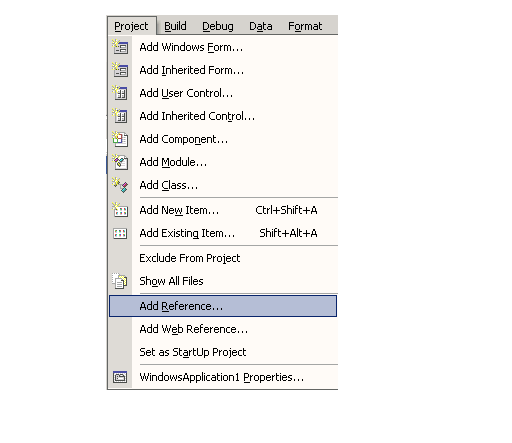 Select the CAN_Monitor 1.0 Type Library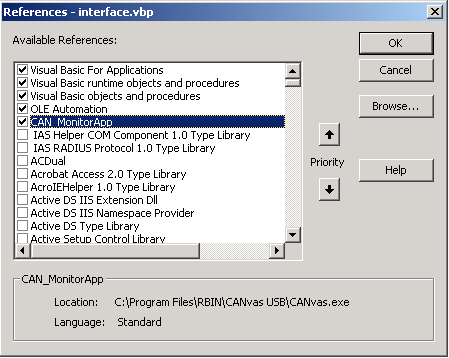
Now all the BUSMASTER COM APIs can be used in the client application.Once the VB project is configured to use CAN_Monitor type library, a global variable is needed to be declared and initialised so that the COM server can be accessed.This can be accomplished using following statement:
Dim gBUSMASTERApp As CAN_MonitorApp.ApplicationSet gBUSMASTERApp = New CAN_MonitorApp.ApplicationNow the varible gBUSMASTERApp can be used to access all the COM members.
For connecting the tool following code is required:
gBUSMASTERApp  .Connect 1```From C++
Let's start with a very simple C++ application. Make a simple dialog-based application with the class wizard, be it an MFC or an ATL/WTL application. Just make sure that :CoInitialize() and CoUninitialize() are called somewhere (that is done automatically in ATL applications). Put a button on the dialog somewhere, wire it up, and put the following in the message handler for the BN_CLICKED handler:
```textHResult hr;hr = ::CoCreateInstance(CLSID_Application, NULL, CLSCTX_LOCAL_SERVER, IID_IApplication, (void**)&m_IApplication);if(SUCCEEDED(hr))  if (m_IApplication) {    m_IApplication->Connect ( 1 );  }}
In the header for the dialog, declare a member like this:
IApplication* m_IApplication;Now, all you need to do is include the file CAN_Monitor_Interface.h which is provided in the BUSMASTER installation folder.When you go looking for this file, you’ll notice another file: CAN_Monitor_Interface.c. This file contains the implementation of the interface and is needed by the linker. So, again, you can copy it, or add it to your project directly.
Now, build your application, click the button you’ve made, and - there is your application!
To receive CAN messages from Busmaster makes use of the new interface_IAppEvents (connection points).
To know more, refer Example folder in BUSMASTER installation folder.
Authoritative source: BUSMASTER DITA help source com_interface_application.dita, compiled into BUSMASTER.CHM with the application.