
Diagnostics Main Window
Introduction:
Diagnostics Main Window is used to transmit diagnostics requests and to monitor the diagnostics responses received from the ECU
Configuration:
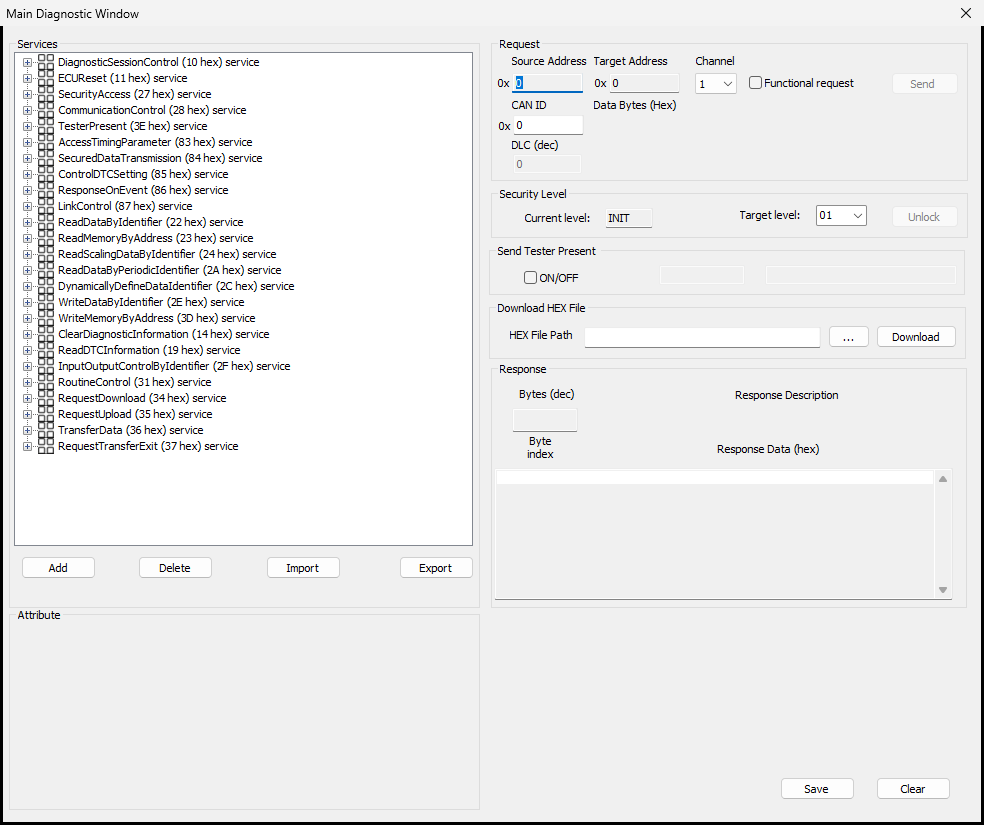
To configure diagnostic requests for transmission or to monitor diagnostic response use CAN->Diagnostics->Transmit Window menu.This will display the Window as shown below.
BUSMUST builds provide an enhanced UDS-oriented diagnostics window. The service tree can be used to choose common UDS services and sub-services, fill typical parameters, and send the request without manually typing every byte.
The service tree on the left side is intended for day-to-day diagnostic operation. Expand a service group, select a request template, adjust the visible parameters such as DID, RID, sub-function, address, or payload bytes, then send the request from the window. For many standard operations, users do not need to manually calculate and type the complete hexadecimal payload.
Displayed Fields:
Source Address To specify the Source Address if the interface is selected as 29 bit interface If the interface is selected as 11 bit interface, the source address will be taken from CAN ID Request to ECU field in the Settings window Target Address To specify the Target address if the interface is selected as 29 bit interface If the interface is selected as 11 bit interface, the source address will be taken from CAN ID Responsefrom ECU field in the Settings window Send Tester Present Checked to transmit tester present message Max DLC If checked, the data length of the messages transmitted will be set to 8 bytes even if the data length of the message is less than 8 bytes Channel Channel number on which the message to be transmitted CAN ID Indicates the message identifier DLC Displays the data length of the message based on the bytes inserted in the Data Bytes field Data Bytes Data bytes to be transmitted UDS Service Tree Lists common UDS services, sub-services, and example parameters. Expand the tree to locate the required diagnostic operation, then select or double-click a request node to load or send the corresponding request. The request can still be edited before transmission when the ECU project uses a different DID, RID, sub-function, or data value. This parameterized workflow is useful for services such as session control, ECU reset, reading DIDs, routine control, security access, request download, transfer data, and tester present. It reduces mistakes that are common when the complete request is entered only as raw hexadecimal bytes. Send Transmits the configured message Bytes Number of data bytes received as response to the request sent Response Description Description of the response received Byte Index Index or position of the data bytes Response Data Data bytes received as response to the request sent
Security Access workflows normally require a seed request such as 27 01 followed by a key response such as 27 02. BUSMUST diagnostics can help execute this sequence when the key algorithm is configured. If the ECU returns a negative response, verify the security level, seed/key algorithm, session state, and timing before retrying.
For programming or download workflows, use the UDS service templates for Request Download, Transfer Data, and Request Transfer Exit. On CAN FD, ensure that the channel and diagnostics settings both match the ECU’s CAN FD configuration.
Authoritative source: BUSMASTER DITA help source Diagnostics_Main_Window.dita, compiled into BUSMASTER.CHM with the application.