
LIN Schedule Table Configuration
LIN Schedule Table Configuration executes schedule tables that are already defined in an imported LDF. Message IDs, payloads, and periods are not created manually in this dialog. Independent single-shot or periodic LIN tasks are configured in the Master-mode Transmit Window.
Prerequisites
Section titled “Prerequisites”-
Import an LDF that contains at least one Schedule Table and associate it with the required LIN channel.
-
Configure the LIN channel as Master.
-
In Select ECU, select the ECU that is defined as the Master node in the LDF.### Configure and run a Schedule Table
-
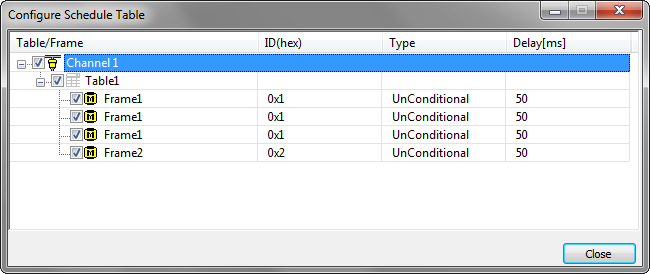
Use LIN->Schedule Configuration to open the Configure Schedule Table dialog.
-
The dialog displays the Schedule Tables for each LIN channel. Expand a table to view its slots.
-
The following columns are displayed: Table/Frame: Schedule Table name or frame name. ID(hex): Frame identifier in hexadecimal format. Type: Frame type or command name. Delay: Time in milliseconds from the start of the current slot to the start of the next slot. It is not a wait inserted before the current frame.
-
Check a Schedule Table to select it. All supported slots in the table are selected by default. Individual slots can then be checked or unchecked.
-
When the selected table requires missing Transmit rows or contains rows whose direction conflicts with the LDF Publisher, BUSMASTER 4.2 displays one reconciliation summary: The active schedule requires missing Transmit rows or direction corrections. Apply them now? Choose Yes to create missing rows and correct conflicting directions in one operation. Choose No to cancel the requested table change and keep the previous schedule and Transmit configuration.
-
After confirmation, BUSMASTER uses the LDF Publisher to create or correct each required row: If the Publisher is the selected Master ECU, the row is configured as Master Write. If the Publisher is another ECU, the row is configured as Master Read. The Repetition field identifies the schedule owner, for example Trig by Table1.
-
Connect the LIN channel. BUSMASTER converts the active table into one ordered hardware task plan and executes it repeatedly using the LDF slot order and Delay values.### Enable, disable, and switch tables
-
The table and its individual slots can be enabled or disabled while the channel is in use.
-
An unchecked slot does not generate a frame task, but its Delay remains part of the original LDF timeline. Later slots are not moved earlier.
-
Only one Schedule Table can be active on a LIN Master channel. Selecting another table starts the same reconciliation process for the new table.
-
The new table becomes active only after reconciliation and hardware application succeed. Cancelling the prompt keeps the previous active table.
-
Transmit rows are not deleted when a table is stopped or replaced. Rows not owned by the active table may continue as separately enabled periodic tasks.
-
Table and slot selections are stored in the configuration file. BUSMASTER validates them again after loading a configuration, changing the LDF or selected ECU, or reconnecting the channel.### Supported schedule items
-
LDF Unconditional Frames are supported.
-
Diagnostic frame 0x3C is executed as Master Write and diagnostic frame 0x3D is executed as Master Read when explicitly present in the selected table.
-
Event-triggered Frames, Sporadic Frames, Collision Resolving Schedules, automatic execution of configuration commands, and diagnostic transport-layer automatic table switching are not executed by this basic scheduler.
Note: Unsupported items may remain visible in the imported LDF and Schedule Configuration dialog, but BUSMASTER does not treat them as ordinary Master Read or Master Write frames.### Troubleshooting
- If a table cannot be activated, verify that the correct LDF is associated with the channel, the channel is in Master mode, the LDF Master ECU is selected, and at least one supported slot is enabled.
- If the reconciliation prompt appears, review the listed rows. The prompt is expected when the table needs new Transmit templates or LDF Publisher direction corrections.
- If a Master Read times out, verify that the external Slave is online and that its response ID, DLC, checksum model, baud rate, and response enable state match the LDF.
Authoritative source: BUSMASTER DITA help source LIN_ScheduleTable_Configuration.dita, compiled into BUSMASTER.CHM with the application.