
Automated Testing: Turn Project Documents into Executable, Traceable Test Suites
Use AI to organize project materials and BMCLI to execute bus operations, bringing test descriptions and automated cases under one set of rules. This article starts with original customer documents and develops an executable, traceable test suite.
Imagine a body controller entering its first integration round. The customer supplies company standards, a communication matrix, and a diagnostic questionnaire; the team also has test materials from the previous generation. Every message, signal, DID, and DTC behavior needs checking. Before writing scripts, the team must reconcile field definitions, resolve document conflicts, and supply operating conditions and pass criteria. AI helps organize materials and expand rules; BMCLI provides interfaces for communication, diagnostics, and fault experiments.
If the customer provides only a communication matrix, ask AI to generate a candidate DBC and cross-check it against the matrix. If a DBC exists, check its consistency with the specification. Use this common definition to organize signal boundaries, allowed combinations, dropped or repeated inputs, diagnostic reads/writes, and fault activation/clearance checks. Bench conditions and permitted operations determine which active tests may run.
Test descriptions, execution configuration, and reports share requirement identifiers. The suite can grow with the rules; each case has explicit input, observable response, and judgment criteria. We begin with a small communication example, then extend the approach to project materials.
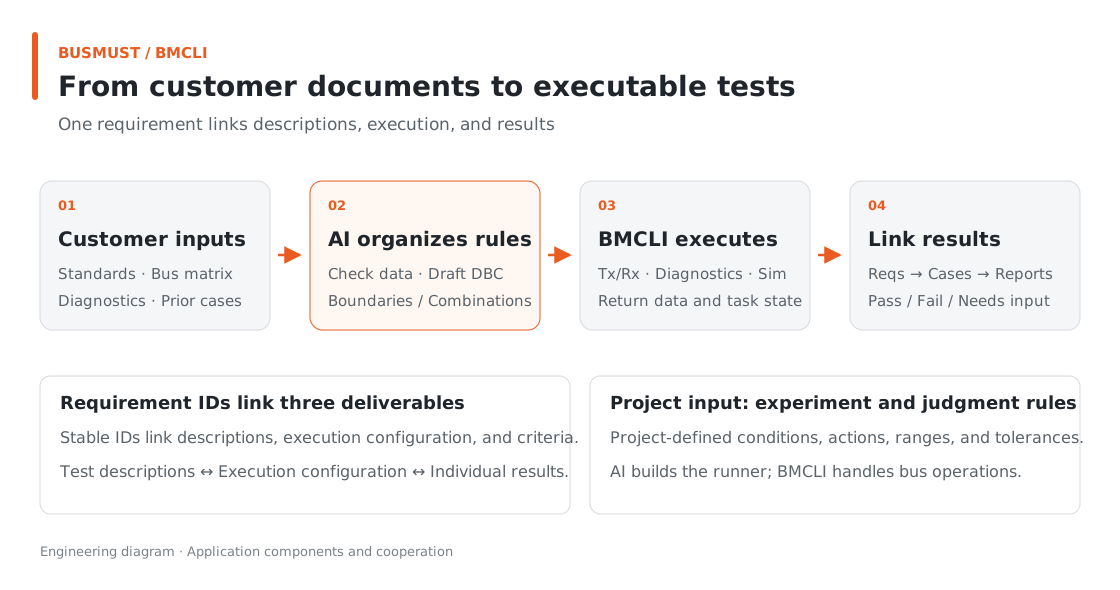
Figure 3-1. The same requirement links documentation, execution, and results. Engineering relationship diagram.
Input for AI: Describe the Testing Task
Section titled “Input for AI: Describe the Testing Task”Collect the communication matrix, diagnostic questionnaire, DBC, bench configuration, and existing acceptance criteria in an input directory, then assign the task:
We are starting a controller project. Use BMCLI to build an executable, traceable test suite from the customer standards, communication matrix, diagnostic questionnaire, and previous-project materials in input. First organize requirement IDs, sources, and conflicts. Compare any existing DBC against the matrix; otherwise generate a candidate DBC from a fully defined matrix and provide a verification checklist. Apply my test rules to message and signal boundaries, allowed combinations, dropped frames, and repeated inputs. Cover DID reads/writes and DTC activation/clearance conditions explicitly documented in the materials. State each case’s preconditions, stimulus, observations, and criteria. Choose orthogonal or pairwise combination coverage according to parameter constraints rather than mechanically multiplying every permutation, and record the actual coverage strategy. Generate test descriptions and execution configuration from the same structured requirements, linking requirements, cases, and results. Complete offline checks and permitted passive tests first; list writes, fault injections, and actuator actions in an active-test plan for confirmation. Deliver the database, test descriptions, execution entry point, and coverage list. Run within the authorized bench scope and produce a report, marking items that lack sufficient criteria as needing input.
AI organizes the materials into a common list, then generates tests and reports. Shared requirement IDs ensure human review and automated regression address the same subject. The bundled requirements and report samples provide a starting point; generate the full runner around your project’s materials.
Finished Result: One Report Linking Requirements and Outcomes
Section titled “Finished Result: One Report Linking Requirements and Outcomes”The intended deliverables are test descriptions, executable cases, and a results report. The bundled sample illustrates their relationships.
Using VehicleStatus from the previous article, five frames produce this check summary:
| Requirement | Check | Result summary |
|---|---|---|
| COM-VEH-001 | Standard frame ID is 0x100 | Received 5 VehicleStatus frames |
| COM-VEH-002 | Speed scaling and units | Decoded 0, 20, 50, 88, 120 km/h |
| COM-VEH-003 | Gear enumeration | 0 means P; 3 means D |
| COM-VEH-004 | Counter increment and wrap | 0..4 consecutive; wrap still needs capture |
| COM-VEH-005 | Receive observation completeness | gaps=0, dropped=0 |
| COM-VEH-006 | Defined Speed range | DBC declares 0..250 km/h |
This table is based on example data. It shows both observed behavior and tests still needed: consecutive counter increments have evidence, while 15→0 wrapping needs a longer capture.
Keeping this distinction gives project review a clear next step. Testing is valuable not just for a row of green indicators, but for showing the team what remains uncovered.
Implementation Explained: BMCLI’s Role in the Tool
Section titled “Implementation Explained: BMCLI’s Role in the Tool”The key calls below explain the implementation. AI-generated code organizes them into a complete workflow, processes responses, and handles cleanup.
Documents and Cases from the Same Requirements
Section titled “Documents and Cases from the Same Requirements”Traceability requires more than an ID in a report: a result must lead back to its case, criteria, and original requirement, and a requirement must lead forward to its covering cases. AI generates descriptions and code from the same structured requirements to reduce divergence from separate maintenance; review and execution still confirm consistency.
For example, when a customer changes VehicleStatus timing requirements, AI should update the description, tolerance configuration, and execution criteria together and list affected cases. Link each run to its requirement materials, database, case version, and ECU software version to form a clear configuration baseline. When discussing a failure, the team then knows which software and requirements were tested, not merely the date of a report.
How Tests Follow the Documents
Section titled “How Tests Follow the Documents”Give each requirement a stable identifier. For example:
- id: COM-VEH-001 source: ../02-from-bus-to-signals/network/vehicle-demo.dbc!VehicleStatus statement: VehicleStatus uses standard CAN ID 0x100 expected: can_id: 0x100This YAML is input to the test program. AI-generated code reads it and calls BMCLI for specialist operations:
# Check database structure and definitions to find problems in the input materials first.bmcli database validate --file=input/vehicle.dbc --format=json# Inspect the selected message's signal layout, scaling, and units.bmcli dbc signal list --message=VehicleStatus `  --database=input/vehicle.dbc --format=json
# Capture on the selected channel; --decode also outputs database-decoded engineering values.bmcli message recv --channel=vehicle-can --duration=30 --decode `  --database=input/vehicle.dbc --format=jsonl
# Read a DID; this example reads VIN through a configured diagnostic connection.bmcli uds did read 0xF190 --format=json
BMCLI handles database parsing, engineering-value conversion, and ISO-TP/UDS communication. The outer program checks period tolerances and signal requirements and presents results. This keeps test code focused and makes individual adjustments easier when documents change.
If Counter jumps from 5 to 8, for example, the report can state that counts 6 and 7 are missing between adjacent observations and attach the frames. Assessing receive completeness and operating conditions afterward is more useful than simply reporting “abnormal CAN communication.”
Specify Complete Judgment Criteria
Section titled “Specify Complete Judgment Criteria”A period test should include expected period, tolerance, and operating conditions. Diagnostic tests need target addresses, sessions, and response meanings. If the matrix and DBC differ, ask AI for a comparison table, then adopt a common standard after team confirmation.
Range checks have two meanings: whether the DBC declares the correct range, and whether the ECU outputs appropriate values under the captured conditions. Record them separately so the report accurately reflects actual coverage.
Explore Further: Let the Test Suite Grow with the Project
Section titled “Explore Further: Let the Test Suite Grow with the Project”You can refine this example or extend it to other work. Choose a direction that interests you and discuss its implementation with AI.
Update Tests Alongside Requirement Changes
Section titled “Update Tests Alongside Requirement Changes”When a new matrix arrives, give AI both versions and ask it to summarize changes and affected requirement IDs/cases. Use structured requirements as the shared input to update descriptions, BMCLI parameters, and criteria together, retaining links among existing IDs. Run only affected checks and record the materials and software versions used. Reviewers can follow a requirement through the reason for change, execution, and outcome without searching across several files.
Attach Bus Evidence to Failure Reports
Section titled “Attach Bus Evidence to Failure Reports”When a period or signal check fails, have the runner save the nearby message window and decode key values using the same DBC. One approach is BMCLI recording throughout the test, while judgment code records the failure time and case ID and extracts the relevant log segment. Put expected values, observed values, and a link to the segment together. This supports manual investigation and provides replay input, connecting this article’s automated testing with field replay in tutorial 7.
Further Reading
Section titled “Further Reading”These references cover the interfaces used here; query local JSON Help for individual parameters.
- DBC Definitions and Signal Encoding/Decoding (dbc)
- UDS Diagnostics and Test Calls (uds)
- Bus Recording During Tests (logging)
Download this tutorial’s companion examples (ZIP)