
Baudrate
While defining a baud rate the number of samples/bit value can also be defined. For a selected baud rate a set of all possible combinations of CNF0, CNF1 and CNF2 values will be listed. From this you can select any one set. The selected combination of CNF0, CNF1 and CNF2 values will be used to initialize the CAN controller. The baud rate can be changed by the method mentioned below.
- Select Hardware –> Channel Configuration.
- Configure CAN Controller dialog box will be displayed as shown below.
- Enter the required Baud rate.
- If required select the Number of Sample/Bit.
- Specific values for propagation delay and SJW can be selected too. Default selection for them is ALL.
- If the default value is not appropriate for the application then the required CNF0, CNF1 and CNF2 value can be selected by selecting an entry from in the list.
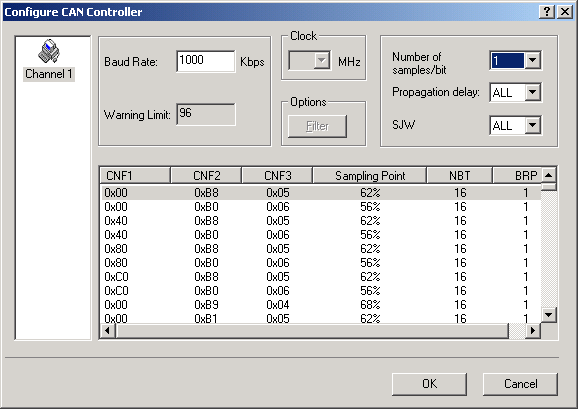
Other fields like BRP, Sampling Point, SJW and NBT are dependent on CNF0, CNF1 and CNF2 values. On clicking the “OK” button the controller will be initialized with the selected baud rate.
For more details on bit values of CNF0, CNF1 and CNF2 and the calculation of baud rate refer the section Bit Time Calculation.
Note: For MH Tiny CAN, either Bit Rate or BTR will be considered. If Bit Rate value is available BTR will be discarded.
Authoritative source: BUSMASTER DITA help source baudrate.dita, compiled into BUSMASTER.CHM with the application.