
Master
Creating Master ECU:
When a new LDF File is crated with LDF Editor a master node will with default values will be crated automaticallyEditing Master ECU Properties:
To edit the properties of master ECU right click on the Master node item in the Element view and click on ‘Edit’. A dialog will be displayed as shown below.
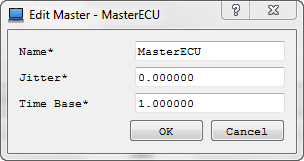 To save the changes click on ‘OK’ button. Errors are displayed if validation fails.
The following validations are performed: ECU name will be checked for its uniqueness
To discard the changes click on ‘Cancel’ button.Deleting Coding:
Master Node can not be deleted.
Authoritative source: BUSMASTER DITA help source LIN_Editor_Master.dita, compiled into BUSMASTER.CHM with the application.