Diagnostics and UDS guide
This guide covers the Diagnostics and UDS panel in the BUSMUST-maintained edition of BUSMASTER: the service tree, session keep-alive, security access, HEX download, manual requests, response inspection, and troubleshooting.
Prerequisites
Section titled “Prerequisites”Before opening Diagnostics, select the BUSMUST driver, map the hardware channel, and configure arbitration and data bitrates, termination, and operating mode. Verify ordinary CAN or CAN FD transmission and reception in Transmit Window before diagnosing a UDS issue.
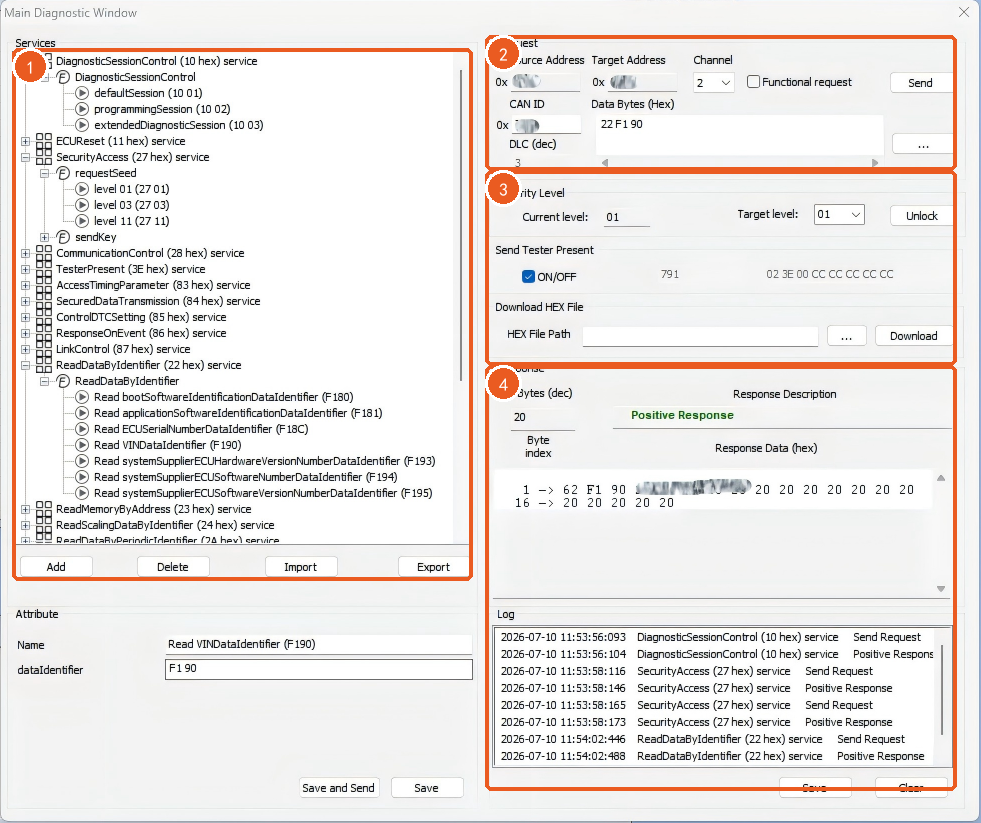
The Diagnostics panel normally includes:
Services: UDS service tree and request templates.Request: channel, request identifier, and hexadecimal payload editor.- SecurityAccess, Tester Present, and HEX download tools.
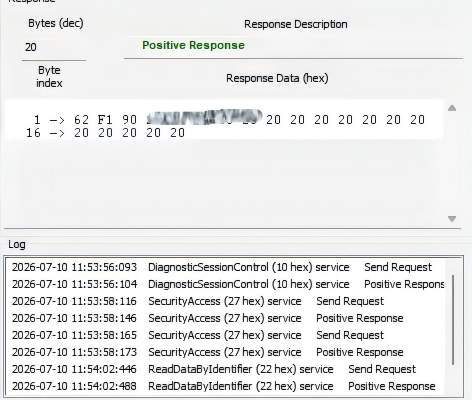
ResponseandLog: decoded responses, negative response codes, and operation history.
Send a request from the service tree
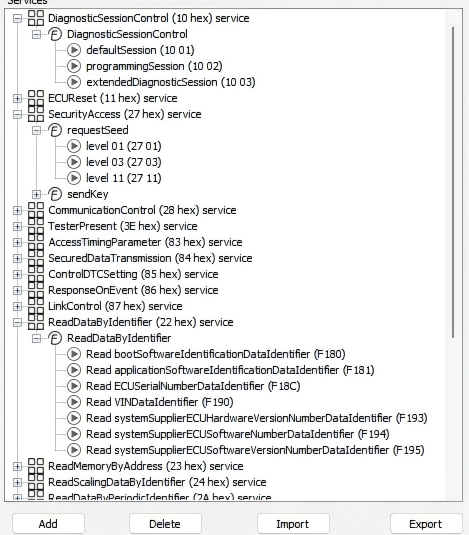
Section titled “Send a request from the service tree”The service tree provides parameterized templates for common UDS services, including DiagnosticSessionControl (0x10), ECUReset (0x11), ReadDataByIdentifier (0x22), SecurityAccess (0x27), WriteDataByIdentifier (0x2E), RoutineControl (0x31), RequestDownload (0x34), TransferData (0x36), RequestTransferExit (0x37), and TesterPresent (0x3E).
- Expand a service and select or double-click its request template.
- Enter the DID, Routine ID, sub-function, security level, address, length, or data required by the ECU project.
- Review the generated request bytes and transmit the request.
- Inspect the positive response, negative response, or NRC in Response and Log.
Project-specific DIDs, routines, and security levels can be added to the service tree. Use XML Import and Export to share a reviewed template within a team.
Keep a session active with Tester Present
Section titled “Keep a session active with Tester Present”An ECU may return from an extended or programming session to its default session when no diagnostic traffic is received. Enable Tester Present to transmit 0x3E periodically and keep the diagnostic session active.
If an extended session expires unexpectedly, verify that Tester Present is enabled and that its interval, functional-addressing option, and suppress-positive-response setting match the ECU requirements.
SecurityAccess 0x27
Section titled “SecurityAccess 0x27”SecurityAccess normally requests a seed, calculates a key with the project algorithm, and sends the key. BUSMASTER can load a Key-Gen DLL to perform the calculation and response automatically.
Before running it, confirm the diagnostic session, security level, Key-Gen DLL version, custom DLL parameters, and any ECU retry delay or lockout state. The DLL must be supplied by an authorized project party or OEM. This function automates the project-defined UDS exchange; it does not bypass ECU security.
Download an Intel HEX file
Section titled “Download an Intel HEX file”Download HEX File parses addresses and data from Intel HEX and issues RequestDownload, TransferData, and RequestTransferExit. When a file contains discontiguous address regions, BUSMASTER can organize multiple transfer sequences.
This tool performs the base data transfer. Session entry, security access, erase, verification, reset, and address/length rules remain project-specific and must follow the ECU bootloader design.
Edit and transmit a request manually
Section titled “Edit and transmit a request manually”For a one-off check, select the Channel and CAN ID, enter the request in Data Bytes (Hex), and transmit it. A service-tree template can also be selected and then edited for a temporary DID, sub-function, or payload change.
The panel uses standard ISO-TP transport. To deliberately generate malformed ISO-TP flow-control traffic, construct individual frames in Message Window or Transmit Window instead of using the UDS panel.
Response, Log, and Message Window
Section titled “Response, Log, and Message Window”Response: positive and negative responses, length, and reassembled diagnostic data.Log: service order, such as session entry, unlock, and DID access.Message Window: underlying CAN or CAN FD traffic, including ISO-TP first, consecutive, and flow-control frames.
If the application-level response is missing, first confirm in Message Window that the request was transmitted and that the ECU returned any frame. This separates a basic bus issue from a UDS or ISO-TP configuration issue.
Diagnostics Settings
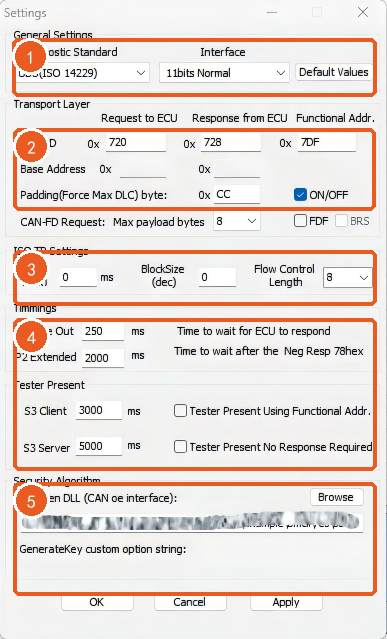
Section titled “Diagnostics Settings”Important settings include:
Diagnostic StandardandInterface: diagnostic standard and 11-bit, 29-bit, normal, or extended addressing.Request to ECU,Response from ECU, andFunctional Addr.: physical request, physical response, and functional request identifiers.Padding byte: payload padding value.STmin,BlockSize, andFlow Control Length: ISO-TP multi-frame control.P2 Time OutandP2 Extended: base response timeout and extended wait after response pending.S3 ClientandS3 Server: session timing.Key-Gen DLLand custom parameters: SecurityAccess algorithm configuration.- CAN FD request, maximum payload, FD, and BRS options.
Every value must match the ECU project’s diagnostic specification.
Troubleshooting
Section titled “Troubleshooting”No response
Section titled “No response”- Verify ordinary bus communication, channel, bitrate, termination, wiring, and ECU power.
- Check request and response identifiers, addressing mode, functional address, and padding.
- For CAN FD, also verify FD, BRS, maximum payload, and data-phase bitrate.
- Use Message Window to confirm that the request left the interface and whether the ECU returned a frame.
Single-frame works but multi-frame fails
Section titled “Single-frame works but multi-frame fails”Check STmin, BlockSize, Flow Control Length, P2, and P2 Extended. On CAN FD, also verify maximum payload, FD, and BRS.
SecurityAccess fails
Section titled “SecurityAccess fails”Verify the current session, security level, Key-Gen DLL and custom parameters, and ECU retry interval. If a seed is received but sendKey fails, review the algorithm and security-level mapping first.
HEX download fails
Section titled “HEX download fails”Verify that session entry and SecurityAccess completed, then check the download address, length, TransferData sequence counter, and the project’s erase, verification, and reset sequence.
Source: BUSMUST technical knowledge base diagnostics-uds-services.md. This public guide is maintained by the website content pipeline. Use the download center for current and archived software releases.
UDS diagnostic panel workflow
Section titled “UDS diagnostic panel workflow”These original screenshots come from the BUSMASTER manual or illustrated guide and show the actual workflow.