
BUSMUST LIN Device Configuration and Workflow
BUSMASTER supports BUSMUST LIN devices, including LIN channels exposed by BUSMUST USB and gateway products. LIN support includes channel configuration, master or slave operation, message transmit and receive, signal interpretation, logging, import, and schedule-table workflows where supported.
Driver and Channel Configuration
Section titled “Driver and Channel Configuration”Select the BUSMUST LIN driver from the LIN driver selection menu, then open LIN channel configuration. Select the physical LIN channels that should be mapped to BUSMASTER logical channels.
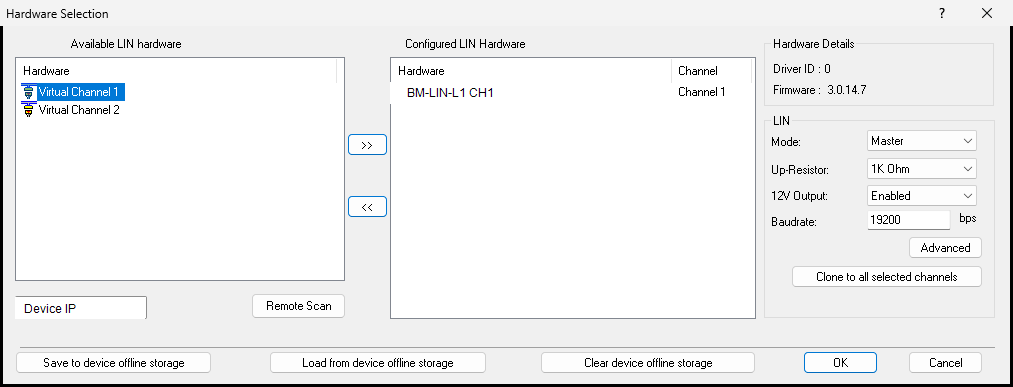 BUSMUST LIN hardware selection
Configure the LIN bit rate, protocol version, and controller mode before connecting. If the channel is used as a LIN master, enable master mode so BUSMASTER can transmit headers and schedule frames. If the channel is used as a LIN slave, configure the response behavior and data according to the LDF or test requirement.### Hardware Acceptance Filter
For BUSMUST LIN devices, the Advanced button in hardware selection opens a hardware acceptance filter for LIN IDs. Select the LIN IDs that should be accepted by the device. The filter covers IDs 0 through 63 and provides Select All and Select Reverse shortcuts.
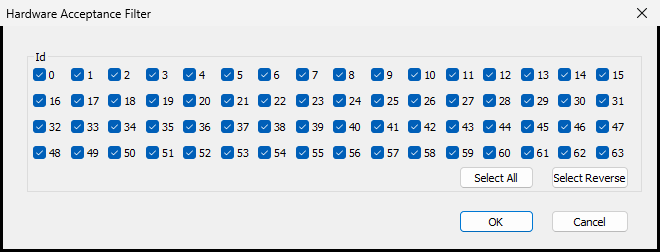 BUSMUST LIN hardware acceptance filter
If you are debugging an unknown LIN network, keep all IDs selected first. After the expected IDs are confirmed, narrow the hardware filter only when you need to reduce received traffic.### Checksum and Protocol Version
LIN protocol version affects checksum behavior. LIN 2.x commonly uses enhanced checksum for unconditional frames, while classic checksum may still be required for some diagnostic or legacy frames. Verify the expected checksum mode with the target ECU or LDF file.### Transmit and Receive
The LIN transmit window is used to configure frame IDs, data bytes, checksum mode, and repeated transmission when supported. In master mode, BUSMASTER can transmit frame headers and master requests. In slave workflows, it can respond with configured data when the master requests a frame.
The LIN message window displays transmitted and received LIN frames, events, and errors. Use it to confirm that the expected frame IDs, payload bytes, checksum, and direction are present on the bus.### Logging, Import, and Schedule Table
BUSMUST LIN workflows support logging and importing common log formats such as LOG, ASC, and BLF where available in the installed version. LIN replay support depends on the current BUSMASTER version and device capability.
Schedule Table is used in LIN master workflows to send frame headers or messages according to an LDF-defined timing plan. Import the LDF, confirm the schedule table, then connect the channel and start the schedule according to the test requirement.
Authoritative source: BUSMASTER DITA help source BUSMUST_LIN_Device_Workflow.dita, compiled into BUSMASTER.CHM with the application.