BUSMUST advanced features
Feature scope
Section titled “Feature scope”BUSMUST Advanced Features extend BUSMASTER with device-oriented capabilities, including:
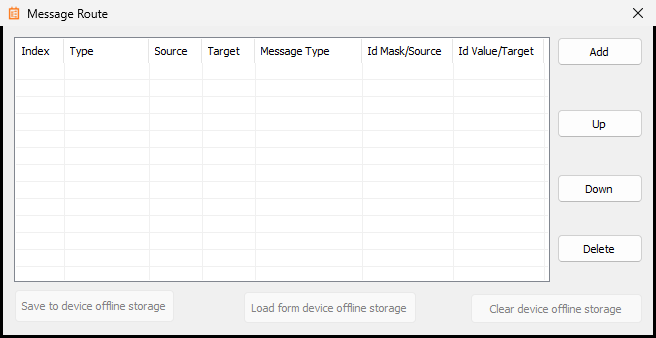
- Routing: forwards messages on the device or in the application.
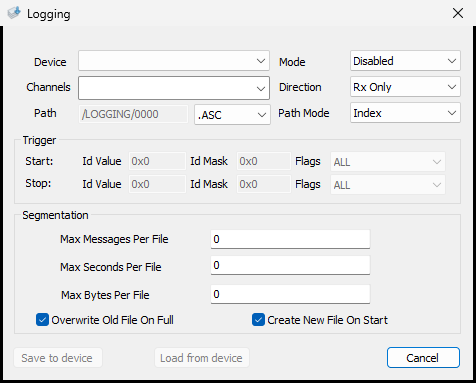
- Offline Logging: records bus traffic without keeping a PC connected.
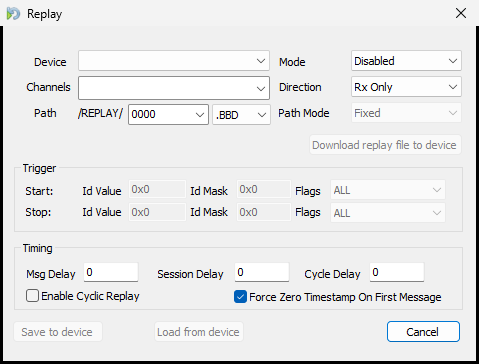
- Offline Replay: replays a stored message sequence without keeping a PC connected.
- Device-timed transmission: runs supported periodic transmission jobs with device timing resources.
Routing
Section titled “Routing”Routing forwards messages that match a channel or identifier rule to another channel. It is useful for gateway testing, forwarding verification, and simple bridge applications. Before enabling a rule, verify the source channel, destination channel, filter conditions, and any identifier or payload conversion.
Key fields include:
Type: direct forwarding, message-type mapping, identifier mapping, or identifier-and-type mapping.Source: source channel or matching condition.Target: destination channel or mapped value.Message Type: standard, extended, CAN FD, BRS, RTR, and other supported frame attributes.Id Mask/Source: source identifier or mask used to select messages.Id Value/Target: identifier value to match or the mapped destination identifier.Add/Up/Down/Delete: creates, orders, or removes rules.Save/Load/Clear device offline storage: writes rules to the device, reads them back, or clears stored offline configuration.
Offline Logging
Section titled “Offline Logging”Offline Logging records bus traffic on a supported device and is intended for installations where a PC cannot remain connected. Confirm the channels, trigger conditions, available storage, and export workflow before deployment.
Key fields include:
Device: the BUSMUST device that performs the recording.Channels: channels included in the recording task.Mode: enables or disables the task.Direction: records Rx, Tx, or both, depending on device capability.Pathand file format: device-side path, file number, and format such as ASC.Path Mode: controls path or file-number generation.Trigger Start/Stop: starts or stops recording when ID, ID Mask, and Flags conditions match.Segmentation: splits files by message count, elapsed time, or byte size.Overwrite Old File On Full: overwrites the oldest file when storage is full.Create New File On Start: creates a new file whenever recording starts.
Offline Replay
Section titled “Offline Replay”Offline Replay lets a supported device repeatedly transmit a known message sequence. Confirm the replay file, output channels, timing, loop behavior, and stop conditions before enabling the task.
Key fields include:
Device: the BUSMUST device that performs replay.Channels: replay output channels.Mode: enables or disables replay.Direction: selects the recorded direction when direction information is present.Pathand file format: device-side replay path, file number, and format such as BBD.Download replay file to device: transfers a replay file to the device.Trigger Start/Stop: starts or stops replay when ID, ID Mask, and Flags conditions match.Msg Delay: delay between messages.Session Delay: delay before the replay session starts.Cycle Delay: delay between replay cycles.Enable Cyclic Replay: repeats the replay sequence.Force Zero Timestamp On First Message: uses the first message timestamp as time zero.
How offline functions differ from standard logging and replay
Section titled “How offline functions differ from standard logging and replay”- Standard Logging and Replay require BUSMASTER to remain running on the PC.
- Offline Logging and Replay execute on a supported device and can continue without the PC.
- Standard functions are convenient for interactive tuning. Offline functions are preferable for unattended or long-duration operation.
Source: BUSMUST technical knowledge base busmust-advanced-features.md. This public guide is maintained by the website content pipeline. Use the download center for current and archived software releases.
Device-side routing, logging, and replay
Section titled “Device-side routing, logging, and replay”These original screenshots come from the BUSMASTER manual or illustrated guide and show the actual workflow.