
Signal Group
Creating Signal Groups:
To create Signal group right click on the Signal Group element in the element view and click on pop up menu ‘New’.A dialog Box as Shown in below image will be displayed.
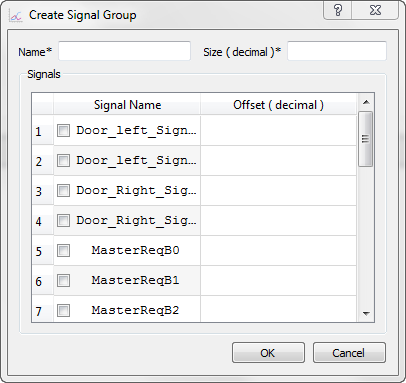
General Properties: Name: Name of the Signal Group should follow C identifier rules and should be unique in Signal and Signal Group List. Size: The size of the signal group can be defined here. Signals: This list the all the signal defined in the LIN Cluster.Signals can be added\deleted from the group by checking\ unchecking.
Editing Signal Group:
To edit existing Signal group right click on the required Signal group item in the Element view and click on ‘Edit’. Edit Signal -
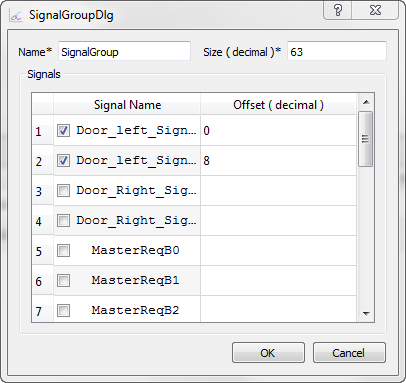 Signals can be added\deleted from the group by checking\ unchecking corresponding check box.The signal offset can be changed in the Offset filled.
To save the changes click on ‘OK’ button. Errors are displayed if validation fails.
The following validations are performed: Signal group name will be checked for its uniqueness. The offset of each signal should be less than the Signal Group size.
To discard the changes click on ‘Cancel’ button.Deleting Signal Group:
To delete any signal group, right click on the signal group item in the Element view and click on the pop up menu Delete. A confirmation message will be displayed before deleting the coding.
Note: Signal groups are depreciated from LDF2.x version.
Authoritative source: BUSMASTER DITA help source LIN_Editor_SignalGroup.dita, compiled into BUSMASTER.CHM with the application.