
Integrate BMCLI into Engineering Systems: From Test Platforms to Production
Beyond standalone tools, BMCLI can serve device communication within existing test platforms and production systems. A LabVIEW multichannel aging station illustrates reusing bus capabilities to connect field operations, automated testing, and result archiving.
Imagine aging a batch of controllers on a production line. Several BUSMUST analyzers connect one channel per ECU, while LabVIEW already handles power sequencing, barcode scans, and aging timers. The station now needs multichannel CAN observation, selected UDS reads, anomaly logs, and per-unit judgments. BMCLI manages devices and communication tasks, LabVIEW retains the production workflow, and AI generates adaptation and result-processing logic between them.
Keep the LabVIEW front panel or add a web monitoring page; both use the same device services and station state. MES receives product and work-order results, while ERP and other systems connect through existing enterprise APIs using project-supplied fields and authentication.
We begin with calls and results for one slot, then expand to several. Configure stations for actual channel counts, acquisition load, and test concurrency, and measure performance on the target host/device combination.
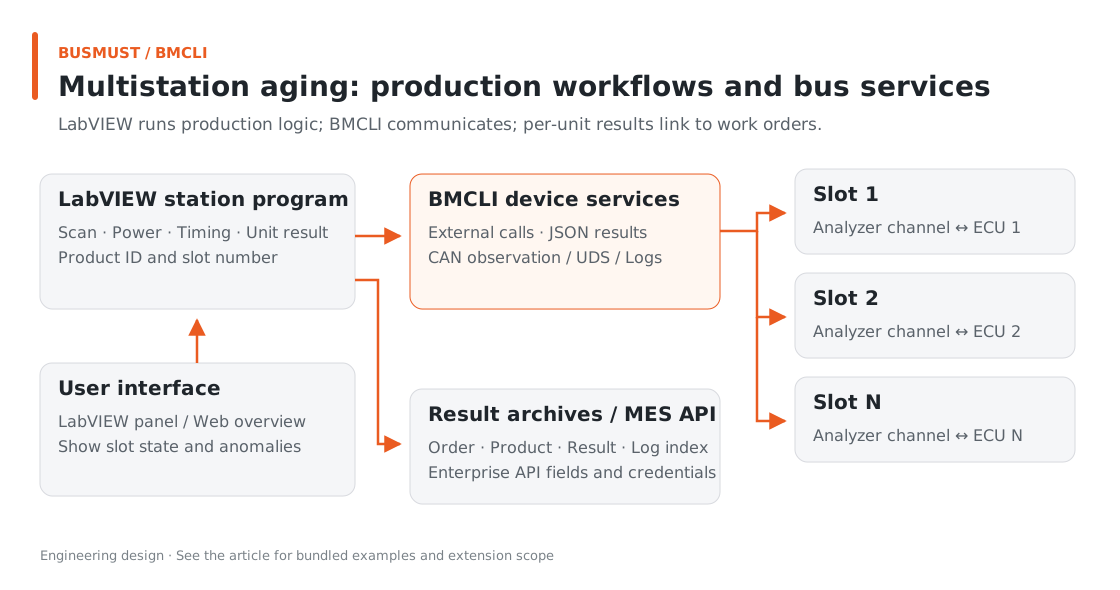
Figure 13-1. Product workflows stay in the station; BMCLI handles devices and continuous communication. Engineering relationship diagram.
Input for AI: Describe Integration Requirements
Section titled “Input for AI: Describe Integration Requirements”Inputs are platform invocation/report APIs, product test materials, and Bench. AI generates an adapter and integration design; the project supplies the existing production platform and its interface documentation.
We have a LabVIEW aging station handling scans, power, and aging timers. Use BMCLI to integrate multiple analyzers and ECU channels. Project materials define bench channels, product IDs, CAN checks, and selected UDS reads. Retain LabVIEW’s UI and workflow. Generate a design for external-process invocation, JSON/JSONL parsing, and archiving, with per-channel task state, timeout, and cancellation handling. Verify one confirmed channel first, then expand by station configuration and measure actual load. Use BMCLI background tasks for long acquisition so long commands do not block the UI. Generate per-product results and upload summaries linked to work order and serial number through my MES API; save locally first if upload fails. Deliver adaptation guidance, invocation examples, data conventions, and station workflow design. A web dashboard is a later extension.
AI can test the adapter with fixed responses before connecting real BMCLI, keeping process errors, JSON parsing, and business judgments distinct.
Finished Result: Independent Aging State for Every Product
Section titled “Finished Result: Independent Aging State for Every Product”The target LabVIEW station displays channel, aging progress, communication state, and result links by product. The following maps UI design to data; the bundled Python adapter demonstrates calls and result handling.
| Station display | Data source | Operational value |
|---|---|---|
| Work order, product serial number, slot | LabVIEW business configuration | Associate results with the correct product |
| Channel and communication state | BMCLI task state and receive statistics | Locate the affected channel |
| Version and diagnostic results | Selected UDS reads | Verify the software under test |
| Aging progress and judgment | Station timers and product rules | Record each product independently |
| Logs and upload state | Local archives and MES responses | Support investigation after communication ends |
Implementation Explained: BMCLI’s Role in the Tool
Section titled “Implementation Explained: BMCLI’s Role in the Tool”The key calls below explain the implementation. AI-generated code organizes them into a complete workflow, processes responses, and handles cleanup.
Three Interfaces for Different Roles
Section titled “Three Interfaces for Different Roles”| Interface | Suitable applications | Main characteristics |
|---|---|---|
| CLI JSON/JSONL | Python, LabVIEW, MATLAB, station test programs | External-process calls for defined tasks |
| Web API | Engineering panels, business services, multistation systems | Shared signals, history, and live streams; separate bus and business services |
| Remote BMAPI | Existing BMAPI applications | Reuse public remote interfaces to access analyzers on trusted networks |
LabVIEW: Join the Aging Station’s Execution Loop
Section titled “LabVIEW: Join the Aging Station’s Execution Loop”Use System Exec for a diagnostic read or status query, collect exit code/stdout/stderr, and parse JSON for product judgment. Each slot uses its own logical channel and product context so results do not carry over to the next unit. Continuous acquisition uses background tasks or independent workers; the LabVIEW UI loop only updates state. For persistent signal displays, HTTP Client VI can access /api/v1/health, /api/v1/signals/latest, and /api/v1/signals/history.
Put time-consuming calls in the acquisition loop and let the UI loop process results to keep interaction smooth. For individual samples, consider history cursors or SSE/WebSocket integration.
Start System Exec command strings with short queries. This illustrates invocation; aging-slot-01 is a project-defined logical channel in the station Bench:
# Read the station Bench configuration to verify product-to-device channel bindings.bmcli bench show --format=json# Capture three seconds on the prepared slot channel and return records for LabVIEW parsing.bmcli message recv --channel=aging-slot-01 --duration=3 --format=jsonlLabVIEW checks the exit code, then parses stdout by record type. Long aging runs use persistent tasks and status queries; short capture is only the initial interface check.
A Python Example Using the Same Invocation Convention
Section titled “A Python Example Using the Same Invocation Convention”The bundled adapter uses only Python’s standard library. A minimal call is:
from bmcli_adapter import Bmcli
# Select the slot's project configuration and use its logical network names afterward.bm = Bmcli(project=r"D:\vehicle-project")# Query BMCLI version and parse JSON into a dictionary.version = bm.run("version")print(version["version"])
# Capture three seconds for station checks; use background tasks for long acquisition.records = bm.capture("vehicle-can", duration=3)for record in records:    print(record)
The first call returns structured version information; the second captures three seconds on a prepared channel and returns JSONL records. Responses may include frames, state, and statistics; process them by record type.
The caller sees:
| Situation | Caller receives |
|---|---|
| Successful JSON response | A Python dictionary with directly accessible fields |
| BMCLI reports an error | BmcliError with code, explanation, and details |
| Client wait times out | TimeoutExpired, for application-level handling |
| Short capture finishes | A JSONL record list for statistics or reports |
Inspect the adapter and tests directly. python smoke_adapter.py checks the version without bus access; prepare Bench and channels before hardware capture.
Python: Keep the Adapter Thin
Section titled “Python: Keep the Adapter Thin”# Query Bench with an argument array, retaining exit code, stdout, and stderr separately.completed = subprocess.run( ["bmcli", "bench", "show", f"--project={project}", "--format=json"], capture_output=True, text=True, encoding="utf-8", timeout=10, shell=False,)Argument arrays preserve paths with spaces and ordinary input as given; JSON gives callers direct field access. Preserve BMCLI errors so the application can give clear explanations.
The bundled capture buffers short runs in memory and returns only after completion. Long or high-load applications can use streaming reads or log files. After a client timeout, device operations may still continue; query the task state before recovery and cleanup.
MATLAB: Retain Analysis and Modeling
Section titled “MATLAB: Retain Analysis and Modeling”MATLAB can invoke an external BMCLI process, parse JSON, and convert it to native structures. For long-running data, an accompanying service can use Web history or live streams. Existing algorithms, plots, and analysis workflows remain usable.
Process and network integration suit experiment orchestration and data exchange. Arrange hard real-time I/O within fixed model steps through the project’s real-time execution platform.
Remote BMAPI: Reuse Existing Applications
Section titled “Remote BMAPI: Reuse Existing Applications”BMCLI’s remote-bmapi service lets existing applications access field analyzers over the network:
# Start Remote BMAPI on a trusted test network for existing device clients.bmcli remote-bmapi start --channel=10356/0,10357/0 ` --target=<clientIPv4> --advertise=<localTestNetworkIPv4> ` --name=lab-gateway# Query remote forwarding, drop, and error counts.bmcli remote-bmapi status --format=json# Stop this remote service and release its listening resources.bmcli remote-bmapi stopremote-bmapi provides remote analyzer access. gateway is the previous chapter’s signal gateway, which decodes, maps, and outputs signals. They address device connectivity and data adaptation respectively.
Replace placeholder addresses with actual test-network addresses, then connect an existing BMAPI client through its remote interface. The service uses UDP 3502/2502 on a trusted isolated network. Protect cross-network access with an authenticated, encrypted VPN or controlled tunnel.
When reusing a daemon, Remote BMAPI exports all open channels in that session. Check the list before starting and prepare a session matching the intended sharing scope.
From One Slot to an Engineering Platform
Section titled “From One Slot to an Engineering Platform”A larger system can preserve these responsibilities:
| System component | Responsibility |
|---|---|
| Field BMCLI | Device sessions, bus protocols, persistent tasks, and structured state |
| Slot application | Product cases, serial-number association, cancellation, and local errors |
| Central business service | Work orders, permissions, task allocation, result storage, and reports |
| User interface | Conditions, operations, and results tailored to roles |
BMCLI supplies communication foundations; the production platform organizes business workflows and field protection. Before rollout, check the full system against throughput, concurrency, power-loss recovery, and permission requirements. Scale business services as needed while continuing to reuse bus interfaces.
Manage Shared Resources
Section titled “Manage Shared Resources”CLI, Web, and Remote BMAPI can reuse one daemon’s receive path. Applications should record the acquisition, replay, and services they create and clean up by ownership on exit to cooperate with other tools.
For hardware transmission tasks, retain the handle from txtask add, remove that task with txtask remove --handle=... in the application’s finally, and query the list to verify release. This manages shared devices by task.
channel claim protects configuration and persistent tasks while ordinary transmission and passive observation remain shareable. Coordinate whole-bench exclusivity with the team’s agreed global hardware lock. Encapsulating these rules in the adapter keeps business code simple.
Explore Further: From Interface Integration to System Reuse
Section titled “Explore Further: From Interface Integration to System Reuse”You can refine this example or extend it to other work. Choose a direction that interests you and discuss its implementation with AI.
Add Product Cases to Station Workflows
Section titled “Add Product Cases to Station Workflows”Ask AI to connect tutorial 3’s test suite to existing scans and work orders, associating every BMCLI operation with product ID, case ID, and slot. Invoke the thin adapter from the business workflow, save structured results and logs, and upload through existing platform APIs. Keep product differences in cases and Bench configuration while the work-order system retains its role. Bus testing becomes part of production with a traceable path from reports to requirements.
Add a Web Overview to the Aging Station
Section titled “Add a Web Overview to the Aging Station”Keep LabVIEW execution and ask AI for a separate web overview showing product state, trends, and anomaly logs by slot. Each field host manages its Bench, sessions, and BMCLI tasks; a central service aggregates state and reports. AI-generated station services use common task/result formats, leaving port differences in local configuration. Pages obtain live slot data through the business service while continuous communication stays onsite. Adding stations then becomes deployment and configuration rather than rewriting protocol access for every device.
The series has progressed from connecting one bus to organizing an engineering system. The epilogue reviews that path and provides further reading and discussion links.
Further Reading
Section titled “Further Reading”These references cover the interfaces used here; query local JSON Help for individual parameters.
- External Calls and Background Execution (execution-modes)
- Project Configuration and Local Device Bindings (bench)
- Web Service Integration for Engineering Systems (web)
Download this tutorial’s companion examples (ZIP)