
BUSMASTER CANopen: Save projects and recover SDO communication
Applies to BUSMASTER 3.2.2.50.
13. Save a project and exit
Section titled “13. Save a project and exit”- Stop active send tasks. Check that no dictionary batch read, node scan or PDO configuration operation remains active.
- Click Stop analysis (
停止分析). In the File menu or upper-left application menu, select Save (保存); use Save As… (另存为…) for the first save or a practice copy. Save as.cfx. - Use Load… (
加载…) to open the CFX next time. - In CANopen settings, check the channel, node resource bindings, time display, send input and plan. Connect and start analysis when online access is needed.
CFX stores configuration and EDS/DCF references. Description files, large data files, current device state and analysis history are outside the CFX package. When moving a project, bring the resource files and check paths and physical channels again.
Analysis and sending remain stopped after loading. Check configuration, connect, start analysis and read current node values. Finish with Stop send tasks → Stop analysis → BUSMASTER Disconnect → Close normally, saving required changes when prompted.
14. Troubleshooting and SDO recovery
Section titled “14. Troubleshooting and SDO recovery”| Symptom | Check and next step |
|---|---|
| Manually added node waits for heartbeat | Check Node-ID, channel and peer transmission; inspect new RX traffic |
| Discovery finds no node | Check connection, analysis and range. The device may not answer identity reads; inspect vendor-supported objects and heartbeat. |
| Heartbeat arrives but EDS does not match | Check model, firmware and Identity against the EDS; heartbeat reception and description matching are separate checks. |
| Start sending is unavailable | Follow the status message: connection, analysis, valid target, busy operation and preparation. Prepare again after input changes. |
| SDO Abort | Use the Abort code to check address, sub-index, permissions, state and EDS; the device has returned a protocol error. |
| SDO timeout | Check node, physical channel, bitrate, SDO addresses and response waiting. A write may have taken effect; use recovery below. |
| PDO needs reconfirmation | Read current communication and mappings, check resources and address conflicts, and confirm Operational before data exchange. |
| Field value is rejected | Supply every mapped field and check duplicates, types and ranges. Ordinary SDO preparation and EDS typed conversion use different entries. |
Recover SDO communication
Section titled “Recover SDO communication”- Check whether the previous operation may have changed the device and whether further access is allowed.
- Select the target node, then Tools… → Recover SDO communication… (
恢复 SDO 通信…). - Read the confirmation: an old response may still arrive late and may not belong to a new request. Confirm to release local protection; cancelling keeps protection in place.
- Read teaching identity object
0x1018:1to check communication, then read back the previously written parameter to inspect its current value.
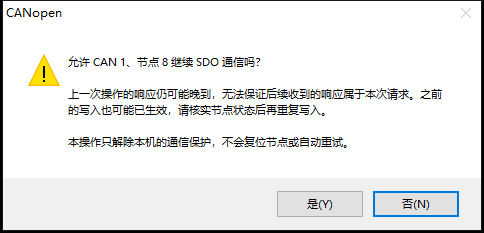
SDO recovery: check device state and possible late responses; cancelling retains protection.
Recovery releases local protection. It does not reset the node, repeat the preceding write or roll back the device. For support, record device model, Node-ID, channel, bitrate, object, steps and the actual message.
Collect the CANopen support log for the running BUSMASTER build, and keep the traffic capture and device state for the same time range. See Collect support logs and submit feedback for log locations, older builds, and what to check before sharing copies.
Continue learning
Section titled “Continue learning”- BUSMASTER basic transmit and receive
- BUSMUST tutorial center
- The device vendor’s CANopen manual, EDS/DCF and object access conditions for the matching model and firmware.
Series home · Previous: events and logs
Use the download center for current and archived BUSMASTER releases.