
Filters
User can configure filter list by choosing messages to be filtered.To configure the filter list, follow the steps given below Select CAN –> Filters. The dialog box specified below will be displayed.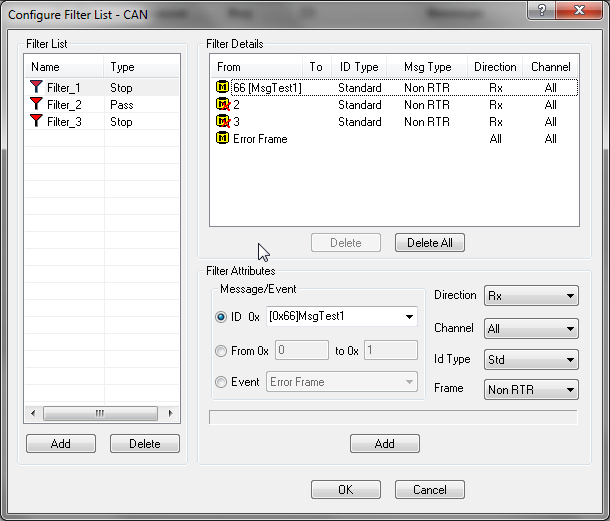
Filter List
Section titled “Filter List”It is a list of filters that are identified by the name. The name of the filter should be unique and can have any kind of special characters also. The second parameter tells about the type of the filter, pass or stop. Pass filter allows only the configure message or range of message to pass. On the other size stop filter blocks the configured messages. These filters shall be used in display, logging and replay filters.### Filter Details
This section shows list of message names, ID and range along with ID type, message frame type, direction and channel number. Type is denoted by different icons. Selecting an entry from the list updates the details of the filter in Filter Attributes section.### Filter Attributes
Filter attributes gives more details of selected filter entry. Message Name or ID in case of single id filtering and message ID range in case of range filter will be update. ID type will give whether the ID is standard or extended type. If ID type is “All” then ID type will be ignored. Frame type will show whether the message is of remote transmit request or not. If this field shows all then frame type will be ignored. Direction field will show whether the message is transmitted or received. If it is all then direction will be ignored. Channel filed associates the message with particular channel. Channel all makes the message independent of channels.Database message names shall be selected from the Message ID combo box. Message ID shall be directly typed in this combo box. If the filter is for a range of messages then the Range radio button shall be selected. This will enable range edit boxes. Message ID type gives information about the ID or message name. For database message this field will be automatically updated. But user can change the type to override the database definition. To make the filter to work for both standard and extended type user shall select the ID type as All. Other attributes shall be selected based on the filter requirements.
Event radio button shall be selected for Event filter. This will enable Event combo box, from which event type can be selected. Channel combo box will enabled.
The Add button in the Filter Attributes section will add configured filter in to the selected named filter list. This button will be disabled in case of invalid parameter entered by the user and appropriate error message will be displayed in the status bar.
Once the filter is added in to the Filter List then the name of the filter will appear in the Filter Configuration List to select. Any modification on these filter will immediately reflect in the all modules that are using these filters.
Filter list will be saved in configuration file and will be updated while loading a configuration file. While loading a configuration file created with BUSMASTER 3.06.02.X.XXX version one filter entry will be created with the previous filter information.
Software Filter and BUSMUST Hardware Filter
Section titled “Software Filter and BUSMUST Hardware Filter”The filters in this window are BUSMASTER software filters. They are applied by BUSMASTER modules such as display, logging, and replay after messages have been received by the PC application.
BUSMUST CAN FD devices may also provide hardware acceptance filters in the channel configuration advanced page. A hardware filter is applied by the device/driver before the message reaches BUSMASTER, so it can reduce host-side traffic for high bus-load cases. Use the software filter for normal viewing and logging workflows. Use the BUSMUST hardware filter when the device should accept or reject messages at hardware level.
For BUSMUST hardware filter configuration, see /docs/busmaster/reference/topics/busmust-canfd-hardware-filter/.
Authoritative source: BUSMASTER DITA help source CAN_Filter.dita, compiled into BUSMASTER.CHM with the application.