
BUSMUST CAN/CAN FD Advanced Settings and Hardware Filters
The BUSMUST CAN/CAN FD driver provides advanced configuration for bit timing and hardware receive filters. These settings are applied at the hardware or driver level and are different from the software filters used by the BUSMASTER message window.
Advanced Bit Timing
Section titled “Advanced Bit Timing”The Advanced window exposes low-level bit timing values such as BTR registers, clock, sample point, and generated timing candidates. Use the normal channel configuration fields for most applications. Use the advanced settings when the bus requires non-standard bit timing or when you need to match an existing network precisely.
For CAN FD, configure both the nominal phase and data phase according to the ECU or network requirement. If the bus is unstable, verify the nominal bit rate, data bit rate, sample point, terminal resistor, and wiring before changing advanced register values.### Hardware Acceptance Filter
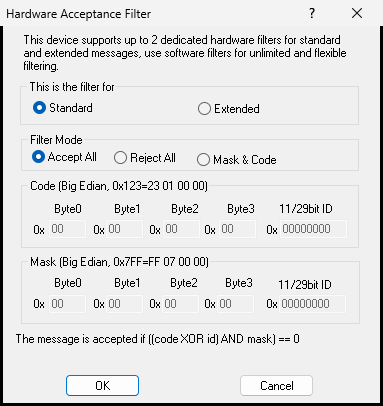
The hardware acceptance filter reduces the frames accepted by the BUSMUST hardware before the messages enter BUSMASTER. It is useful when the bus load is high or when the application only needs a small set of identifiers.
 CAN/CAN FD hardware acceptance filter
The BUSMUST driver supports separate standard-frame and extended-frame filter definitions. Each filter can be configured as:
- Accept All: accept all frames of the selected ID type.
- Reject All: reject all frames of the selected ID type.
- Mask & Code: accept frames that match the configured acceptance code and mask.
A mask-and-code filter is useful when several identifiers share a common bit pattern. Confirm the mask logic with a simple receive test before using it in a critical measurement.### Hardware Filter and Software Filter
Hardware filters and BUSMASTER software filters solve different problems. Hardware filters reduce the frames delivered by the device. Software filters control how already received frames are displayed, logged, or interpreted inside BUSMASTER.
If a frame is rejected by the hardware filter, BUSMASTER cannot display or log it later. If you are not sure which identifiers are required, keep the hardware filter open and use software filters first.
Authoritative source: BUSMASTER DITA help source BUSMUST_CANFD_Hardware_Filter.dita, compiled into BUSMASTER.CHM with the application.