
Transmit Messages
Use CAN –> Transmit Window to define and send Classic CAN or CAN FD messages. Each row can be sent once, by an assigned key, or periodically. A row can also generate changing identifiers and payload fields with a test pattern. Test patterns and finite send counts are independent: either feature can be used alone, or both can be used together.
Transmit row controls
Section titled “Transmit row controls”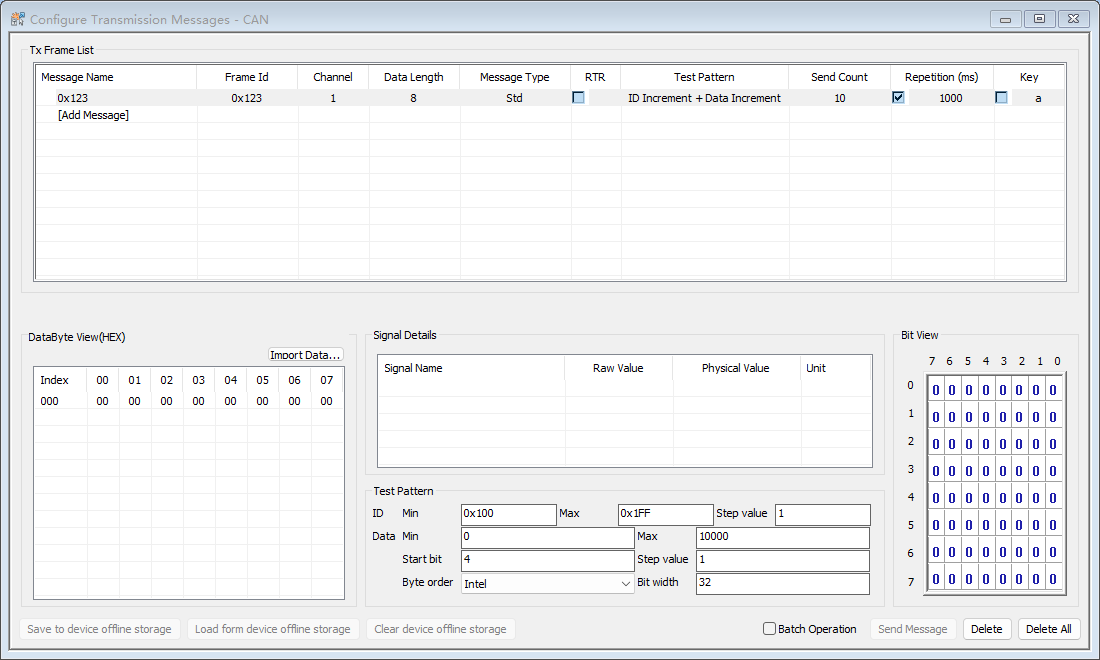
- Message definition contains the message name or ID, channel, data length, and message type. Double-click [Add Message] to choose an imported DBF/DBC message, or type a non-database ID and set the remaining fields manually. DBC is recommended for CAN FD definitions and payloads up to 64 bytes.
- Frame options select the Classic CAN/CAN FD format and RTR state. RTR frames have no editable payload and cannot use a data test pattern.
- Test Pattern selects a fixed, incrementing, random, or combined ID/data pattern. Disabled sends the row exactly as entered.
- Send Count limits the number of successful periodic submissions. Choose Infinite or a value from 1 through 65534.
- Repetition (ms) enables periodic transmission and sets its interval. When a finite count completes, BUSMASTER automatically clears this check box.
- Key assigns an alphanumeric shortcut for event transmission. Manual or key-triggered sends do not consume the periodic Send Count.
Editing data and signals
Section titled “Editing data and signals”Select a row to edit its bytes in DataByte View (HEX). For a database message, the Signal Details list also accepts raw or physical signal values; BUSMASTER validates the edit and updates the payload and bit view. Double-click a described physical value to choose one of its value descriptions.
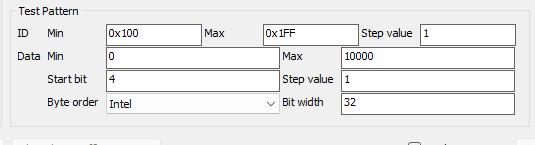
- ID parameters set the minimum, maximum, and step for an incrementing ID, or the minimum and maximum for a random ID.
- Data parameters set the minimum, maximum, and step for an incrementing field, or the minimum and maximum for a random field.
- Field location uses Start bit, Bit width, and Intel or Motorola Byte order. Data fields can be 1 through 64 bits and must fit inside the current payload.
Import Data… loads payload bytes from a .txt or .bin file. For a text import, all whitespace is ignored and the remaining characters must be an even number of hexadecimal digits; both spaced bytes and continuous hexadecimal text are accepted. A binary import reads raw bytes. Import changes only the current payload length: short input is zero-padded and long input is truncated, with an inline notice. It never changes the message type or data length. With Batch Operation enabled, the same file payload is merged into each marked row using that row’s own data length; rows without a payload are skipped. Signal Details displays the database signals belonging to the selected message and keeps signal and byte edits synchronized.
Test patterns
Section titled “Test patterns”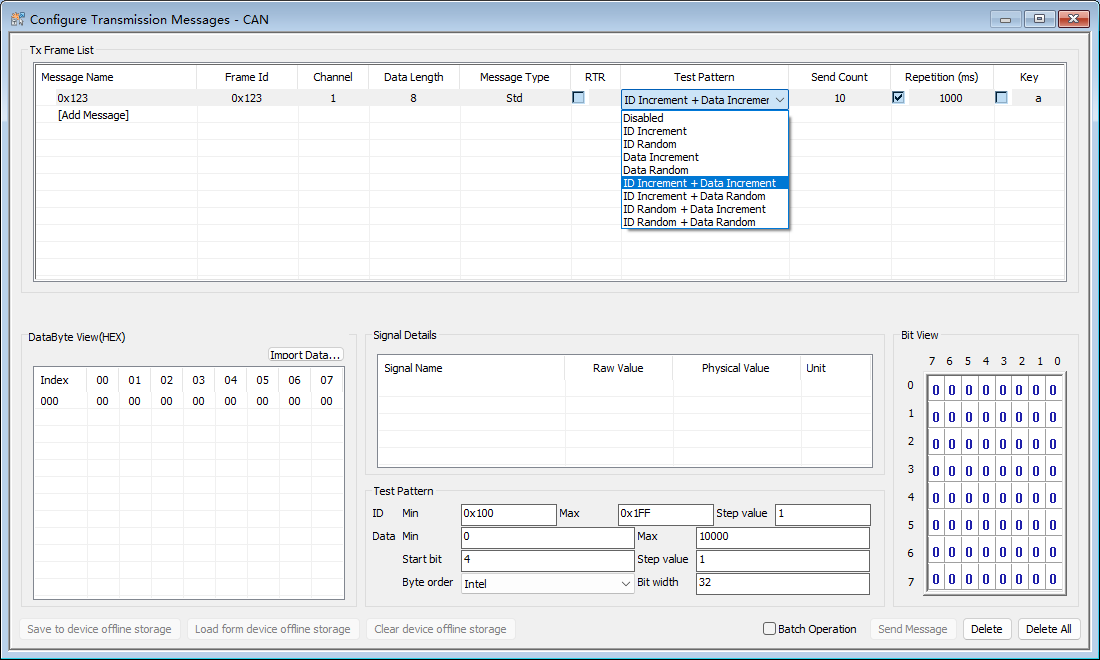
| Pattern | Result |
|---|---|
| Disabled | Sends the configured ID and payload without generated changes. |
| ID Increment | Starts at ID Min, adds Step value after each periodic send, and wraps after ID Max. |
| ID Random | Chooses an ID between ID Min and ID Max for each periodic send. The step control is not used. |
| Data Increment | Starts the selected payload field at Data Min, adds Step value, and wraps after Data Max. |
| Data Random | Chooses a value between Data Min and Data Max for the selected field. The step control is not used. |
| Combined ID + Data | Runs the selected ID and data generators together. The two generator states advance independently. |
Note: Changing DLC, frame type, or RTR can make an existing data field invalid. Correct the field before enabling repetition. Editing a running row safely restarts that row’s pattern from its configured minimum; other rows keep their own state.
Finite periodic transmission
Section titled “Finite periodic transmission”Set Send Count to 1 through 65534 and then check Repetition. BUSMASTER sends the row periodically and counts successful submissions only. After the requested number is reached, transmission stops and Repetition is cleared automatically. Check Repetition again to start a new run from the full count. Disconnecting and reconnecting also prepares a fresh run.
Infinite is the default and is also used for the reserved values 0 and 65535. Common presets include 10, 100, 1000, and 10000. A finite count does not require a test pattern, and a test pattern does not require a finite count.
CAN FD notes
Section titled “CAN FD notes”Select the required frame format, including CAN FD with bit-rate switching when appropriate, and set a valid CAN FD payload length. BUSMUST hardware may use device-side timing resources for periodic rows when available and software timing otherwise; this routing is normally transparent in the Transmit Window.
Authoritative source: BUSMASTER DITA help source transmit_messages.dita, compiled into BUSMASTER.CHM with the application.