
LIN Transmit Window
Open LIN –> Transmit Window to define master transmissions or slave responses for the selected LIN channel. Imported LDF messages are available from [Add Message]; a non-database row can also be created by entering its ID and fields manually.
Message types and editable data
Section titled “Message types and editable data”- Master Write transmits the header and data from BUSMASTER. Its payload can be edited, imported, or generated by a test pattern.
- Master Read transmits a header and waits for the slave response. The response length, checksum type, and received data are determined from the bus.
- Slave Response prepares data that the hardware returns when an external master sends the matching header. Its timing is controlled by the external master, so Send Count and test patterns remain fixed to Infinite and Disabled.
Select a database message to edit its raw or physical signal values in Signal Details. Select a non-database payload row to edit hexadecimal bytes directly. Import Data… accepts whitespace-insensitive hexadecimal .txt files and raw .bin files. It writes only the row’s current data length, zero-pads short input, and truncates long input without changing the row type or length. Batch Operation applies the same file payload to each marked, payload-carrying row using its own length.
LIN test patterns and send count
Section titled “LIN test patterns and send count”For an independently timed Master Write row, Test Pattern offers the same choices as the CAN Transmit Window: ID Increment, ID Random, Data Increment, Data Random, and the four combined ID/data variants. Incrementing values use Min, Max, and Step and wrap at the configured maximum. Random values use Min and Max. A data field is defined by Start bit, Bit width from 1 through 64, and Intel or Motorola Byte order, and must fit inside the current LIN payload.
Send Count and Repetition (ms) are independent of Test Pattern. Set a count from 1 through 65534, check Repetition, and BUSMASTER stops after that many successful periodic submissions and clears the check box. Checking it again starts a new full run. Infinite continues until Repetition is cleared or LIN disconnects. A manual Send Message or key-triggered send does not consume the periodic count.
Note: A LIN schedule owns the timing of its matched rows. When a row is accepted into a schedule, its standalone Send Count becomes Infinite and its period is controlled by the schedule. Stop the schedule before editing schedule-owned timing. Slave-response rows likewise do not use a finite standalone count.
Find responding LIN IDs
Section titled “Find responding LIN IDs”Master Read ID Scan helps identify the frame IDs to which a connected LIN ECU responds. It is available only while LIN is connected and the selected channel is configured as a master.
The example below completed the full 0x00 through 0x3F range against a connected LIN device. IDs 0x01, 0x04, and 0x12 responded with data and are highlighted in green; IDs without a response are highlighted in red.
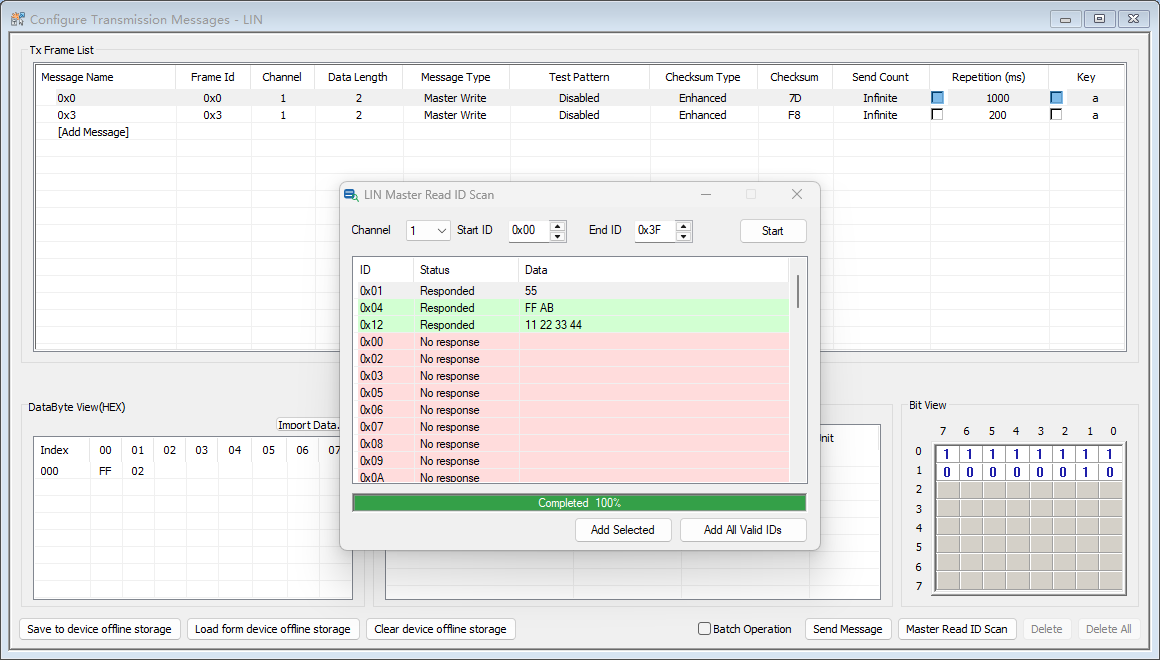
- Channel selects one connected LIN master channel.
- Start ID / End ID define an inclusive 6-bit frame-ID range from 0x00 through 0x3F.
- Start begins one Master Read request for each ID. While running, the button becomes Stop.
- Results lists every requested ID as Pending, Responded, No response, Error, or Cancelled. A responding row also shows the returned data.
- Status shows Ready, scan progress, completion, cancellation, or a reason the scan could not start.
- Add Selected adds one selected responding ID to the LIN transmit list. Add All Valid IDs adds every responding ID. Existing matching Master Read rows are treated as duplicates instead of being added again.
Note: Stop periodic transmission on the channel and stop any schedule that owns it before scanning. The scanner temporarily owns the selected channel; normal sends and schedule changes are blocked until the scan stops. Disconnecting LIN cancels the scan safely.
Authoritative source: BUSMASTER DITA help source LIN_TxWindow.dita, compiled into BUSMASTER.CHM with the application.