
Test Stimuli: Make Messages and Signals Change on Demand
Once a bus is connected, the next step is often to make its inputs move: sweep through a range of message IDs to check filters, vary data progressively to inspect decoding, or make vehicle speed cross an alarm threshold repeatedly to see whether the display triggers and recovers as expected. This tutorial shows how AI and BMCLI can turn such requirements into executable test stimuli.
Compared with node simulation, this tutorial focuses on a more specific question: what input to give the device under test, and how to confirm that the input matches the design. Message-level tests work with IDs and raw bytes; signal-level tests work with engineering values such as speed or temperature. Choose the right level and many experiments need only a few commands or one manifest.
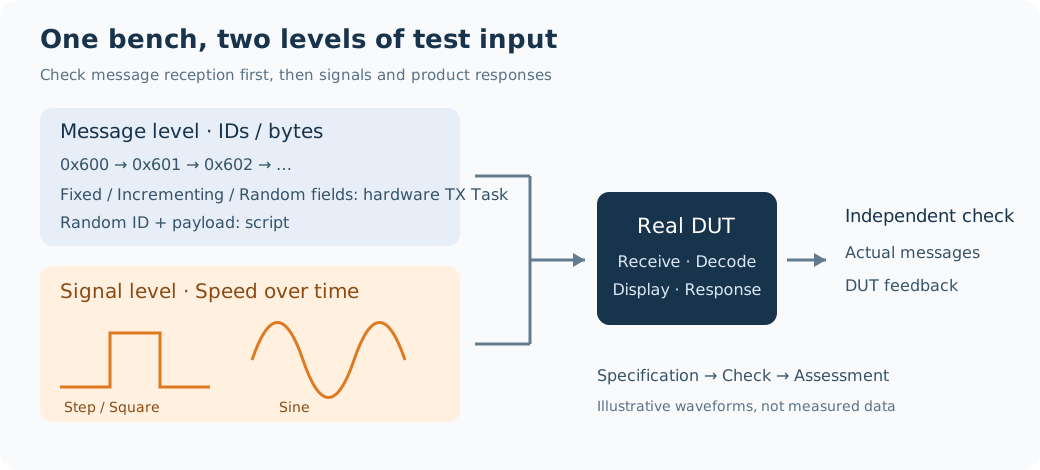
Figure 7-1. Two paths construct inputs at different levels, then use independent capture and DUT responses to check the result. Diagram, not measured data.
Define the Stimulus Specification First
Section titled “Define the Stimulus Specification First”Suppose you are integrating a display controller with a CAN interface. Its lower layer accepts only a specified ID range, while its application displays vehicle speed and raises an overspeed warning. Start with raw messages to check the receive path, then use signals that follow the DBC definition to check application behavior.
The parameters below form the task specification for AI. Adapt IDs, ranges, and durations to the project; obtain bitrates, wiring, and DUT feedback definitions from the actual bench material.
| Specification level | What to state | Example in this tutorial |
|---|---|---|
| Bench | Transmit and capture channels, bus parameters, permitted operating range | Configured isolated CAN bench; logical channels stimulus-can and observe-can |
| Message format | Standard/extended frame, Classic CAN/CAN FD, length | Standard ID, Classic CAN, eight bytes |
| Message variation | What changes, range, step, and treatment of other fields | ID 0x600–0x60F; or payload bytes 0–3 from 0 to 255 |
| Timing | Interval, count, transitions between runs, and stop condition | One hardware-task frame every 100 ms, 32 frames per run, runs executed in sequence |
| Signal definition | DBC, message name, signal name, unit, valid range | VehicleStatus.Speed in km/h |
| Waveform | Type, center and amplitude/step points, period, initial value | Sine wave 60±20 km/h, two-second period, 50 ms message cycle |
| Result criteria | Required input pattern and expected DUT response | IDs remain in range; signals follow targets; alarm threshold and recovery time follow project requirements |
The interfaces in this tutorial were checked against local BMCLI 1.6.5 help, and the bundled waveform manifests passed offline validation. The result tables below describe intended behavior; confirm actual transmit timing and DUT results from bench capture.
Case 1: Check ID Filtering and Raw-Data Reception
Section titled “Case 1: Check ID Filtering and Raw-Data Reception”Input for AI
Section titled “Input for AI”Use BMCLI to build message-level tests for my display controller. Read the project Bench first and confirm the bindings, wiring, and CAN parameters for stimulus-can and observe-can. Run this work only on the authorized isolated bench. Use standard CAN data frames with eight-byte payloads. Test these patterns in separate runs: fixed ID and fixed payload; IDs incrementing from 0x600 to 0x60F; fixed ID 0x600 with the first 32 payload bits incrementing as a big-endian integer from 0 to 255; fixed ID with the first 32 bits randomized; and random IDs with a fixed payload. Let the hardware task transmit one frame every 100 ms and 32 frames per run, start capture before transmission, and execute runs sequentially. Add one more run through a wrapper script that randomizes both the ID and the complete eight-byte payload, saving the generated sequence. Deliver the test specification, runner, and input-check report. Record separately whether each command was accepted, whether the observation side received the frames, and whether the DUT followed the project filter rules. Remove only tasks created by this run when finished. If the project material does not define DUT feedback, list the missing information.
Result: Each Variation Maps to a Check
Section titled “Result: Each Variation Maps to a Check”| Stimulus | BMCLI implementation | What remains fixed | What it is useful for observing |
|---|---|---|---|
| Fixed message | txtask --type=fixed |
ID and payload | Establish a baseline and check periodic reception |
| Incrementing ID | --type=incid |
Payload | Receive-filter range and ID dispatch logic |
| Incrementing payload field | --type=incdata |
ID and bytes outside the field | Byte order, value decoding, and receive continuity |
| Random payload field | --type=random, also accepted as randomdata |
ID and bytes outside the field | Robustness under changing data combinations |
| Random ID | --type=randomid |
Payload | Behavior under changing ID distribution |
| Random ID and complete payload | A wrapper script generates each ID and byte sequence, then calls message send |
Length and frame type fixed as required | Parsing and filtering under mixed inputs; saved sequences can be run again |
Here random means a random data field, and randomdata is its alias. A hardware task selects one pattern. Creating separate “random ID” and “random data” tasks produces two streams; it does not make both the ID and payload random in every individual frame.
For incrementing and random payload modes, the current interface requires a 32-bit, byte-aligned field in Motorola big-endian byte order, and all four bytes must fit inside the payload. For example, --inc-startbit=0 changes bytes 0–3 while the last four bytes retain their template values. DBC fields such as a four-bit Counter or a 12-bit temperature are better handled with the signal-level method later in this tutorial.
The report should communicate information like this:
| Experiment | Expected input characteristic | What the report should show |
|---|---|---|
| ID sweep | 0x600, 0x601 … 0x60F | Actual ID set, frame count per ID, and count outside the range |
| 32-bit increment | 00 00 00 00 → 00 00 00 01 → 00 00 00 02 | Decoded field value, step, and whether other bytes changed |
| Random payload field | Values remain in the requested range; repeats are allowed | Minimum/maximum, number of distinct values, and consistency outside the field |
| Dual random | Each frame’s ID and eight data bytes come from the saved sequence | Sequence index matched to capture and frames not observed |
| DUT filtering | Product rules determine which IDs are accepted or rejected | Relationship between DUT feedback and each input |
Random testing broadens combination coverage, but it does not guarantee that a finite run visits every value. Use a deterministic ID sweep first when every ID must be covered.
Implementation Explained: Hardware Tasks Generate Regular Patterns
Section titled “Implementation Explained: Hardware Tasks Generate Regular Patterns”The calls below are the key operations an AI-generated runner may use; they are not a single script to execute all at once. Prepare the daemon and channels as described in the getting-started tutorial, binding both logical names to the actual bench. Save the handle returned by each add, remove that task after capture, and only then begin the next run.
# Establish a fixed-ID, fixed-data baseline with 32 frames.bmcli txtask add --channel=stimulus-can --message=0x600 --cycle=100 --rounds=32 --type=fixed --data="00 00 00 00 AA BB CC DD" --format=json
# Sweep 0x600–0x60F while keeping the payload fixed.bmcli txtask add --channel=stimulus-can --message=0x600 --cycle=100 --rounds=32 --type=incid --inc-min=0x600 --inc-max=0x60F --inc-step=1 --data="00 00 00 00 AA BB CC DD" --format=json
# Increment the first four bytes as a big-endian 32-bit integer; keep AA BB CC DD unchanged.bmcli txtask add --channel=stimulus-can --message=0x600 --cycle=100 --rounds=32 --type=incdata --inc-startbit=0 --inc-nbits=32 --inc-min=0 --inc-max=255 --inc-step=1 --data="00 00 00 00 AA BB CC DD" --format=json
# Randomize only the integer represented by the first four bytes, within 0–65535.bmcli txtask add --channel=stimulus-can --message=0x600 --cycle=100 --rounds=32 --type=random --inc-startbit=0 --inc-nbits=32 --inc-min=0 --inc-max=65535 --data="00 00 00 00 AA BB CC DD" --format=json
# Randomize only the CAN ID; retain the eight-byte template payload.bmcli txtask add --channel=stimulus-can --message=0x600 --cycle=100 --rounds=32 --type=randomid --inc-min=0x600 --inc-max=0x60F --data="00 00 00 00 AA BB CC DD" --format=json
The installed Reference states for tested third-generation firmware that an increment starts at the minimum value and remains at the maximum once reached; it does not wrap automatically. The ID sweep above therefore stays at 0x60F for its remaining transmissions. If every run must restart the sweep, let the runner recreate the task. If a protocol Counter must wrap, use the corresponding simulation and E2E configuration.
Capture and cleanup are also part of the runner:
# Start capture in another terminal before adding the transmit task; this command runs for six seconds.bmcli message recv --channel=observe-can --duration=6 --format=jsonl
# List tasks and check the handle returned by add; clean up the slot even after a finite task finishes.bmcli txtask list --channel=stimulus-can --format=json
# Replace the placeholder with the complete handle returned by this run, removing only this task.bmcli txtask remove --handle="<handle returned for this run>" --format=json
“Command accepted,” “observed on the bus,” and “processed correctly by the DUT” are three separate results. A receiving analyzer confirms that the stimulus reached the bus. Confirming product behavior requires DUT feedback or observation of its display.
Randomize Both ID and Complete Payload
Section titled “Randomize Both ID and Complete Payload”A wrapper program arranges the frame sequence for this run. The bundled dual-random example prints JSONL by default and does not send. It transmits frames through BMCLI only when both --send and a channel are specified. A fixed seed generates 32 frames, and the script saves the sequence for review.
# Inspect the 32 frames generated by seed 2026 offline, including every ID and complete payload.python random-frames.py --seed=2026
# Send on an already-open isolated channel; the sequence path must name a new file.python random-frames.py --seed=2026 --send --channel=stimulus-can --sequence=run-01.jsonl
Inside the script, each frame uses a call of this form:
# Both ID and eight-byte payload come from one generated frame; this line only illustrates the call.bmcli message send --channel=stimulus-can --message=0x607 --data="12 83 A4 00 FF 21 68 09" --count=1 --format=jsonThe host process controls the interval and includes command invocation overhead, so this method suits low-speed functional tests. Prefer hardware-supported patterns when strict periods or high loads matter. To reproduce random input frame by frame, retain both the original sequence and actual capture timestamps before organizing replay.
Case 2: Make Vehicle Speed Follow Different Waveforms
Section titled “Case 2: Make Vehicle Speed Follow Different Waveforms”After checking the receive path, you can give the instrument physically meaningful input. To observe whether speed display is smooth and when a warning appears or clears around a threshold, make the same Speed signal follow step, sine, and sawtooth waveforms.
Input for AI
Section titled “Input for AI”Use BMCLI and the bundled vehicle-demo.dbc to generate vehicle-speed stimuli for an instrument bench. Send VehicleStatus every 50 ms, set Gear to D, and update Counter and Checksum with the bundled counter-sum teaching rule. Prepare four speed conditions in sequence and capture each for ten seconds: constant 60 km/h; 40, 80, and 40 km/h at 0, 2, and 4 seconds while retaining the final value; a sine wave centered at 60 with amplitude 20 and a two-second period; and a sawtooth with the same range and period. Also prepare a square-wave variant that switches between 40 and 80 km/h every second. Generate manifests that validate offline. After capture, plot target and received speed, compare values using DBC resolution, and record cycle deviation. Read the alarm threshold and permitted response time from my product specification; if absent, validate the input waveform only. Use the confirmed isolated bench, stop and unload each run before switching, and preserve unrelated tasks.
Result: A Waveform Specification Is Clearer Than “Make the Value Change”
Section titled “Result: A Waveform Specification Is Clearer Than “Make the Value Change””| Signal stimulus | Type and principal parameters | Expected result here | Engineering purpose |
|---|---|---|---|
| Constant | constant, value |
Remains at 60 km/h | Steady display and reference point |
| Step/piecewise hold | step, time-value points |
40 → 80 → 40, then remain at 40 | Threshold trigger, jump, and recovery |
| Sine | sine, center, amplitude, period, phase |
60±20 km/h, two-second period | Smooth tracking and display refresh |
| Sawtooth | sawtooth, center, amplitude, period |
Rise from 40 toward 80, then return to 40 | Range sweep and drop response |
| Square | Repeating step with two points and a repeat period |
Hold 40/80 for one second each | Repeated threshold crossings and periodic switching |
| Custom/random signal sequence | Generate valid engineering values externally, then organize step points or signal assignments | Save every time point and value | Specified condition combinations; not a built-in random waveform |
Message and waveform periods serve different purposes: 50 ms is the interval between frames, while two seconds is one waveform cycle, nominally giving 40 samples per cycle. Draw curves from received data; visual interpolation is not additional bus sampling.
The bundled five waveform manifests reuse the teaching DBC from tutorial 2. They are inputs that AI can extend and do not include a product alarm-judgment program.
Implementation Explained: Describe Engineering Values and Let BMCLI Encode Them
Section titled “Implementation Explained: Describe Engineering Values and Let BMCLI Encode Them”For example, the sine source contains this fragment:
"Speed": { "type": "sine", "offset": 60, "amplitude": 20, "period_ms": 2000}The values 60 and 20 are in km/h, matching the DBC physical unit. AI does not need to convert every speed manually into message bytes. BMCLI encodes the database signal and updates the configured protection fields.
In the bundled example directory, validate offline first, then let AI run against the confirmed bench:
# Validate the complete manifest and referenced DBC offline without accessing hardware.bmcli simulation validate --file=speed-sine.json --format=json
# Load the manifest for this run; no transmission starts yet.bmcli simulation load --file=speed-sine.json --name=tutorial-stimulus-wave --format=json
# Start capture in another terminal before starting the waveform.bmcli message recv --channel=observe-can --duration=10 --decode --dbc=../02-from-bus-to-signals/network/vehicle-demo.dbc --format=jsonl
# Start this waveform on an already-open isolated CAN channel.bmcli simulation start tutorial-stimulus-wave --channel=stimulus-can
# Stop the waveform after capture, then unload its resources.bmcli simulation stop tutorial-stimulus-wavebmcli simulation unload tutorial-stimulus-wave
You can also replace the Speed source on a loaded resource before it starts. Each line below is an optional variant; choose one at a time:
# Constant: keep speed at 60 km/h.bmcli simulation source set Speed --simulation=tutorial-stimulus-wave --task=vehicle --type=constant --value=60
# Step: rise to 80 at two seconds, fall to 40 at four seconds, then hold.bmcli simulation source set Speed --simulation=tutorial-stimulus-wave --task=vehicle --type=step --point=0:40 --point=2000:80 --point=4000:40
# Sine: center 60, amplitude 20, period 2000 ms, initial phase zero.bmcli simulation source set Speed --simulation=tutorial-stimulus-wave --task=vehicle --type=sine --offset=60 --amplitude=20 --period=2000 --phase=0
# Sawtooth: rise through the same range, returning to the start every 2000 ms.bmcli simulation source set Speed --simulation=tutorial-stimulus-wave --task=vehicle --type=sawtooth --offset=60 --amplitude=20 --period=2000
# Square: express it as a repeating step, with 40 for the first second and 80 for the second.bmcli simulation source set Speed --simulation=tutorial-stimulus-wave --task=vehicle --type=step --point=0:40 --point=1000:80 --repeat=true --period=2000
A step takes its new value at the specified time, and its repeat period must exceed the last point. Values are checked against their valid range by default; only an explicit --range=clip truncates out-of-range samples. Keeping the default check in tests makes contradictions between a specification and DBC easier to find.
Signal simulation is scheduled by the host, with waveforms evaluated at planned time. The capture report should also inspect actual frame intervals and missed scheduling periods so that an attractive curve does not hide gaps in transmission. Replace the teaching counter-sum scheme with the product’s specified protection method in a real project.
Explore Further: Use Stimuli for Product Verification
Section titled “Explore Further: Use Stimuli for Product Verification”Put the Waveform and Threshold Response on One Plot
Section titled “Put the Waveform and Threshold Response on One Plot”If the instrument specifies an overspeed threshold and hysteresis, ask AI to build step points around that threshold, hold each value long enough, and capture the DUT’s state feedback in parallel. Align input speed and warning state in one report to reveal early triggers or delayed recovery. If the device has no status message, provide display recognition or manually marked results rather than treating “input sent” as a passing test.
Preserve Random Input as a Regression Case
Section titled “Preserve Random Input as a Regression Case”When a random combination exposes a product fault, save the input order, actual timestamps, and device responses. Ask AI to extract the frames around the fault into a separate case, then shorten the sequence progressively to isolate the trigger. Reusing that exact input after the next firmware release is more targeted than generating an unrelated random run.
Further Reading
Section titled “Further Reading”- Hardware transmit tasks (txtask)
- Message transmit and receive (message)
- DBC signal encoding and decoding (dbc)
- Node simulation and fault injection tutorial
Query exact waveform parameters with bmcli help simulation source set --format=json. Specify stimulus ranges and stop conditions for the project and validate them on an isolated bench; these inputs may trigger real control behavior in the DUT.
Download this tutorial’s companion examples (ZIP)