
Advanced Scripted Tools: Build a Product-Specific Bootloader Flashing Tool
BMCLI’s basic commands can run individually or combine into advanced scripts that handle complete business workflows. This article uses a product-specific Bootloader flashing tool to show how AI can turn project specifications into a program reusable in CI/CD, benches, and the field.
Imagine connecting firmware build, ECU flashing, regression execution, and result archiving to CI/CD. The project has a Bootloader specification and an authorized security algorithm but no unified flashing entry point. Whether using existing flashing software or a custom program, target addresses, sessions, unlocking, and verification need adapting. These project rules are well suited to an AI-generated script.
The tool first provides a command-line entry point that runs without a UI: it accepts firmware, a target, and configuration, and outputs stage records, result files, and an exit code. CI/CD can invoke it, and engineers can run it manually on the bench. A future UI can call the same workflow. BMCLI handles UDS transactions and image transfer; the AI-generated script organizes them into a complete, maintainable process.
The project inputs are an isolated flashing bench, stable power, matching ECU and firmware, the flashing specification, and algorithm library. The bundled example first demonstrates downloading with a small image and simulator, then explains how to organize the full procedure according to project specifications.
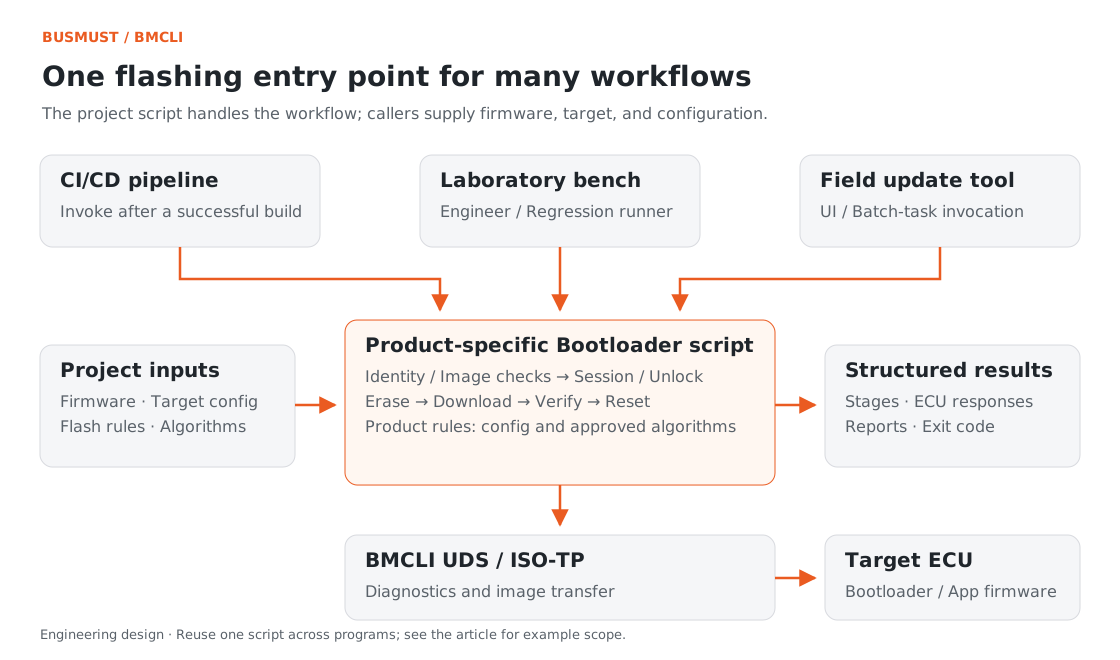
Figure 4-1. The script orchestrates the project workflow; BMCLI executes UDS transactions. Engineering relationship diagram.
Input for AI: Describe the Project Workflow
Section titled “Input for AI: Describe the Project Workflow”Inputs include the flashing specification, workflow configuration, firmware, algorithm library, and CI/CD parameter/result conventions. The deliverable is a scripted tool. Check the first integration before allowing the pipeline to run a verified target and workflow with fixed configuration.
Our new project needs ECU flashing in CI/CD. Use BMCLI to generate a headless Bootloader flashing script callable by an external process. I have provided the flashing specification, flash-plan.yaml, matching firmware, and authorized algorithm library; take the target connection from the project Bench. Accept a firmware path, target configuration, and report directory. Check image and device identity, then organize session entry, unlocking, erase, download, verification, reset, and version reading according to the specification. Record structured results for every stage. Return a successful exit code only when all stages pass; otherwise return nonzero, preserve the failing stage and ECU response, and clean up this task’s resources. First perform offline checks and list missing information, then verify the complete workflow on my confirmed isolated bench. Use the verified configuration for unattended execution afterward. Deliver the script, configuration, invocation guide, and sample report. Do not build a graphical interface for this task, so CI/CD, bench programs, and a future UI can reuse one entry point.
AI turns the project description into a workflow program and calls BMCLI for individual actions. The bundled plan demonstrates organization; the actual project supplies firmware, algorithm libraries, and routine parameters.
Script output separates current stage, stage progress, and overall outcome. CI/CD uses the exit code to decide whether regression can continue; engineers use stage records to locate failures.
Finished Result: A Clear Flashing Outcome for the Pipeline
Section titled “Finished Result: A Clear Flashing Outcome for the Pipeline”The intended deliverable is an independently callable flashing entry point. The pipeline supplies firmware and target configuration, receives stage records, post-flash identity, and an exit code, then decides whether to start tests. The image checks and simulator output below demonstrate its transfer component; AI can combine them with the ECU specification to generate the project script.
You can try image inspection before an ECU is available. This article’s example directory includes a four-byte teaching HEX file. Offline inspection reports:
| Check | Result |
|---|---|
| Image format | Intel HEX |
| Data segments | 1 |
| Address range | 0x00000000–0x00000003 |
| Effective data | 4 bytes |
| Planned requests | RequestDownload → TransferData → TransferExit |
| Estimated transfer blocks | 1; determined after connection using ECU-negotiated values |
This answers what the file contains and how it will be transferred. --dry-run sends no bus requests, making it useful before connecting an ECU.
The download example using our own simulated ECU also demonstrates typical outcomes:
| Simulator response | Tool presentation |
|---|---|
| Accepts requests and data | Completes the four-byte transfer and TransferExit |
| responsePending followed by a normal response | Keeps waiting and obtains the final result |
| Returns an incorrect block sequence number | Identifies transfer_data and preserves expected and actual sequence numbers |
| RequestDownload returns NRC 0x31 | Identifies request_download and displays the negative response |
The image is small, but it demonstrates the download tool’s essential abilities: completing a transfer and explaining why one did not complete.
Implementation Explained: BMCLI’s Role in the Tool
Section titled “Implementation Explained: BMCLI’s Role in the Tool”The key calls below explain the implementation. AI-generated code organizes them into a complete workflow, processes responses, and handles cleanup.
What BMCLI Handles
Section titled “What BMCLI Handles”For image preview, the application calls the offline download check to read image segments and the transfer plan without bus requests:
# Parse the image offline and generate a transfer plan without download requests to the ECU.bmcli uds download --file=firmware/demo.hex --dry-run --format=jsonThe bundled demo.hex preview should show one segment, four bytes total, and start address 0x00000000, along with the 0x34/0x36/0x37 download sequence and ALF 0x44. This offline step checks segment addresses, lengths, and estimated block counts before connecting to the target for downloading.
The following project parameters illustrate how commands connect. Addresses, security level, routine data, and BIN size are configuration examples:
# Set the logical channel, diagnostic addresses, and padding for this flashing operation.bmcli uds config set --channel=programming-can `  --request-id=0x7E0 --response-id=0x7E8 `  --flags=classic --padding=0xAA
# Enter the programming session and adopt the session timing returned by the ECU.bmcli uds session change programming --format=json# Start background TesterPresent, using the project's permitted response-suppression mode to maintain the session.bmcli uds present start --interval=2000 --suppress-positive-response# Use the project's algorithm library to unlock the specified security level.bmcli uds unlock --level=0x11 --algo=security/project-seed-key.dll# Invoke the project erase routine; its ID and data come from the flashing configuration.bmcli uds routine start 0xFF00 --data=0040000000002400 --format=json# Transfer the image and handle block numbering, waiting, and transfer exit; full flashing also requires subsequent verification.bmcli uds download --file=firmware/demo-app.bin `  --addr=0x00400000 --size=9216 --format=json
session change parses ECU session timing, background TesterPresent maintains the session, and unlock calls the project algorithm library. download handles the image, negotiated block size, block sequence numbers, and transfer exit. The AI-generated script can focus on stage transitions, conditions, failure handling, and results.
After downloading, the project workflow performs the required verification, reset, and version confirmation. Recording every stage produces a complete flashing report.
Use on the Project Bench
Section titled “Use on the Project Bench”For first integration, record ECU identity, image addresses, power conditions, and recovery procedure as configuration-check results. After validation, CI/CD runs with fixed target and workflow parameters. If the environment or model does not match, the script exits before flashing and explains why. Unattended execution thus rests on confirmed engineering configuration.
After a timeout, inspect device state and the last confirmed stage before choosing how to retry. On exit, stop tasks created by the tool, including TesterPresent. Centralizing these actions reduces manual cleanup in everyday use.
Explore Further: From Flashing Workflow to Delivery Tool
Section titled “Explore Further: From Flashing Workflow to Delivery Tool”You can refine this example or extend it to other work. Choose a direction that interests you and discuss its implementation with AI.
Support Several Product Models with One Tool
Section titled “Support Several Product Models with One Tool”If a product line has different ECUs or memory layouts, ask AI to organize addresses, image regions, diagnostic connections, and flashing steps into model-specific configurations. The tool first reads identity as specified by the project, then presents matching firmware and procedure. BMCLI still handles diagnostics and transfer; the application selects and organizes them. Validate each model through image checks and its bench before adding it to supported target configurations. This reuses the tool while keeping model differences explicit and traceable.
Add Per-Device History for Small-Batch Updates
Section titled “Add Per-Device History for Small-Batch Updates”For sequential field updates of several prototypes, add associations among scanned codes, device identities, and flashing records. AI can reuse the verified single-device workflow, saving firmware identity, outcome, and operation time for each unit, then generating a batch summary. BMCLI handles the current device’s UDS transactions; the application manages product histories and failures. This supports per-unit investigation without mistaking one successful flash for completion of the entire batch.
Further Reading
Section titled “Further Reading”These references cover the interfaces used here; query local JSON Help for individual parameters.
- UDS Sessions, Unlocking, and Download (uds)
- ISO-TP Transport Layer (isotp)
- Background Service and Continuous Tasks (daemon)
Download this tutorial’s companion examples (ZIP)