
BUSMASTER transmit test patterns and message send count
BUSMASTER 3.2.2.47 and later can vary the CAN or LIN identifier, a selected payload bit field, or both from the Transmit Window. Send Count can also limit how many times one row is transmitted. Test Pattern, Send Count, and Repetition are independent, so each can be used alone or in combination.
In short, Test Pattern controls how the ID or payload changes on each transmission, Send Count controls the total number of periodic transmissions in the run, and Repetition (ms) controls the interval.
1. Create a transmit row
Section titled “1. Create a transmit row”- Open
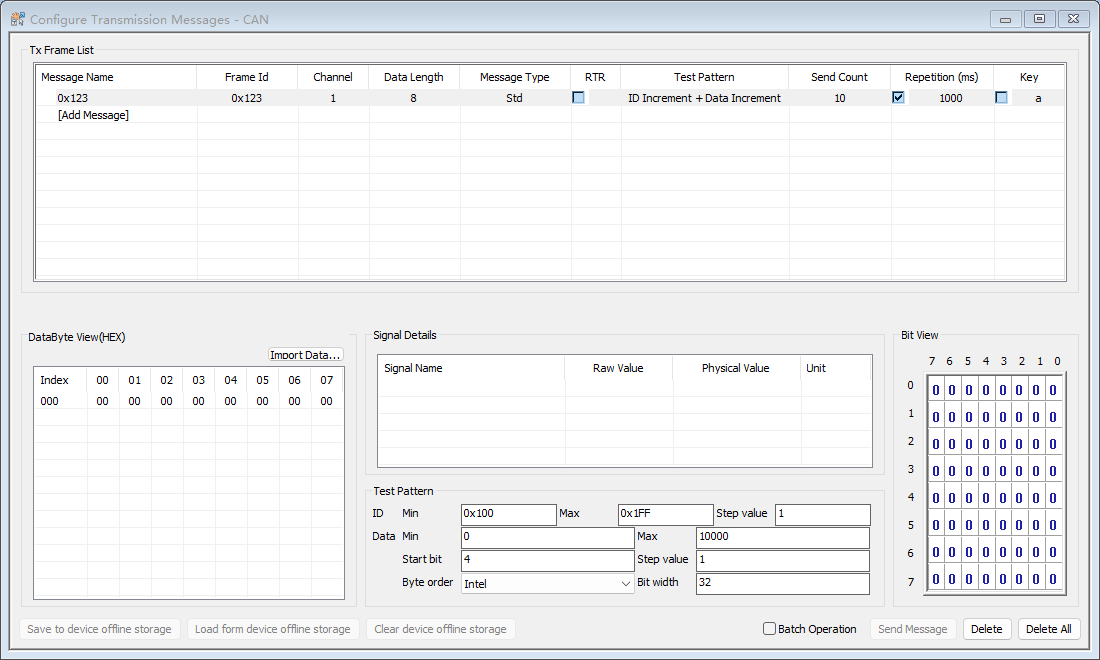
CAN -> Transmit Window; useLIN -> Transmit Windowfor a LIN project. - Double-click
[Add Message]and select a database message, or enter the ID, channel, length, and type for a non-database message. - Verify that the fixed frame transmits correctly before enabling
Test Pattern.
This example combines a pattern with Send Count = 10 and Repetition = 1000 ms:
2. Select a pattern
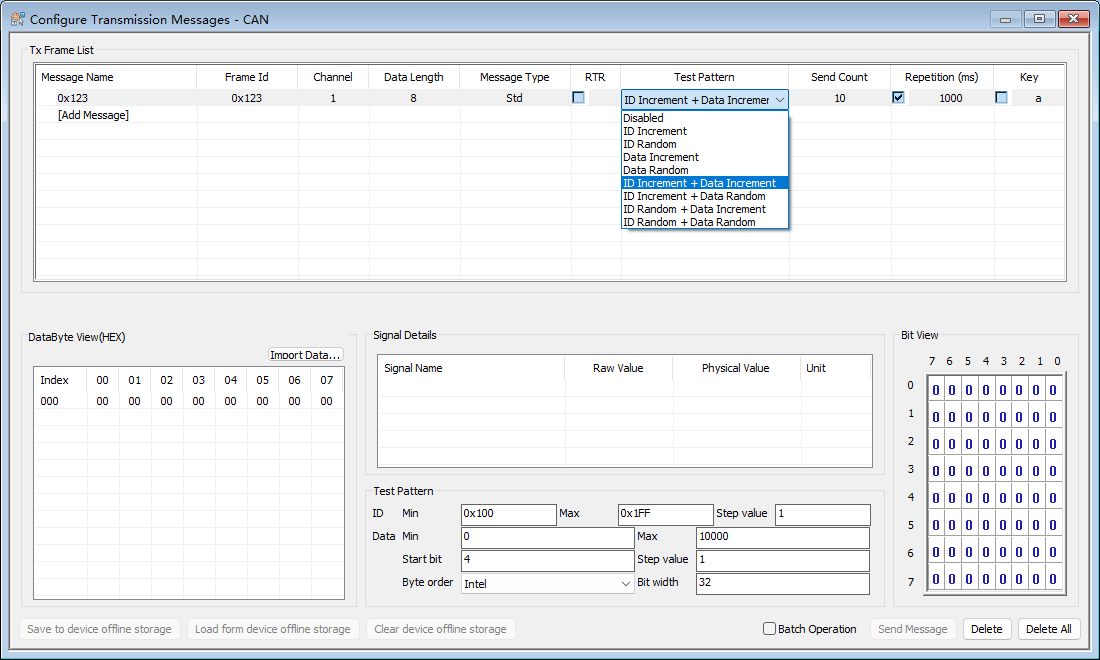
Section titled “2. Select a pattern”Test Pattern provides these choices:
| Pattern | Change on each periodic transmission |
|---|---|
Disabled |
Keep the current ID and payload |
ID Increment |
Add the configured step and wrap after the maximum ID |
ID Random |
Choose an ID between the configured minimum and maximum |
Data Increment |
Increment the selected payload field and wrap after its maximum |
Data Random |
Choose a value between the selected field’s minimum and maximum |
Four ID ... + Data ... choices |
Run the ID and data generators together with independent state |
3. Configure ID and payload parameters
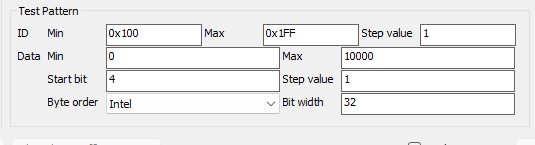
Section titled “3. Configure ID and payload parameters”Selecting the row displays the parameters required by its pattern.
ID parameters
Section titled “ID parameters”ID Minis the first ID in a run.ID Maxis the highest allowed ID.Step valueis added by an incrementing pattern; random patterns do not use it.
For example, an ID range of 0x100–0x10F with step 1 advances from 0x100 to 0x10F, then wraps to 0x100.
Data parameters
Section titled “Data parameters”Data Min/Data Maxdefine the selected field’s value range.Step valueis added by an incrementing pattern.Start bitlocates the field.Bit widthcan be 1 through 64 bits.Byte orderselectsIntelorMotorola.
For example, Start bit = 8, Bit width = 16, Intel, range 0–255, and step 1 changes only that 16-bit field. All other payload bits continue to use the row’s current template. The field must fit inside the current DLC and the configured values must fit its width.
4. Set the message send count (Send Count)
Section titled “4. Set the message send count (Send Count)”- Enter a period in
Repetition (ms)and check the column. - Use
Infinitefor continuous transmission. - Enter
1–65534for a finite run. Common presets include 10, 100, 1000, and 10000.
BUSMASTER counts successful periodic submissions only. When a finite run completes, it stops the row and clears Repetition. Checking it again starts a new run with the complete count. A manual Send Message action or keyboard-triggered frame does not consume the periodic count.
Test Pattern and Send Count remain independent:
- Pattern only: repeat the generated range until manually stopped.
- Count only: send the fixed ID and payload N times.
- Pattern and count: advance the generator on each period and stop after the Nth successful periodic submission.
For example, if the ID range is 0x100–0x1FF but Send Count = 10, the run sends only its first 10 generated IDs. If the pattern range ends first, it wraps according to its own rules until the count reaches N.
5. CAN and LIN boundaries
Section titled “5. CAN and LIN boundaries”- CAN/CAN FD validates the ID against the selected standard or extended frame format. RTR frames have no payload and cannot use a Data pattern.
- LIN patterns are available for independently timed
Master Writerows. AMaster Readrow can use a finite count but does not generate payload data. - A LIN
Slave Responseis triggered by an external master and does not use a finite periodic count or test pattern. - A row owned by a LIN Schedule Table uses schedule timing and an Infinite standalone count. Stop the schedule before editing standalone timing.
6. Verification and safety
Section titled “6. Verification and safety”- Begin with a slow period and use an independent receiver to verify ID, channel, DLC, payload order, and physical frame count.
- Motorola and Intel start-bit conventions differ. If unsure, use a small range and inspect the actual byte changes first.
- Editing valid pattern parameters while a row is running safely restarts that row from its configured minimum; other rows keep their state.
- After changing DLC, frame type, or RTR, correct any field that no longer fits before re-enabling repetition.
- A sweep or random pattern can produce traffic an ECU does not expect. Use an authorized test network, not a live vehicle or safety-critical bus.
Quick example
Section titled “Quick example”To send 10 frames with both an incrementing ID and payload field:
- Select
ID Increment + Data Increment. - Set the ID Min, Max, and Step.
- Set the Data Min, Max, Step, Start bit, Bit width, and Byte order.
- Set
Send Count = 10. - Enter the period and check
Repetition. - Verify that an independent receiver sees 10 frames and then no more. Check
Repetitionagain for the next run.
Frequently asked questions
Section titled “Frequently asked questions”How can BUSMASTER transmit a message only a specified number of times?
Section titled “How can BUSMASTER transmit a message only a specified number of times?”Set Send Count to a value from 1–65534, enter Repetition (ms), and enable periodic transmission. BUSMASTER stops the row and clears Repetition when the count is reached. To repeat a fixed frame N times, leave Test Pattern = Disabled.
Must a test pattern be used together with Send Count?
Section titled “Must a test pattern be used together with Send Count?”No. The two controls are independent. You can run a pattern continuously, transmit a fixed frame N times, or advance the pattern and stop after the Nth successful periodic transmission.
Why does checking Repetition again restart the full count?
Section titled “Why does checking Repetition again restart the full count?”After a finite run completes, is stopped manually, or is disconnected, checking Repetition starts a new run. Send Count restarts from its configured value, and an incrementing pattern restarts from its configured minimum.
Does Send Message consume the periodic send count?
Section titled “Does Send Message consume the periodic send count?”No. Send Count counts successful periodic submissions only. A manual Send Message action or keyboard-triggered frame does not consume the run count.
Source: BUSMUST technical knowledge base transmit-test-patterns.md. This public guide is maintained by the website content pipeline. Use the download center for current and archived software releases.