
XCP Calibration: Build a Product-Specific Calibration Tool
With BMCLI’s XCP and A2L support, AI can combine variable access, continuous measurements, and analysis into a product-specific calibration tool. We first compare a set of parameters, then explore autonomous tuning from experimental feedback.
Consider a thermal management controller whose team wants faster warm-up, less overshoot, and fewer repeated fan-request changes. Build a dedicated tool around these goals. The main page shows only relevant measurements, parameter controls, and comparison curves; each experiment saves its parameter set and results. You define the workflow in natural language; AI generates the UI and application logic; BMCLI handles XCP, A2L interpretation, parameter access, and DAQ.
Prepare an XCP-capable ECU, an A2L matching its software, a BUSMUST analyzer, stable power, and permitted calibration ranges. The project bench supplies operating conditions and external measurements. AI can do more than build a variable browser: it can analyze response stages using target/actual temperature, control outputs, and internal state, then propose justified parameter changes. Engineers supply parameter meanings, allowed ranges, and targets; adopt candidates after bench comparisons.
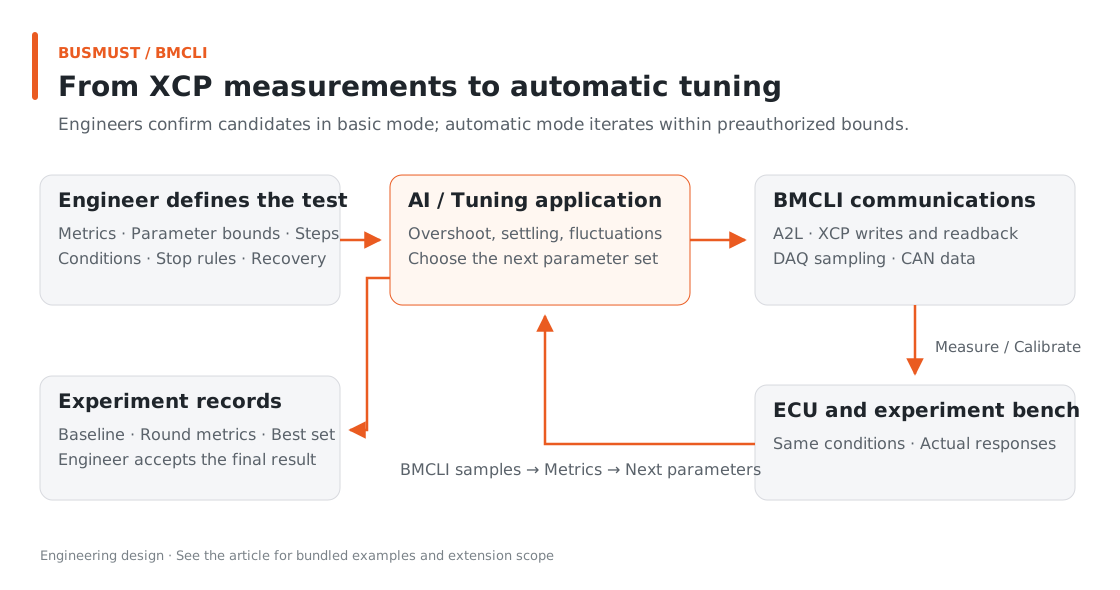
Figure 9-1. Measurement → analysis → candidate → verification creates comparable experiment records. Engineering relationship diagram.
Input for AI: Describe the Product Calibration Tool
Section titled “Input for AI: Describe the Product Calibration Tool”Inputs include an A2L matching ECU software, Bench, adjustable parameters, operating conditions, and evaluation metrics. The request below targets a full product tool; the small bundled A2L illustrates underlying access and DAQ only.
Build a dedicated web calibration tool for our thermal management controller using BMCLI. The project directory contains A2L, Bench, calibration ranges, and operating-condition descriptions. Select measurements and characteristics from the materials. Show temperature measurements, internal state, and CAN outputs, using DAQ for continuous curves. Record original parameters and a baseline each round; analyze overshoot, settling time, and fluctuations using temperature, control output, and conditions. Based on my parameter meanings and ranges, propose changes and expected effects, explaining evidence and uncertainty. After my confirmation, write and read back values, then compare responses under the same conditions. Provide parameter-set saving, experiment reports, and restoration according to project rules. Begin with offline UI and interface checks, then connect the bench gradually. List missing information for storage or calibration-page operations not specified by the target.
AI can reuse the web architecture from tutorial 5, treating XCP as another specialist data service. BMCLI handles protocols, addresses, and samples; the surrounding application handles parameter sets, experiments, and long-term reports. Use currently available Web APIs, or have the application backend orchestrate CLI calls.
The bundled A2L and debugging plan provides introductory access and DAQ exercises. EngineSpeed and CalByte below illustrate underlying calls. Substitute actual names, ranges, and event numbers from your A2L to build a product-focused tool.
Finished Result: Organize One Calibration Round
Section titled “Finished Result: Organize One Calibration Round”AI should deliver dedicated calibration pages, parameter sets, and experiment reports. First consider the intended tool workflow, then the actual teaching-variable examples; these represent product design and API demonstration respectively.
| Stage | What the operator sees | Intended benefit |
|---|---|---|
| Select conditions | Experiment conditions and current parameter set | Establish the comparison baseline |
| Observe baseline | CAN outputs, XCP internal values, and state curves | Understand behavior before changes |
| Analysis and candidates | Metrics, possible causes, suggestions, and expected effects | Provide testable hypotheses for the next experiment |
| Adjust parameters | Names, units, allowed ranges, original and target values | Change values by engineering meaning and confirm by readback |
| Compare results | Before/after curves and metrics under identical conditions | Determine whether parameters improve the product |
| Save the solution | Parameter set, summary, and restoration entry point | Reuse later or hand to colleagues for verification |
This table describes the project workflow. Writing RAM, switching calibration pages, and saving to ECU nonvolatile memory are separate actions; persistence and recovery follow target-supported methods. A complete calibration workflow combines BMCLI communication with application-level condition management.
Try Access and Sampling First
Section titled “Try Access and Sampling First”This article uses our own simulator and a tiny A2L: EngineSpeed is a measurement, and CalByte a readable/writable calibration byte. Example results:
| Object | Operation | Observation |
|---|---|---|
| EngineSpeed | Read by measurement name | 42 |
| CalByte | Read original value | 16 |
| CalByte | Write 24 and read back | 24 |
| EngineSpeed | DAQ sampling | 42, 42, 42 |
EngineSpeed here is a unitless eight-bit teaching variable, displayed as a raw number. With a project A2L, pages and reports show its defined physical values and units.
This small experiment covers three common actions: inspect internal state, adjust and confirm parameters, and observe continuously. During real integration, combining these with CAN data adds another view of the problem.
Implementation Explained: BMCLI’s Role in the Tool
Section titled “Implementation Explained: BMCLI’s Role in the Tool”The key calls below explain the implementation. AI-generated code organizes them into a complete workflow, processes responses, and handles cleanup.
The Work Behind a Variable Name
Section titled “The Work Behind a Variable Name”# Load the ECU-matched A2L to map variable names to addresses and conversion rules.bmcli a2l load --file=ux-xcp.a2l --name=ux-xcp# List observable measurements for page sampling selection.bmcli a2l measurement list --database=ux-xcp --format=json# List calibration parameters and check types, layouts, and allowed ranges.bmcli a2l characteristic list --database=ux-xcp --format=json
# Configure the XCP channel, master/slave IDs, and A2L resource.bmcli xcp config set --channel=xcp-can ` --master-id=0x600 --slave-id=0x601 --database=ux-xcp# Connect to the XCP slave and obtain negotiated information for subsequent operations.bmcli xcp connect --format=json# Read the teaching measurement by name without hard-coding a memory address in the script.bmcli xcp measurement read EngineSpeed --database=ux-xcp --format=json# Read the original parameter value as a baseline for adjustment and restoration.bmcli xcp characteristic read CalByte --database=ux-xcp --format=json
# Write the confirmed candidate to the teaching parameter, then verify by readback.bmcli xcp characteristic write CalByte --value=24 ` --database=ux-xcp --format=json
# Configure DAQ for the measurement; event 0 belongs to this example's simulator.bmcli xcp daq create EngineSpeed --event-channel=0 --database=ux-xcp# Start continuous ECU event-driven sampling.bmcli xcp daq start# Receive DAQ samples within a bounded wait and return a JSON sample collection.bmcli xcp daq receive --count=20 --timeout=2000 --format=json# Stop this DAQ acquisition.bmcli xcp daq stop# Delete the dynamic DAQ configuration created here.bmcli xcp daq delete# End the XCP connection and release this protocol session.bmcli xcp disconnectStop sampling, delete DAQ configuration, and disconnect in the order above. Finally, use bmcli xcp config get --format=json to confirm connected:false. Keep the simulator running until protocol disconnection completes.
A2L tells BMCLI each variable’s location, size, conversion, and range. The script can request EngineSpeed by name while the database manages addresses and widths.
For DAQ, the ECU samples on events and sends data transfer objects (DTOs); BMCLI configures and decodes them. AI plots returned samples without simulating acquisition through repeated memory reads. This interface packs selected variables into one ODT; determine capacity and event number from target negotiation. Reception returns a bounded JSON sample collection, and the actual count belongs in the report.
From Data Analysis to Candidate Parameters
Section titled “From Data Analysis to Candidate Parameters”BMCLI provides measurement and calibration interfaces with engineering meaning; AI-generated applications organize analysis. For example, separate warm-up and steady-state intervals by condition changes, compute project-defined overshoot and settling time, then align control output and internal saturation state to distinguish parameter issues from operating constraints. AI can propose a few values or a scan plan without treating correlation as causal proof. Keep a baseline, range, and recovery method for each change; bench results determine whether to retain it.
Replace Teaching Variables with Project Variables
Section titled “Replace Teaching Variables with Project Variables”Begin internal measurement with an A2L matching ECU software. Record original, target, and readback values during calibration and restore as required after experiments to make later comparison easier.
Before combining CAN and XCP analysis, confirm meanings, units, and time bases. Engine speed and vehicle speed can be observed together, but subtracting them requires a conversion model. State time-alignment accuracy so apparent event order has a sound basis.
Explore Further: Use Calibration Results for Product Decisions
Section titled “Explore Further: Use Calibration Results for Product Decisions”You can refine this example or extend it to other work. Choose a direction that interests you and discuss its implementation with AI.
Let AI Tune Parameters from Experimental Feedback
Section titled “Let AI Tune Parameters from Experimental Feedback”The earlier tool asks an engineer to confirm each adjustment. With clear experiment conditions, AI can go further: choose the next parameter set from each round’s measurements and automatically write, read back, execute conditions, and resample. Within preauthorized ranges and workflows, each iteration needs no further confirmation. Engineers define objectives, prepare the bench, and accept the final solution.
For thermal management, ask AI to turn overshoot, settling time, and steady-state fluctuation into metrics, beginning with a few parameters and bounded steps. After each experiment, compare the current set with the historical best and choose the next direction. Stop when targets are met, several rounds bring no improvement, or the experiment budget is exhausted, then report comparisons. Add temperature and load scenarios to avoid a set that works only under one condition.
The AI-generated application organizes tuning: it can choose values after reading each result or execute an explicit search algorithm. BMCLI supplies measurement, parameter access, and DAQ; the application checks ranges, change size, and data validity before writing.
After the basic tool is ready, continue with this request:
Add automatic tuning to the calibration tool. Use confirmed ranges, maximum steps, metrics, condition interfaces, and stopping rules in the project directory. Once these are complete, run adjustments automatically within them without asking me each time. First implement inspectable evaluation and search strategies. Choose subsequent parameters from each round’s measurements, write and read back, and compare under identical conditions. Retain the historical best and the reason for every choice. Stop and restore the agreed state according to project rules if measurements fail, conditions are unstable, or protection triggers. Deliver the parameter solution and comparisons across conditions; do not automatically persist it to ECU nonvolatile memory.
Develop this extension using offline data or a simulated target to check decisions and stopping logic, and verify the specified recovery process. Independent bench measures still provide temperature/current protection, without depending on AI response speed. Automation handles repeated experiments and comparisons; engineers retain authority over objectives, permitted ranges, and the final choice.
Turn Calibration Results into Software Regression Checks
Section titled “Turn Calibration Results into Software Regression Checks”After choosing parameters, turn key response metrics into acceptance criteria for the next ECU software version. AI retains A2L mappings, baseline conditions, and tolerances, then resamples through BMCLI and generates version comparisons. Show internal states alongside CAN outputs when differences appear, helping distinguish parameter changes from software behavior. The calibration tool can thus support ongoing product development beyond one tuning session.
Further Reading
Section titled “Further Reading”These references cover the interfaces used here; query local JSON Help for individual parameters.
- Engineering Database Loading and Management (database)
- Web Services for Dedicated Calibration Pages (web)
Download this tutorial’s companion examples (ZIP)