
BUSMASTER CANopen: Inspect events, EMCY and logs
Applies to BUSMASTER 3.2.2.50.
12. Events, EMCY, history and logs
Section titled “12. Events, EMCY, history and logs”Read an event
Section titled “Read an event”- Start analysis, select teaching node 8 and observe new events on the right.
- Inspect the same frame by direction → COB-ID → type → node → decoded fields → raw data.
- Heartbeat example:
RX / 0x708 / Heartbeat / Node 8 / 05is Operational;7Fis Pre-operational. - For an SDO Abort example, read missing object
0x2FFF:0. A response can be80 FF 2F 00 00 00 02 06; Abort code0x06020000means the object does not exist. Return to0x1018:1and check that identity reads normally.
Understand EMCY
Section titled “Understand EMCY”EMCY is an emergency error reported by the node. Node 8’s default EMCY COB-ID is 0x088. Example payload 00 10 01 00 00 00 00 00 contains error code 0x1000 (generic error), error register 01 and manufacturer-specific data. For practice, have the teaching node send this EMCY and inspect its decoding in the event list. When a real device reports EMCY, find the corresponding remedy in its manual.
Filter history and read further events
Section titled “Filter history and read further events”- Open Analysis history… (
分析历史…) from the main window. - Initially select All (
全部) types and node 0 for all nodes. Then select EMCY, SDO or PDO, or node 8, and click Read (读取). - Inspect sequence, time, type, node, quality and decoded fields. Direction and full raw bytes are available in the main event list or ordinary CAN logs. Click Read again after new events arrive to obtain subsequent records.
- A record-evicted or observation-gap message means records are missing from the retained history. Enable CAN logging to keep a continuous frame record.
- Close history to return to the main window.
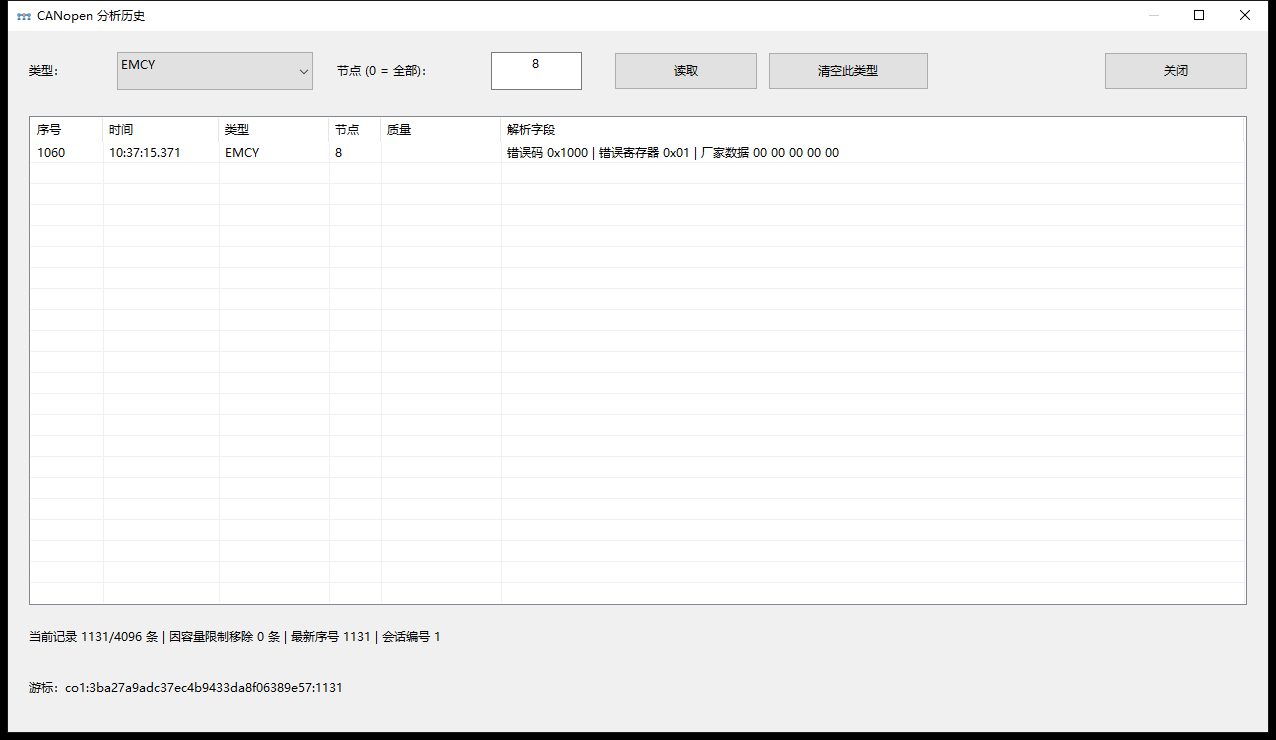
Analysis history: filter by type and node, then inspect quality and decoded fields.
Clearing events and keeping long-term logs
Section titled “Clearing events and keeping long-term logs”Clear events (清空事件) in the main window also clears the corresponding analysis history. In history, select EMCY, SDO or PDO first, then Clear this type (清空此类型) for that type and node range; type clearing is unavailable for All. These commands clear local records, not device error storage or the device fault itself. Save the information you need before clearing.
The main event display limit is adjustable in settings. Analysis history capacity is established when the session starts; changing the display limit alone leaves the existing history capacity unchanged. History is bounded and is not stored in CFX.
- For long-term capture, open Logging (
日志记录) configuration in the BUSMASTER main window and select output file, format and recording scope for the actual CAN channel. - Enable logging and begin capture, then stop recording when finished.
- Check the resulting log for the target COB-ID and timestamps. See the logging, import and replay tutorial for the full workflow.
Ordinary CAN logs store traffic. When troubleshooting a CANopen operation, record the time and collect the support log for your BUSMASTER build. See Collect support logs and submit feedback for file names and locations, including older builds.
Series home · Previous: file transfer · Next: projects and recovery
Use the download center for current and archived BUSMASTER releases.