
Signal Watch
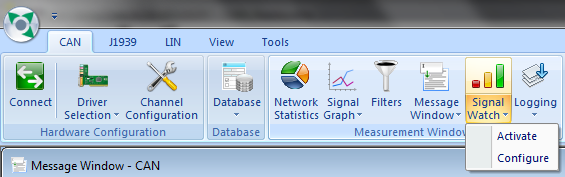
User can watch the value of a signal using the signal watch window as and when a message having that signal is received. The Physical and Raw values will be listed and updated as and when the message arrives. Click on the tool bar button shown below to display the signal watch window.
Add/ Delete Signals
Section titled “Add/ Delete Signals”Signal watch list can be interactively populated. The following list describes the steps to Add/Delete signals. Click on LIN –> Signal Watch –> Activate. A dialog box will be displayed then do right click and select Configure Signals from the menu. This will show the signal configuration Window. 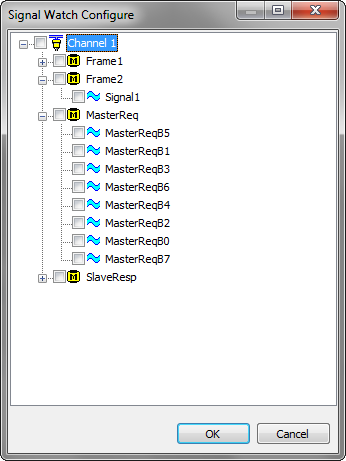 Select a message and select associated signal from the Signal list. Check the signals to move the selected signal in to Watch List. Multiple signals can be checked. All signals belonging to a message can be added in to the watch list by checking the message check-box. Uncheck the signal to delete it from the signal watch. Signal Watch List can be cleared by selecting Delete All button. Changes will be saved and applied on selection of Ok. Cancel will ignore the changes. The Signal Watch List will be saved in the configuration file and will be reloaded during the load of that configuration file.### Show Signal Watch WindowTo pop up signal watch window, select the tool-bar button explained in the previous section or the menu
CAN->Signal Watch->Activate
. This will show the Signal Watch Window.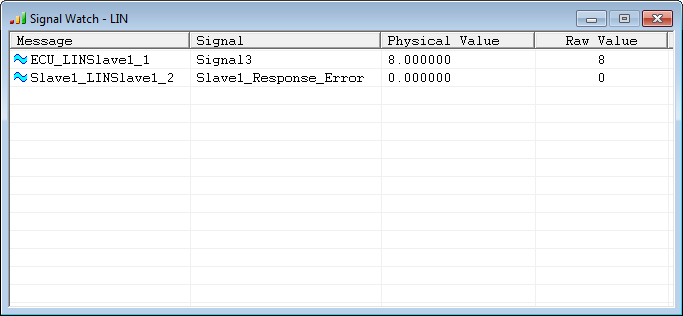
After receiving a message BUSMASTER will update the signal watch window if the signals of received message are included in the signal watch list. The signal watch list will show Raw and Physical value of the signal with the Unit along with Message and Signal name.### Close signal watch window
User can directly close the window by clicking on Close [X] button.
OR
- Click on the drop-down button associated with the tool bar button shown above. This will pop-up a menu.
- Click on Close menu option to close the signal watch window.
Authoritative source: BUSMASTER DITA help source LIN_Signal_Watch.dita, compiled into BUSMASTER.CHM with the application.