
Message Log
CAN messages can be logged to a file for analysis and replay. Log file name shall be selected as described in section Log and Replay.
To start message logging select Log Start or press the Tool Bar Button shown in the figure below. The tool bar is toggle button. Clicking on the button or selecting the menu again will stop logging. Once the logging has started, the messages received and transmitted will be logged in to the file with time of message reception.
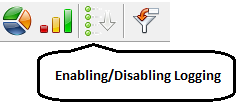
Note: Logging will fail if the log file is not present in the specified location. Logging status is stored in configuration file and logging will be started automatically during application startup if it is enabled and saved in the configuration file.
Authoritative source: BUSMASTER DITA help source message_log.dita, compiled into BUSMASTER.CHM with the application.