
Reset Controller
The CAN controller can be reset through BUSMASTER application. Reset of the controller will require in case of error conditions. BUSMASTER provides two kind of reset of the CAN controller. Hardware Reset Software Reset
Hardware Reset
Section titled “Hardware Reset”The hardware reset will initialize CAN control by resetting the controller. This will also clear the internal buffer of the CAN controller. After hardware reset the controller’s internal buffer will be empty. To do hardware reset select Functions Reset Hardware### Software Reset
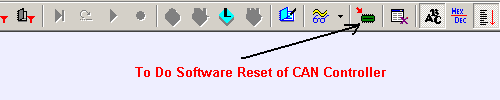
The software reset of CAN controller will initialize the controller. But the messages in the internal buffer of CAN controller will remain as it is. To do software reset select Functions Reset Software.
Note: In USB interface software reset will clear Rx and Tx buffer of that instance of BUSMASTER in driver. Hardware will not be influenced by software reset.
Toolbar shortcut Software reset has associated toolbar button as shown in the fig. below.
Authoritative source: BUSMASTER DITA help source reset_controller.dita, compiled into BUSMASTER.CHM with the application.