CAN FD hardware receive filters
Purpose
Section titled “Purpose”BUSMASTER provides two filtering layers:
- Software filters control what BUSMASTER displays, records, or replays. They are suitable for routine analysis.
- BUSMUST hardware receive filters reject messages at the device or driver layer. They are useful on high-load networks, when only a small identifier range matters, or when PC processing and log size must be reduced.
Typical use cases
Section titled “Typical use cases”- The network load is high and the Message Window updates too rapidly.
- Only one CAN identifier or a limited identifier range is required.
- The host-side data rate or log size needs to be reduced.
- Only key diagnostic or application messages should be retained during field work.
Filter modes
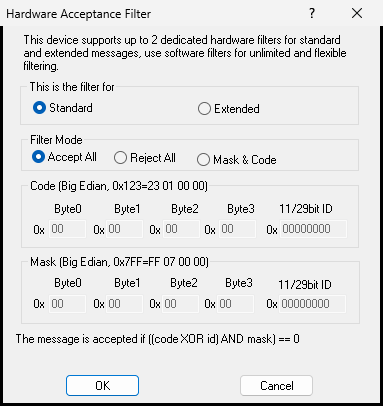
Section titled “Filter modes”Accept All: accepts every message and is recommended during initial bring-up.Reject All: rejects every message and is mainly useful for testing filter configuration.Mask & Code: selects a specific identifier or range using acceptance code and mask values.
Hardware Acceptance Filter
Section titled “Hardware Acceptance Filter”The BUSMUST CAN/CAN FD Hardware Acceptance Filter provides:
- Separate configuration for standard and extended identifiers.
Accept All,Reject All, andMask & Codemodes.- Byte-oriented Code and Mask fields that cover 11-bit or 29-bit identifiers.
- The acceptance rule
((code XOR id) AND mask) == 0.
If messages disappear after a hardware filter is enabled, restore Accept All first and confirm that communication is healthy. Then narrow the Code and Mask values step by step.
Important considerations
Section titled “Important considerations”- An incorrect hardware filter can prevent the target message from reaching BUSMASTER at all.
- Restore
Accept Allbefore diagnosing a general receive problem. - Standard and extended frames use different identifier widths and must be configured separately.
Source: BUSMUST technical knowledge base busmust-canfd-hardware-filter.md. This public guide is maintained by the website content pipeline. Use the download center for current and archived software releases.
Hardware acceptance filter
Section titled “Hardware acceptance filter”These original screenshots come from the BUSMASTER manual or illustrated guide and show the actual workflow.