
Test Suite Executor
Test suite executor is used to execute one or more test setup files sequentially. The result of execution will be logged into the result file specified in test setup file. The collection of test setup files are called test suite. Here is the list of different services rendered by the editor.
Features provided by test suite Executor
Section titled “Features provided by test suite Executor”- Adding a test setup files
- Delete a test setup file from the execution
- Select/Deselect a test setup file for execution
- Select/Deselect a test case for execution
- Execute the test suite### Invoking Test suite Executor
To open the test suite editor, in BUSMASTER click on menu Item CAN –> Test Automation Executor.
The first look of test suite is shown in the following figure:
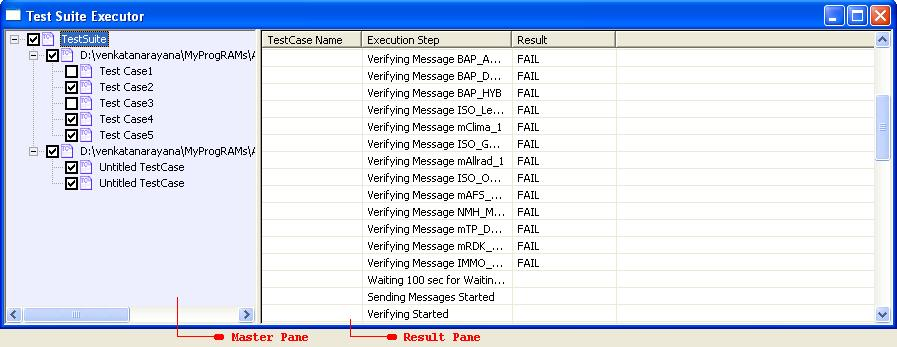
Master pane: Using this pane we can add test setup files and select and deselect a test case. All the functionalities described in the following section can be performed using this pane.
Result pane: The Result pane will display the current execution status of the test suite.### Using Executor
Naming a test suite: Double click on the top most tree node (test suite node) on master pane. A edit box will appear, give a suitable name and press enter. Adding a test Suite: Right click on the test suite node. A pop up menu will displayed. Click on Add Menu. A file browser will appear where you can select a test setup file. If the file is correct one the executor will add it in test suite and displays all its test cases. Select/Deselect a test suite: To select or deselect test setup for execution click on the check box located near the test setup file. Delete a test setup file: Right click on the required test setup file and select Delete in the pop up menu. Select/Deselect a test case: Click on the check box of particular test case to enable or disable it for execution. Note that if the test setup is deselected from the execution then all its test cases are nor executed. Execute test suite: Right click on the test suite node and select Execute in the pop up menu. Each selected test case is executed and the summary will be displayed in Result view.
Authoritative source: BUSMASTER DITA help source test_suite_executor.dita, compiled into BUSMASTER.CHM with the application.