
LIN Cluster Configuration
Introduction:
To connect BUSMASTER to the LIN Network first it has to be configured with the proper LIN Baud Rate and LIN Protocol Version.This can be done using by importing a LDF or using manual settings.
Configuration:
To configure the Cluster use LIN->Channel Configuration menu.This will display the Window as shown in following Figure.
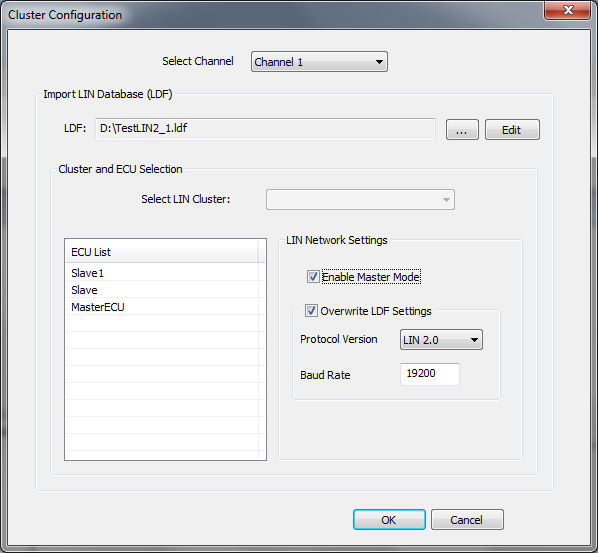
To enable master mode for LIN channel for transmitting frame headers, check the Enable Master Mode check box under LIN Network Settings LIN baud rate & Protocol version can be set either by loading the LDF file or can be set explicity by using LIN Network Settings section by Enabling Overwrite LDF Settings as shown in above figure.
Authoritative source: BUSMASTER DITA help source LIN_Cluster_Configuration.dita, compiled into BUSMASTER.CHM with the application.