
Hardware in the Loop: Reproduce Field Conditions on the Bench
BMCLI recording and replay turn field data into experimental inputs for a hardware-in-the-loop bench. This article focuses on problem reproduction and regression, explaining how to recreate bus conditions and observe a real DUT’s response.
For example, an instrument occasionally degrades during a road test, but stable bench signals never trigger it. A computer and BUSMUST analyzer first record CAN/CAN FD traffic around the event in the test vehicle. Back in the laboratory, replay the inputs with original timing to a DUT running the same software, then compare responses before and after a fix.
Our target is a HIL bench with a real DUT, using recorded data as open-loop stimulus while acquiring the DUT’s current response. Recording and replay, introduced as basic capabilities in tutorial 1, become the test system’s input and execution stages. BMCLI handles log formats, channel mapping, and replay; AI organizes event windows, DUT observation, and criteria. With field recordings, a matching DBC, bench power, and enough analyzer channels, an intermittent issue can become a repeatable regression case.
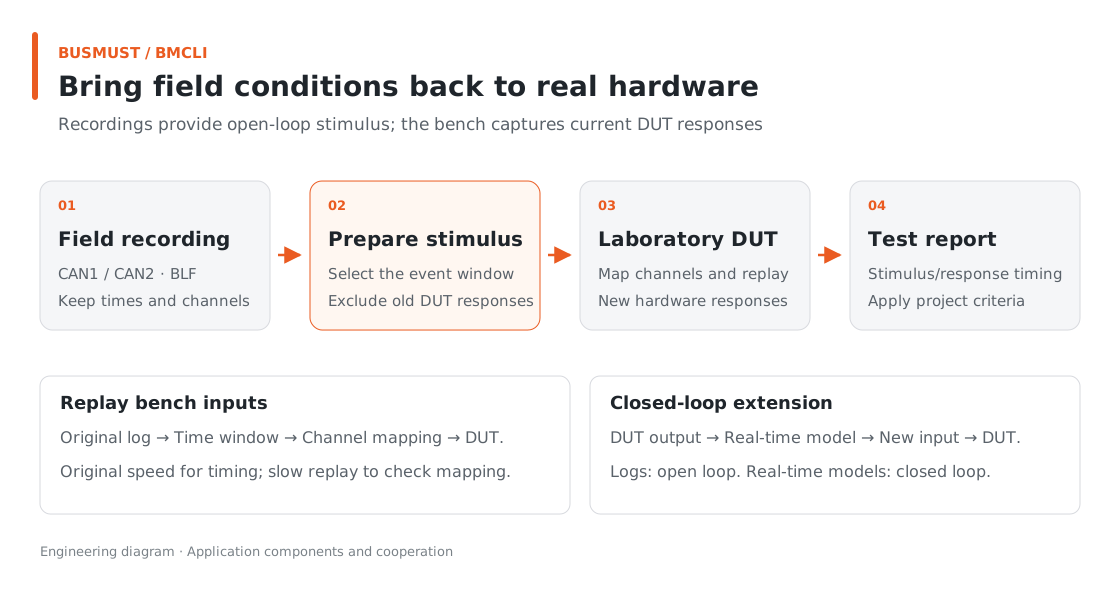
Figure 7-1. Recordings provide open-loop stimulus; the bench captures the current DUT response. Engineering relationship diagram.
Input for AI: Describe the HIL Test
Section titled “Input for AI: Describe the HIL Test”Provide separate field and laboratory Bench configurations, DBCs for both channels, the DUT’s transmitted-message list, and definitions and judgment windows for Counter and DegradedMode. Record in the field first, then bring selected logs to a bench connected to the real DUT.
Reproduce a road-test instrument degradation issue on a bench with a real DUT. Use BMCLI to organize HIL tests based on field recordings. Record field-can-a and field-can-b from Bench to BLF in 5-minute segments, stop after 12 segments, and generate an index and summary. In the laboratory, map the two channels of my selected log to hil-can-a and hil-can-b. Use my node-message list to retain external-node inputs only, allowing the DUT to generate its own responses. Check channel mapping at 0.5x speed, then run the formal test at original speed. Capture the current DUT’s Counter and DegradedMode and judge them using my DBC, initial state, and timing requirements. Deliver field-recording and bench-test entry points, configuration, and a stimulus/response report. Preserve original logs and stop this replay and acquisition after the test.
AI organizes separate recording and replay entry points, checks mapping, and writes observations to the report. The bundled routing and judgment configuration is a reference; use project materials for DegradedMode definitions and deadlines.
Finished Result: What to See After Replay
Section titled “Finished Result: What to See After Replay”AI should deliver field recording, bench execution, and a stimulus/response report. Below is a sample report design. Mapping and judgment configuration are included; actual DUT responses come from bench execution.
Suppose Counter jumps from 17 to 20 in the event window, followed by DUT degradation. Showing stimulus and response together is more useful than viewing the log alone:
| Observation | Report presentation |
|---|---|
| Input log | Included channels, IDs, frame counts, and time range |
| Laboratory mapping | Log ch1 → hil-can-a; ch2 → hil-can-b |
| Key stimulus | Counter jumps from 17 to 20 |
| DUT response | Whether DegradedMode is set and its delay after the stimulus |
| Judgment | Whether the response meets project timing requirements |
This is a report design example; fill in counts and times from execution. A Counter gap in the input may be the intended stimulus. Whether the DUT handles it correctly is a separate judgment. Keeping those questions separate makes the report easier to understand.
Implementation Explained: BMCLI’s Role in the Tool
Section titled “Implementation Explained: BMCLI’s Role in the Tool”The key calls below explain the implementation. AI-generated code organizes them into a complete workflow, processes responses, and handles cleanup.
Turn a Log into Test Input
Section titled “Turn a Log into Test Input”# Start segmented BLF recording: 300 seconds per segment, stopping after 12 segments.bmcli logging start --channel=field-can-a,field-can-b ` --path=logs/field.blf --log-format=blf --path-mode=time ` --segment-duration=300 --max-files=12 --format=json# Query the current recording file and task state.bmcli logging status --format=json# Stop this recording and finalize the file.bmcli logging stop --format=json
# Convert the selected BLF to ASC for inspection of raw frames and timestamps.bmcli convert logs/field.blf review/field.asc
# Replay filtered inputs with source-channel mapping; 1.0x retains the original time scale.bmcli replay start --channel=hil-can-a,hil-can-b --file=prepared/external-input.blf ` --map-channel=1:hil-can-a --map-channel=2:hil-can-b ` --map-strict --speed=1.0 --format=json# Read replay task state so the runner can determine whether it is still active.bmcli replay status --format=jsonBMCLI handles ASC/BLF formats, segmented recording, replay speed, and source-channel mapping. AI can focus on selecting event windows, filtering node traffic, and writing application criteria.
With timestamp-based naming, actual filenames come from logging responses. The convert example uses a fixed filename to illustrate invocation. The runner should select the actual segment, filter external inputs according to the node list, save them as prepared/external-input.blf, and replay that file. Always preserve original recordings and exclude the DUT’s own responses from the stimulus file.
Without --wrap, --max-files=12 stops recording at the limit. For continuous retention of the latest segments, choose wrapping: after a new segment is completed, old segments from this recording are removed. This suits long acquisition with fixed storage capacity.
Bring Replay Closer to the Original Conditions
Section titled “Bring Replay Closer to the Original Conditions”In the laboratory, normally replay only external-node inputs that need simulation and let the DUT generate responses. The observed degradation then comes from the current DUT, not a response frame stored in the log.
Use 0.5x speed to confirm wiring and routing; use original speed to judge actual periods and response deadlines. When one file contains recordings from several devices, confirm clock synchronization before comparing cross-channel delays accurately.
Fixed-log replay is open-loop stimulus, a useful part of HIL. To change inputs dynamically in response to the DUT or coordinate power, relays, and loads, add a real-time model and external I/O for a fuller closed-loop bench.
Explore Further: Make Field Recordings Reusable Cases
Section titled “Explore Further: Make Field Recordings Reusable Cases”You can refine this example or extend it to other work. Choose a direction that interests you and discuss its implementation with AI.
Build a Problem Replay Library
Section titled “Build a Problem Replay Library”As similar issues accumulate, ask AI to organize logs by symptom and condition, saving each case’s DBC, channel mapping, event window, and expected response. Retain full original recordings and generate segments for quick reruns, documenting required initial DUT state. BMCLI handles formats and replay; AI manages the case index and criteria. After the next software update, the team can select an experiment by issue name instead of searching for the original log.
Move from Open-Loop Stimulus to a Closed-Loop Bench
Section titled “Move from Open-Loop Stimulus to a Closed-Loop Bench”If tests must adjust the next input immediately from DUT output, add a real-time model or external I/O. Give AI model interfaces, state-transition rules, and timing requirements; the application computes subsequent conditions from current DUT responses and sends corresponding signals through BMCLI. Recordings can still supply initial conditions or background traffic, while the closed loop requires live computation and independent timing validation. For strict hard real-time requirements, run models and control in an appropriate real-time environment, with BMCLI handling suitable bus access and experiment orchestration.
Further Reading
Section titled “Further Reading”These references cover the interfaces used here; query local JSON Help for individual parameters.
- Bus Logging (logging)
- Log Replay and Channel Selection (replay)
- Device-Side Recording and Replay (offline)
Download this tutorial’s companion examples (ZIP)