
BUSMASTER CANopen: Send tasks and manage the network
Applies to BUSMASTER 3.2.2.50.
8. Finite and cyclic sending
Section titled “8. Finite and cyclic sending”Practise with read-only identity object 0x1018:1, which you have already read successfully. Start with reads before applying repeated plans to writes, resets or NMT.
Read three times
Section titled “Read three times”- Keep SDO, Read / upload, Automatic SDO, node 8 and
0x1018:1. - Select Specified count (
指定次数), interval 1000 ms and count 3. - Click Prepare → Start sending, then open Send tasks… (
发送任务…). - Wait for 3/3 and check that each read completed with the same identity value.
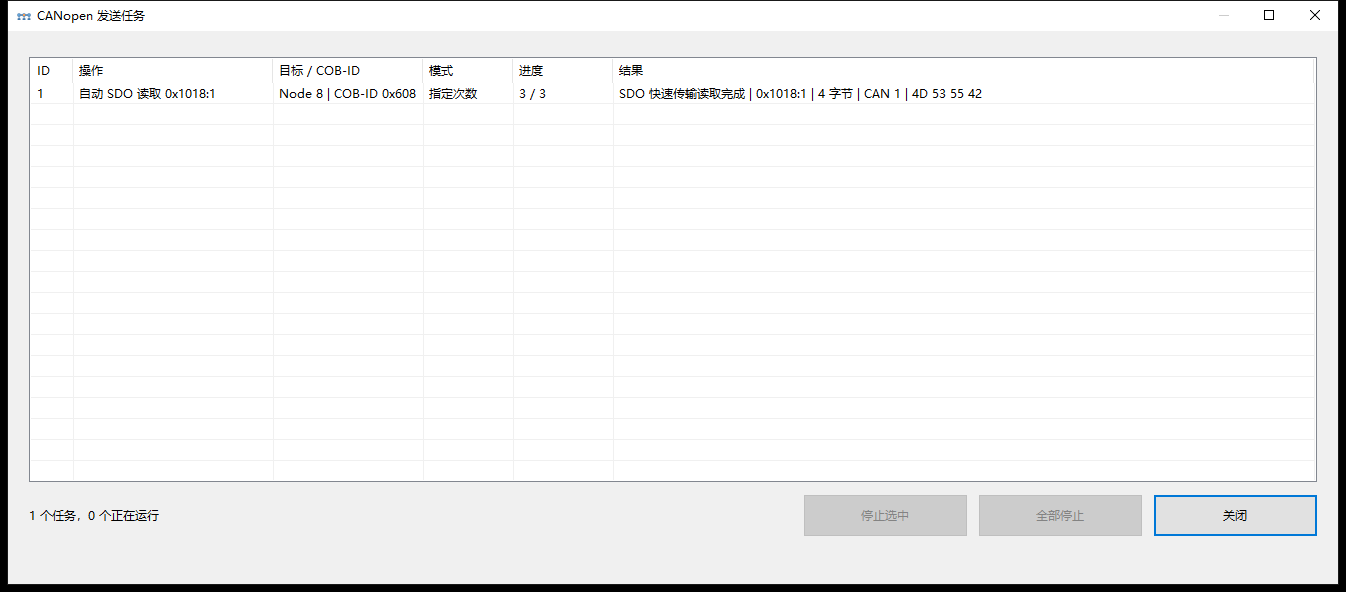
Specified-count read: 0x1018:1 completed three reads.
Start and stop cyclic reads
Section titled “Start and stop cyclic reads”- In the main window, select Cyclic (
周期), set an interval, prepare again and start sending. - Select the task in Send tasks… and click Stop selected (
停止选中). Stop all (全部停止) ends all repeated tasks. - Check that no tasks remain active, then close the task window.
- Switch the main-window plan back to Once before the next exercise. Stopping a task leaves the plan selection unchanged.
Repeated reads still complete one SDO request and response at a time; the actual rate depends on node response time. Stop send tasks, Stop analysis and NMT Stop node control local tasks, local analysis and the peer’s communication state respectively.
9. Use NMT, SYNC and TIME
Section titled “9. Use NMT, SYNC and TIME”For the single operations below, set the plan to Once, check the Node-ID and prepare again.
NMT: change node communication state
Section titled “NMT: change node communication state”- Select NMT, node 8.
- Click Prepare, select Start node (
开始节点), inspect the preview and start sending. - Check the node list and a new heartbeat for Operational, heartbeat state byte
05. PDO data exchange in the next tutorial uses this state. - Select Pre-operational (
7F) when needed. SDO is normally available in Pre-operational; PDO data exchange requires Operational.
Single-node and broadcast commands have different scopes. Use Reset node or Reset communication according to the device documentation and your task.
SYNC: send a synchronization frame
Section titled “SYNC: send a synchronization frame”Select SYNC → Prepare → Start sending. If a counter is needed, configure it under Settings… → Advanced parameters (高级参数) first. For cyclic SYNC, choose a cyclic plan and an interval allowed by the device. Stop the task and return to Once afterward.
TIME: distinguish transmission time from display time
Section titled “TIME: distinguish transmission time from display time”- For default TIME, disable Specify TIME (
指定 TIME) in settings, apply, then select TIME → Prepare → Start sending. - Each default TIME uses the computer’s UTC time at actual transmission, rather than at preparation.
- For a fixed value, open Settings… → Advanced parameters → Specify TIME, enter the date, time and milliseconds using the network’s time convention, apply, prepare again and send.
Specified TIME encodes the entered calendar value directly, with no automatic local-time-to-UTC conversion. For example, if the network uses UTC and the computer is at UTC+8, local 16:00 corresponds to UTC 08:00; enter 08:00 using that network convention. The editor’s initial value may be local time, so check it before sending. Disable Specify TIME after the fixed-time exercise.
Time display changes the event, most-recent-reception and history displays. The TIME payload and the network time convention are separate from that display setting.
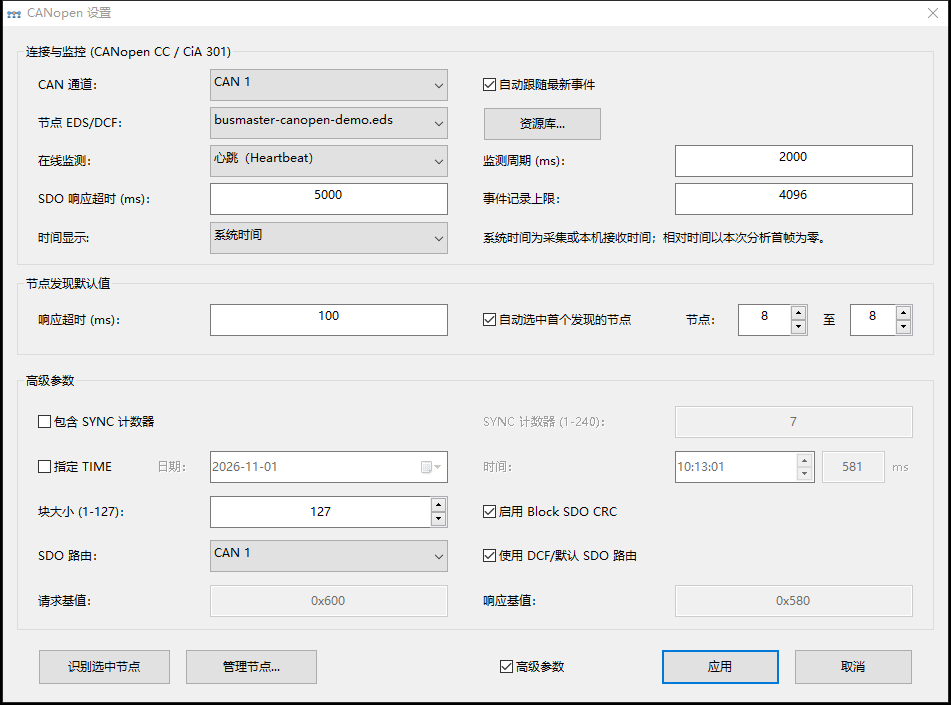
Advanced parameters: SYNC, specified TIME, Block and SDO routes.
Keep Use DCF/default SDO route selected unless the device explicitly uses other addresses.
Series home · Previous: SDO parameters · Next: PDO
Use the download center for current and archived BUSMASTER releases.