
BUSMASTER CANopen: Read and write SDO parameters
Applies to BUSMASTER 3.2.2.50. Use the teaching node and EDS from the first tutorial.
6. Complete the first SDO read
Section titled “6. Complete the first SDO read”SDO addresses a parameter by index and sub-index. Read / upload transfers from node to computer; write / download transfers from computer to node. Begin with vendor ID 0x1018:1.
| Field | Setting |
|---|---|
| Command | SDO |
| Direction | Read / upload |
| Transfer | Automatic SDO |
| Node | 8 |
| Index / sub-index | 0x1018 / 1 |
| Plan | Once |
- Connect and start analysis. Fill in the fields above; the value field is unused for a read.
- Click Prepare (
准备). The preview should show a read of0x1018:1, Node 8 and request COB-ID0x608. - Click Start sending (
开始发送) and wait for the read completion result at the bottom. - The teaching node returns
4D 53 55 42, four little-endian bytes representing0x4255534D. Compare the request and0x588response in the event list.
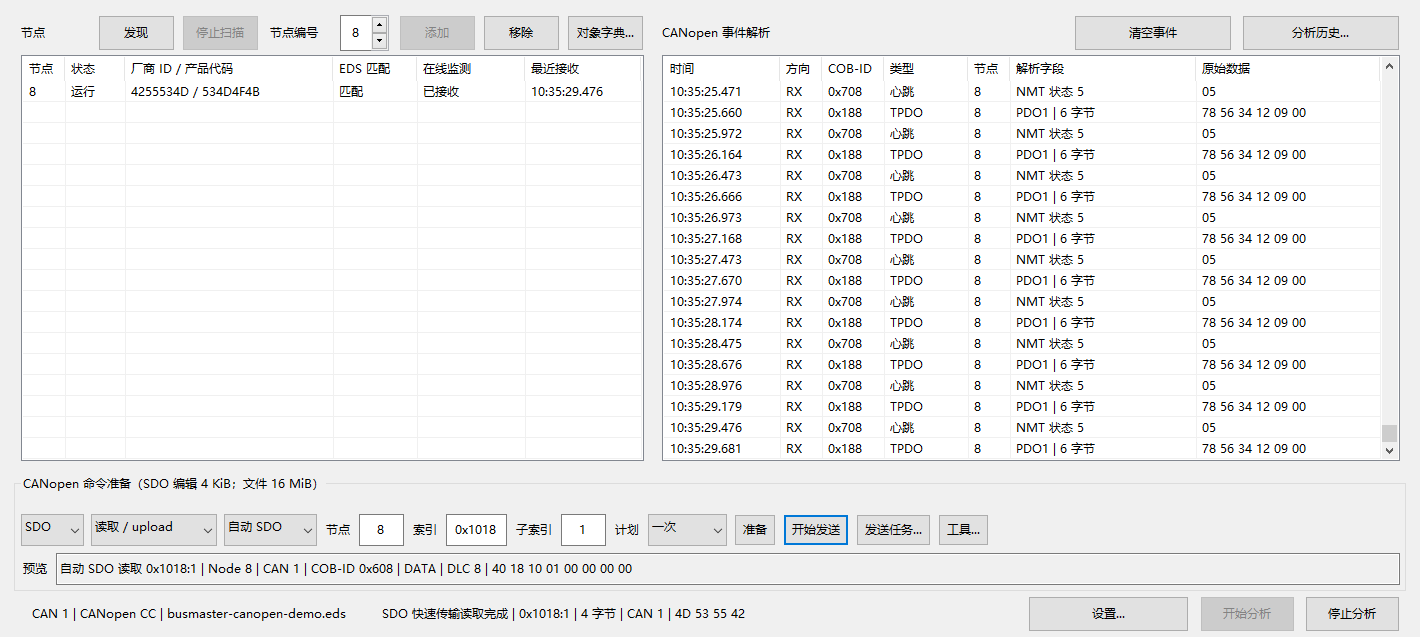
SDO result: 0x1018:1 returns 4D 53 55 42.
A known address and byte format can be accessed through raw SDO without an EDS. The EDS helps select the object, type and permissions. For timeouts or Abort responses, see troubleshooting and recovery.
7. Write a parameter and read it back
Section titled “7. Write a parameter and read it back”Practise on a test node you can operate. Read the original value, read back the write and restore the original value afterward. This exercise uses heartbeat producer period 0x1017:0 (UNSIGNED16). Check that the plan is Once before each operation.
Write raw hexadecimal bytes
Section titled “Write raw hexadecimal bytes”- Read
0x1017:0as above and record its value. The teaching initial value is 500 ms, bytesF4 01. - Select Write / download, node 8, index
0x1017, sub-index 0 and value58 02(600 ms =0x0258, little-endian). - Check Once, prepare, inspect the object and two-byte payload, then start sending.
- After completion, return to Read / upload, prepare again and send. The readback should be
58 02. - Write the recorded original value and read it back. The teaching initial bytes are
F4 01; restore your own recorded value when working with a real device.
Enter a value using its EDS type
Section titled “Enter a value using its EDS type”Bind a matching EDS, select the write direction and enter 600 in the value field. Select Tools… → Convert value using EDS type and prepare SDO (按 EDS 类型转换值并准备 SDO). Check that conversion produced 58 02 before sending. Ordinary Prepare treats input as hexadecimal bytes; it does not interpret 600 as decimal milliseconds.
After a write timeout, the parameter may already have changed. If communication recovery is requested, follow SDO recovery, read identity to check communication, then read back the parameter you wrote.
Series home · Previous: connection and EDS · Next: tasks and network management
Use the download center for current and archived BUSMASTER releases.