
XCP Settings
Open CAN –> XCP Settings or click Settings in the XCP Main Window. Disconnect XCP before applying endpoint, A2L, acquisition, or security changes. BUSMASTER can import XCP-on-CAN transport information from the selected A2L instead of requiring every endpoint field to be copied manually.
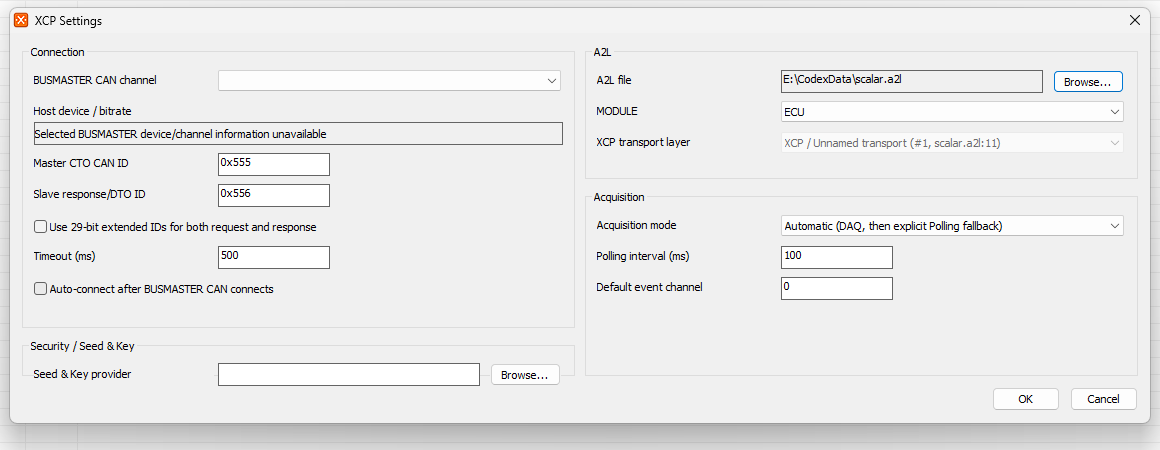 The settings are grouped on one compact page:
- BUSMASTER CAN channel lists channels that are usable in the current CAN configuration, including valid Simulation channels. Selecting a channel refreshes the displayed device and nominal bitrate. XCP shares this channel and does not configure or open separate hardware. If a saved channel is no longer available, BUSMASTER keeps the saved value visibly unavailable instead of silently selecting another channel.
- Connection sets the master CTO CAN ID, slave response/DTO CAN ID, CTO timeout, optional auto-connect, and whether both identifiers are 29-bit extended IDs.
- A2L selects the file, MODULE, and XCP-on-CAN transport-layer instance. BUSMASTER parses MODULE and
IF_DATA/XCP_ON_CANcandidates and keeps multiple candidates as explicit choices. Selecting a transport imports its available CTO/DTO IDs, identifier format, and nominal CAN bitrate information. A bitrate mismatch with the selected BUSMASTER channel is reported for correction rather than ignored. - Acquisition selects On-demand, Polling, Dynamic DAQ, or Automatic mode. Polling interval and DAQ event channel are the user-controlled timing inputs. Automatic mode attempts DAQ and reports an explicit Polling fallback when required. A high live Polling load is reported in the Main Window Measurement status.
- Security / Seed & Key optionally selects a compatible provider DLL. The provider is loaded only when the ECU requests protected access. BUSMASTER does not display or log seed/key secret material.
- OK validates and applies the complete candidate. Cancel discards the candidate, including A2L, MODULE, transport, and endpoint changes. A parse error, unresolved ambiguity, invalid endpoint, or cancellation leaves the previously applied model and settings unchanged. Endpoint and acquisition changes require XCP to be disconnected, but Host CAN can remain open. When auto-connect is enabled, applying settings while Host CAN is already connected starts the XCP connection automatically.
Note: The transport selector is disabled when the selected MODULE has only one unambiguous XCP-on-CAN candidate, but its resolved source remains visible. If an A2L has no usable XCP-on-CAN transport information, enter the connection IDs and identifier format manually.
XCP settings are stored only inside the current BUSMASTER CFX configuration. No separate XCP settings file is created. If the XCP component is temporarily missing or incompatible, BUSMASTER preserves the original XCP configuration in the CFX file for a later compatible installation.
Authoritative source: BUSMASTER DITA help source XCP_Settings.dita, compiled into BUSMASTER.CHM with the application.