
LIN Communication: Master/Slave Scheduling and LDF Signal Decoding
BMCLI uses an LDF to organize LIN master/slave communication, connecting schedules, node responses, and signal decoding. Through a component integration example, this article shows how AI can help build the communication environment and observe interactions.
A LIN network resembles a conversation with a moderator: the master sends Headers according to a schedule, and the node publishing each frame supplies its data. Prepare the order, roles, and responses, and both ends can communicate as agreed.
For example, a door LIN switch or actuator may have arrived before the body controller. A BUSMUST analyzer can replace the master, sending commands and reading status according to the LDF. Conversely, when developing the master controller, the analyzer can provide slave responses.
Prepare LIN-capable ports, module-appropriate power and pull-ups, wiring, and the LDF for real-component integration. This article uses two ports and a small LDF to demonstrate master/slave interaction. Command/Status are teaching fields; the same approach applies to project button, position, or fault signals. AI manages configuration and results; BMCLI parses the LDF and handles roles, response tables, and schedule execution.
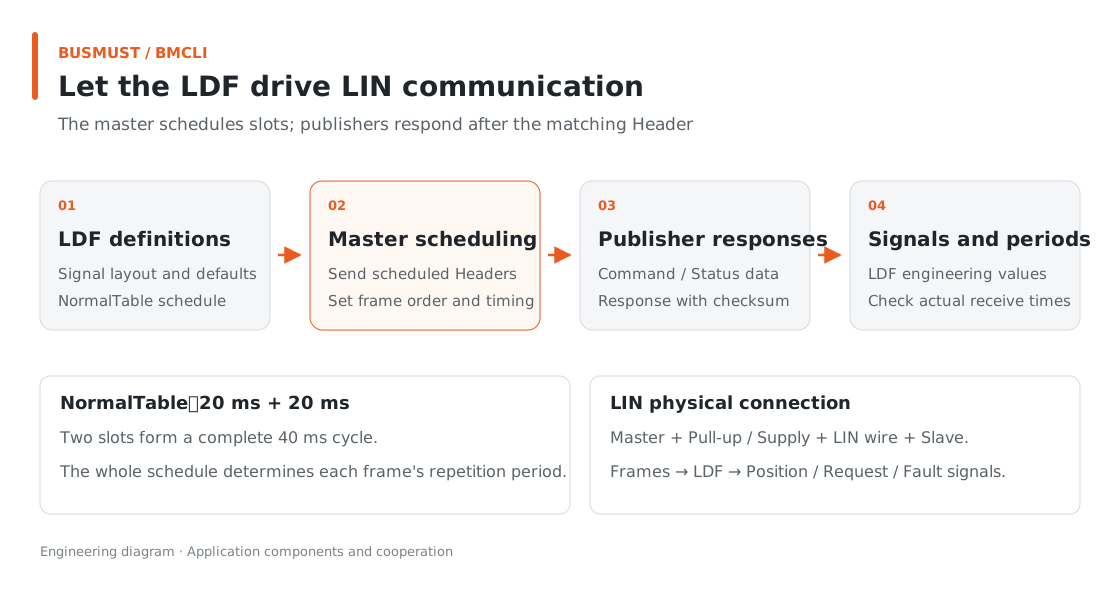
Figure 8-1. The master schedules slots; publishing nodes respond after the corresponding Header. Engineering relationship diagram.
Input for AI: Describe the LIN Network
Section titled “Input for AI: Describe the LIN Network”Inputs are ux-cluster.ldf and confirmed master/slave ports, power, and pull-up configuration. Device identifiers below belong to the dual-analyzer teaching bench; replace them with actual connections for real components.
Use BMCLI and ux-cluster.ldf to configure my isolated LIN bench. 10356/4 is Master, with the confirmed 1 kΩ pull-up and LIN supply; 10357/4 is Slave, with pull-up and supply disabled. Run the LDF’s NormalTable with Command=0x5A and Status=0xC3. Check and show payloads, roles, and schedule configuration before starting communication on these channels. Observe for 5 seconds, deliver configuration and a report on frame counts, checksums, and actual periods, then stop this schedule.
AI parses the LDF and shows initial payloads, prepares slave responses, and starts the schedule by name. The bundled LDF supports offline checks; physical communication requires appropriate wiring and power.
Finished Result: A Minimal Two-Frame Network
Section titled “Finished Result: A Minimal Two-Frame Network”The deliverables are master/slave configuration and a five-second observation report. Command and Status in the teaching LDF illustrate payloads and scheduling below.
The example LDF contains UXMaster, UXSlave, and NormalTable. One complete cycle is:
| Schedule position | Frame | Data meaning | Delay to next entry |
|---|---|---|---|
| First | MasterFrame, 0x10 | Master publishes Command=0x5A | 20 ms |
| Second | SlaveFrame, 0x11 | Master requests; slave responds with Status=0xC3 | 20 ms |
The table therefore repeats every 40 ms, with each frame appearing once per cycle. A separate one-bit ResponseError for the slave distinguishes response errors from application Status.
After running, the receive summary should show counts, checksums, and measured periods for both frame types. Seeing 0x5A sent and 0xC3 returned makes the master/slave interaction directly visible.
Implementation Explained: BMCLI’s Role in the Tool
Section titled “Implementation Explained: BMCLI’s Role in the Tool”The key calls below explain the implementation. AI-generated code organizes them into a complete workflow, processes responses, and handles cleanup.
Let the LDF Guide Scheduling Directly
Section titled “Let the LDF Guide Scheduling Directly”# Check database structure and definitions to identify input problems first.bmcli database validate --file=ux-cluster.ldf --format=json# Load the database as a named resource for later decoding or protocol operations.bmcli database load --file=ux-cluster.ldf --name=ux-cluster# Inspect NormalTable frame order and time slots without starting communication.bmcli ldf schedule show NormalTable --database=ux-cluster --format=json# Inspect frame definitions and initial payloads to verify Command encoding.bmcli ldf frame show MasterFrame --database=ux-cluster --format=json
# Open the LIN master channel using confirmed bitrate, pull-up, and supply settings.bmcli channel open --channel=10356/4 --mode=master ` --bitrate=19200 --pullup=1k --power=on --lin-version=2.1# Open the LIN slave channel with its pull-up and supply output disabled.bmcli channel open --channel=10357/4 --mode=slave ` --bitrate=19200 --pullup=off --power=off --lin-version=2.1
# Prepare slave response data; return payload and checksum after the corresponding Header.bmcli lin response set --channel=10357/4 --id=0x11 ` --data="C3 00 00 00 00 00 00 00" --checksum=enhanced# Have the master execute the confirmed LDF schedule.bmcli ldf schedule activate NormalTable ` --database=ux-cluster --channel=10356/4 --format=json
# Stop this LIN schedule and its periodic Header requests.bmcli ldf schedule deactivate --channel=10356/4 --format=jsonThe LDF defines publishers, lengths, signal positions, and schedule intervals. BMCLI uses those definitions to generate initial master-published payloads, execute master reads/writes, and handle LIN PID and checksums.
Slave response set accepts raw bytes. The example’s C3 00… comes from the LDF’s initial Status value. If signal positions change, AI can regenerate response bytes from ldf frame show, keeping interpretation and transmission consistent.
Configuration Details
Section titled “Configuration Details”The master schedules communication and usually supplies the master pull-up and bus power; configure real wiring according to project electrical design. This example uses 19.2 kbit/s on both ends. Prepare slave responses before activating the master schedule.
Preview a full table with ldf schedule show, then use activate after confirmation. Individual lin schedule add calls modify the runtime system schedule and suit cases requiring schedule changes. Use show for simply inspecting an LDF.
This example executes two unconditional frames through NormalTable. Clean up in order: stop the schedule, clear this task’s responses, and close its channels.
For LIN master-read, obtain the slave response from status, length, and data in tx_complete events. Analysis combines rx_frame and tx_complete to build a complete interaction record.
Explore Further: From LIN Integration to Component Tools
Section titled “Explore Further: From LIN Integration to Component Tools”You can refine this example or extend it to other work. Choose a direction that interests you and discuss its implementation with AI.
Build an Actuator Debugging Panel
Section titled “Build an Actuator Debugging Panel”With master/slave communication working, ask AI to turn LDF control and feedback signals into sliders, indicators, and curves. For example, issue a position request while displaying returned position and fault state; BMCLI handles encoding, scheduling, and reception. The page changes a target value, the backend updates response data, and the schedule continues according to the LDF. Colleagues can then focus on component behavior without repeatedly looking up frame IDs and raw bytes.
Use Slave Responses to Assist Master Development
Section titled “Use Slave Responses to Assist Master Development”If the master is ready before some slaves arrive, let the analyzer provide their responses. Give AI the LDF, node roles, and sample states to configure the slave response table, while the master continues initiating Headers. Change feedback by experiment stage and capture subsequent master requests to assess handling. This reuses the network definition and supplies comparison records for later integration of real components.
Further Reading
Section titled “Further Reading”These references cover the interfaces used here; query local JSON Help for individual parameters.
- LIN Response Tables and Scheduling (lin)
- LDF Nodes, Signals, and Schedules (ldf)
- LIN Channel Configuration (channel)
Download this tutorial’s companion examples (ZIP)