
CAN Controller Configuration
Introduction:
BUSMASTER can be connected to classic CAN and CAN FD physical channels using supported CAN controllers. BUSMUST CAN FD hardware is the recommended controller family for BUSMUST-maintained CAN FD workflows.
ETAS BOA ETAS ES581.3 ETAS ES581.4 ETAS ISOLAR-EVE i-VIEW InterprediCS neoVI IXXAT VCI Kvaser CAN MHS Tiny-CAN NSI CAN-API PEAK USB BUSMUST USB-CAN(FD) Vector XL VScom CAN-API
Controller Selection:
To select controller use CAN->Driver Selection->{Driver} For example to select ETAS Devices use CAN->Driver Selection->ETAS BOA.
For BUSMUST CAN and CAN FD devices, select CAN->Driver Selection->BUSMUST USB-CAN(FD). BUSMASTER will scan supported BUSMUST USB and Ethernet devices and display the available hardware channels for mapping.
If there are multiple devices connected BUSMASTER will display a hardware selection dialog to map physical devices and channels to BUSMASTER logical channels. For BUSMUST devices, this dialog also exposes CAN FD mode, arbitration bit rate, data bit rate, terminal resistor, and offline storage controls.
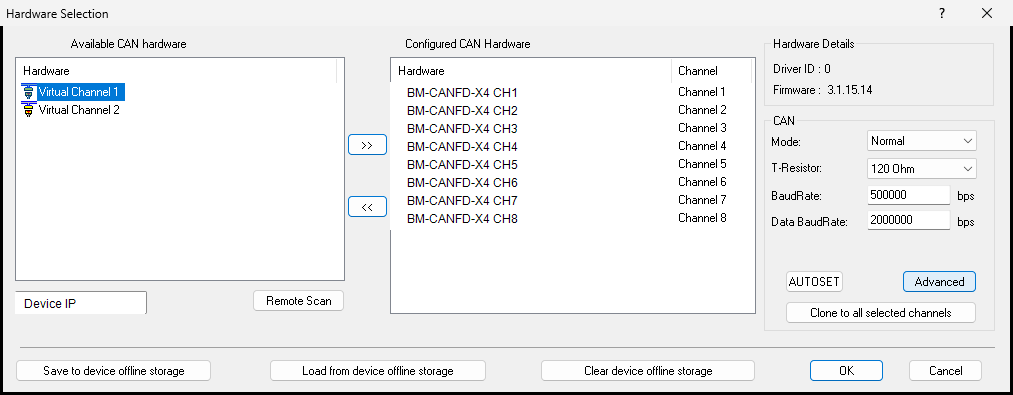
CAN Parameter Configuration:
BUSMASTER will open the CAN channel with default parameters when no project-specific setting is configured. These parameters can be changed using the CAN channel configuration window. Select CAN->Channel Configuration. The dialog depends on the controller selected.
BUSMUST CAN FD channels provide additional fields for CAN FD operation, including arbitration bit rate, data bit rate, sample point, terminal resistor, and CAN/CAN FD mode selection. Use these fields before connecting when the bus uses CAN FD or bit-rate switching.
For detailed BUSMUST-specific channel configuration, see /docs/busmaster/reference/topics/busmust-canfd-channel-configuration/ and /docs/busmaster/reference/topics/busmust-canfd-hardware-filter/.
Once the controller is configured BUSMASTER can be connected to the CAN or CAN FD network using CAN->Connect.
Authoritative source: BUSMASTER DITA help source CAN_Controller_Configuration.dita, compiled into BUSMASTER.CHM with the application.