
AI is here: BMCLI and the next era of automotive engineering productivity
This article was first published by the BUSMUST team on the BUSMUST WeChat account on September 11, 2026. This website edition follows the final published article.
BMCLI is a cross-platform command-line tool connecting AI to BUSMUST CAN/CAN FD/LIN analyzers. Its bus I/O, signal decoding, recording, replay and protocol services support automated tests, Web interfaces and signal gateways. This article explains the approach; find procedures, examples and source code in the BMCLI practical tutorials, and command parameters in the BMCLI Reference.
Good morning. I can see the rising sun.
2026 feels like the beginning of the AI era. A wave of technological change is sweeping through industry after industry. In automotive electronics, a field known for its caution, many professionals are watching the rapidly evolving technology community with growing anxiety: “Everyone around me is trying something new with AI. What can I do?”
That anxiety is understandable. Developers wonder whether their experience will remain valuable. Test engineers wonder whether repetitive work will be replaced. Team leaders face a more practical question: how can we shorten development and testing cycles without sacrificing quality?
Behind these concerns lies the automotive industry’s long-standing caution about new methods. Stability, traceability, and compliance ultimately affect production vehicles and the safety of the people inside them. Any new method entering this industry must answer a fundamental question: AI can write plenty of code, but how do we ensure its quality?
Think back to the discussion about internet-style agile development a decade ago. Similar questions arose then: could automotive development, with its emphasis on process and verification, accept faster iteration? Today, project schedules once measured in three to five years have compressed to one or two years, sometimes less than a year.
Speed has become an unmistakable theme of this era. Every development team now faces the challenge of keeping pace while still validating its work thoroughly.
AI brings another transformation, similar in some ways but deeper in scope. It is beginning to change how engineering work is organized: who reads the documents, who builds the tools, who runs the tests, and who judges the results. Reassigning these responsibilities will change how entire teams deliver projects—and gradually widen the productivity gap between them.
Bus analysis is an essential part of automotive electronics development and testing. Its efficiency directly affects project progress. BUSMUST has always focused on this specialized field. As AI reshapes the world, our small, previously little-known team has found a new sense of purpose: bring AI working methods into automotive bus analysis and help engineers enter this new era sooner.
As we worked through the product requirements, the direction became clearer and the team grew deeply energized. Give AI access to the bus. Let it analyze that bus in the way it works best. Free engineers from detailed execution so that they can apply their experience to higher-level decisions. Our team believes this is a meaningful path toward a hundredfold increase in industry productivity.
How can we connect AI’s ability to generate and analyze to real bus work, while grounding professional operations in reliable components? BUSMUST built BMCLI to answer that question: a bus engineering tool for AI and automation.
BMCLI is a cross-platform command-line tool connecting bus analyzers with AI. It exposes frame transmission and reception, signal decoding, recording, replay, diagnostics, and other capabilities as commands that AI and automation programs can call directly. Together with scenario-specific Skills, it provides a reusable, reliable foundation for AI to build test workflows, create specialized tools, and work with real equipment.
BMCLI explores a new method for automotive development and testing: people focus on goals and results, AI organizes and executes tasks, and verified components perform the specialized operations.
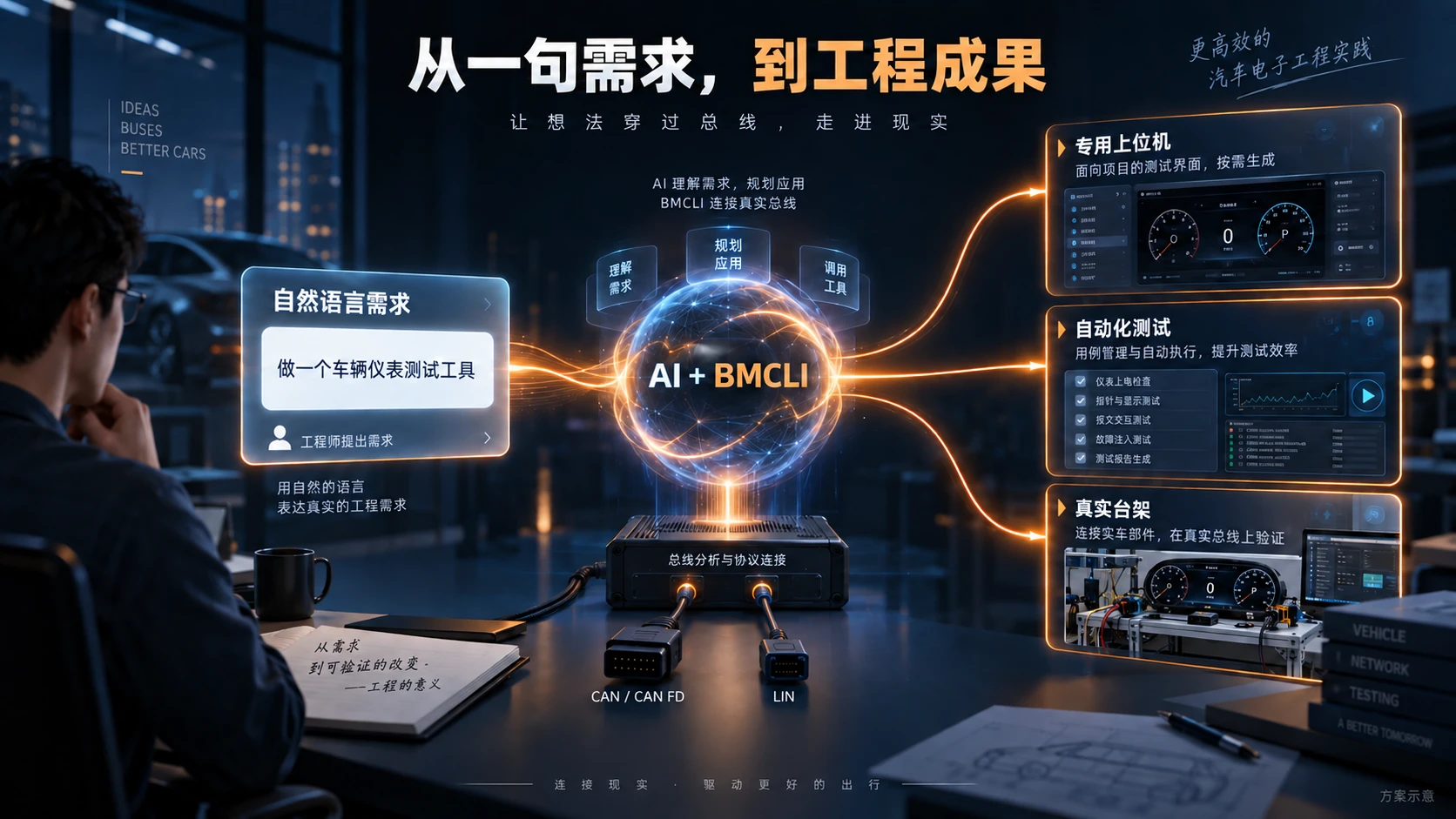
A collaborative workflow from natural-language requirements to engineering results.
01 — BMCLI: professional bus capabilities that AI can use
Section titled “01 — BMCLI: professional bus capabilities that AI can use”To put this approach into practice, BMCLI must provide two things: reliable professional components and an interface to the physical world.
Give AI’s creativity a reliable foundation
Section titled “Give AI’s creativity a reliable foundation”You can certainly ask AI to write programs without BMCLI. You can also use an MCP interface to let AI operate a large graphical application such as BUSMASTER.
But an important question remains: how can AI take over traditionally human-operated workflows most efficiently? Which pieces should AI generate for each project, and which capabilities should be verified, maintained, and reused across projects?
The automotive industry has accumulated substantial expertise. International standards and mature protocols provide a shared technical language. Communication, diagnostics, network management, and bootloaders contain many common elements that can be reused. Asking AI to generate new transmission, reception, decoding, and protocol code for every project consumes time and tokens, and every new implementation needs validation. Fast code generation does not remove engineering verification costs. A project can move from difficult-to-maintain human code to equally difficult-to-maintain AI-generated code, consuming effort in repeated revisions without resolving the quality problem.
BMCLI forms the foundation. It turns reusable bus operations and protocol capabilities into designed and verified components, exposed through interfaces that AI can call conveniently.
AI works one floor above, organizing project-specific workflows, scripts, and interfaces on top of those capabilities.
The engineer takes the view from the stratosphere: defining goals, constraints, and acceptance criteria.
Professional capabilities accumulate over time; project applications are generated as needed. This division of work lets AI concentrate on project-specific requirements while reusing the validation already invested in the underlying capabilities. It is a key foundation for bringing the ambition of “100× productivity” into engineering practice.
Let AI reach a real bus
Section titled “Let AI reach a real bus”Reusable capabilities also need a way to return execution results to AI’s analysis. AI can analyze a log, but a conversation alone cannot tell it what an ECU is transmitting right now. It needs a connection to the equipment so it can collect data, observe responses, run diagnostics, and choose its next step from actual results.
Touch the grass. Let AI leave a purely textual environment and reach the real world. Its role can then develop from offering advice to using tools, completing tasks, and checking the results.
BMCLI is the bridge between AI and a real bus. Within the designated bench and authorized operating scope, AI can connect to an ECU, read signals, initiate diagnostics, collect logs, and bring those results into its analysis. Vehicle-level investigation can begin with approved read-only acquisition. AI can even develop algorithms and help lead sensor calibration and parameter tuning—work traditionally dependent on experienced specialists. The missing piece is a closed path from action to observation.
Why a CLI?
Section titled “Why a CLI?”The form of this connection determines how AI uses it. During product design, we considered adding MCP interfaces around the BUSMASTER GUI or providing a command-line tool designed for AI.
We chose to prioritize an interface that is easy to compose and execute automatically. Commands can form scripts, their output can be processed further, and execution does not depend on a particular window being open, a button being in a particular position, or a model having particular multimodal capabilities. AI can express an operation, read its result, and arrange the next step directly through the command line.
Connecting operations with data processing reduces the engineer’s repeated movement between individual steps. People can concentrate on the inputs and outputs: explain the requirements, inspect the deliverables, and intervene in important decisions when needed.
With an AI coding assistant such as Claude Code or Codex, you can communicate in natural language throughout the process without writing the code or scripts yourself. BMCLI provides the specialized capabilities, AI assembles the application, and the engineer keeps overall control.
MCP has its appeal, and we may add it to BUSMASTER in the future. But CLI interfaces fit AI remarkably well—they feel like a natural match.
AI is visibly taking on more work that can be performed on a computer. If this is where work is heading, why not design for that future, let people step behind the scenes, and give AI room to perform?
A look at the BUSMUST software ecosystem
Section titled “A look at the BUSMUST software ecosystem”With BMCLI, the BUSMUST software ecosystem has three complementary parts. Each connects BUSMUST analyzers with real buses, but with a different emphasis:
- BUSMASTER: the graphical workbench. People—or AI—configure equipment, inspect frames, and carry out everyday analysis and debugging through a standard graphical interface.
- BMCLI: the entry point for AI and automation. AI—or people—organize bus tasks through commands, scripts, and web interfaces.
- BMAPI SDK: fully customized application development. When an application needs deeper customization than BMCLI’s abstractions provide, AI and human developers can call the hardware API directly and choose their own architecture and processing flow.
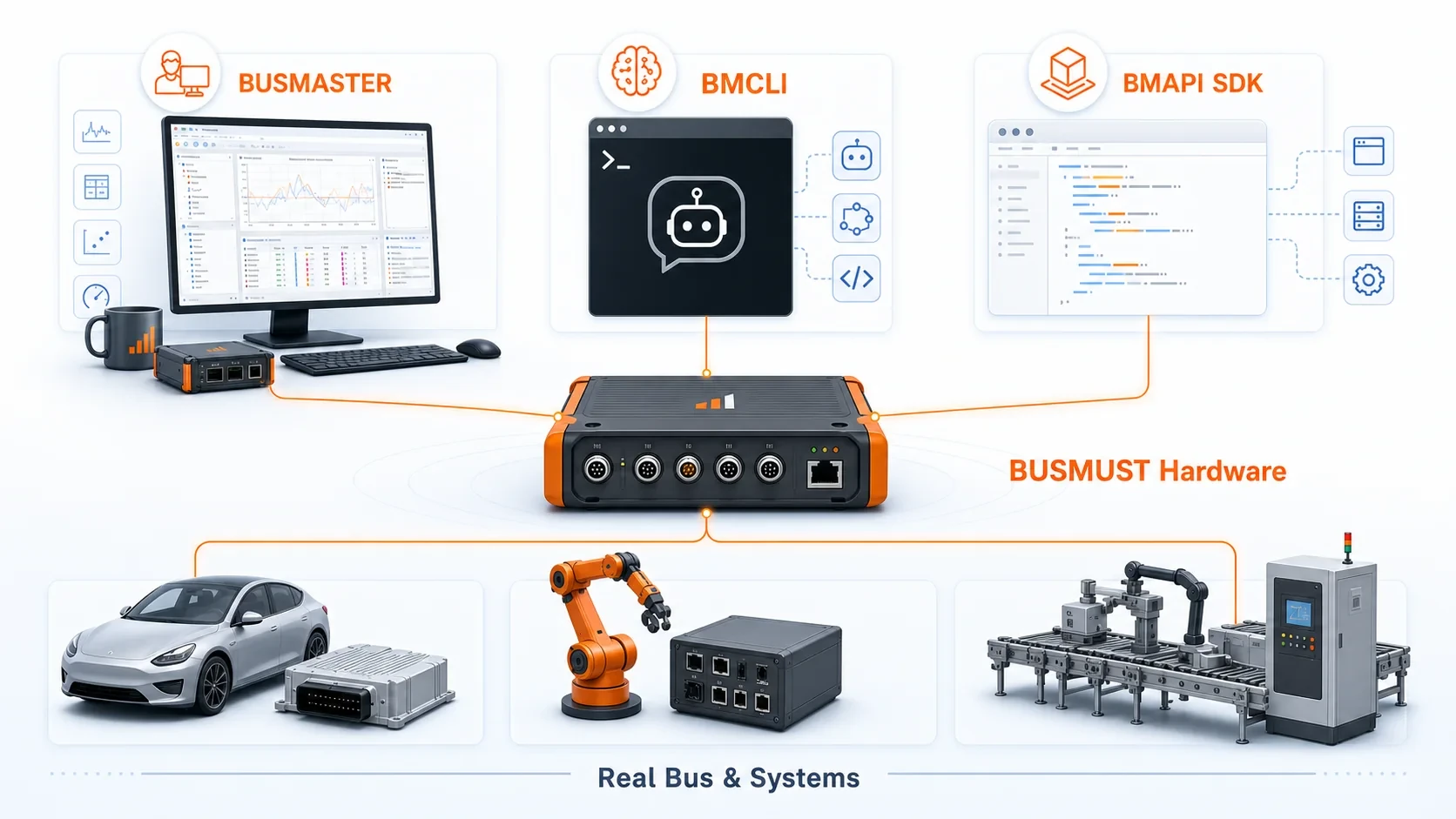
Graphical operation, AI and automation, and custom application development share access to hardware and engineering environments.
The BMCLI capability stack
Section titled “The BMCLI capability stack”BMCLI already provides a broad set of reusable, thoroughly validated engineering capabilities. CAN FD and LIN frame I/O, logging operations such as recording and replay, and protocol services including UDS, XCP, CANopen, and Modbus are directly available. Project databases and description files let tasks operate on signals and variables. The following overview reflects BMCLI 1.6.3; new capabilities continue to be added. Consult the online BMCLI reference for details.
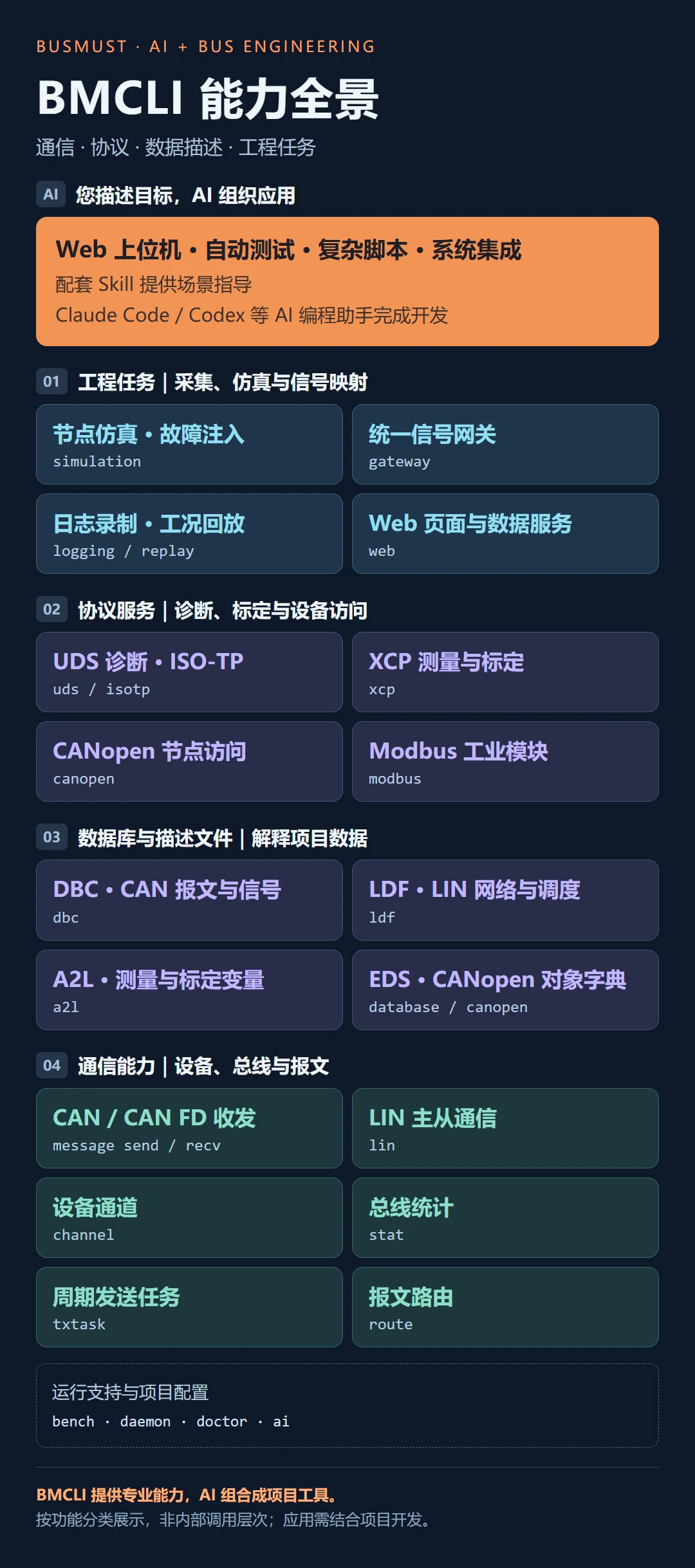
Communication, protocol services, data descriptions, engineering tasks, and scenario guidance.
The accompanying Skills explain how to build web interfaces, generate test cases, create complex scripts, and integrate systems. AI can use these practices to locate interfaces, organize tasks, and check results instead of deriving every workflow from scratch.
As capabilities and practical experience accumulate, AI can assemble complete tools with less project-specific code, leaving engineers more time for requirements and acceptance.
Our goal is to combine the strengths of people and AI, greatly reduce the time spent on traditional automotive development and test workflows, and help engineers enter a new era of productivity.
02 — Application scenarios: from a request to an engineering result
Section titled “02 — Application scenarios: from a request to an engineering result”A working method ultimately proves its value in practice. When one request can call on a complete set of professional capabilities, familiar, time-consuming jobs gain new possibilities. Here are four examples of how this change can enter everyday engineering.
Scenario 1: turn a pile of project documents into an automated test system
Section titled “Scenario 1: turn a pile of project documents into an automated test system”A new customer provides a communication matrix, diagnostic questionnaire, company specifications, and material from the previous product generation. Test engineers must organize the requirements, create cases, write scripts, examine results, and maintain the relationships between them.
Work with clear rules and repetitive structure is well suited to AI-assisted organization and generation. Try asking:
Read the project’s communication matrix and diagnostic documents. Use BMCLI to create a test specification and executable cases covering signal boundaries, timeouts, and diagnostic reads and writes. Identify the original requirement for every case. List conflicting documents or unclear pass/fail criteria separately, submit them for my review, and then run the tests on the designated bench.
The goal is a corresponding set of test descriptions, executable scripts, and result reports. Each case is a readable, executable, partly document-like BMCLI script. Alongside efficiency and stability, AI helps maintain traceability in both directions between requirements and tests.
Why does a case exist? Which requirement does it cover? Where should someone look when it fails? These relationships can be built in from the start. When a requirement changes, AI can follow the references to update the affected cases.
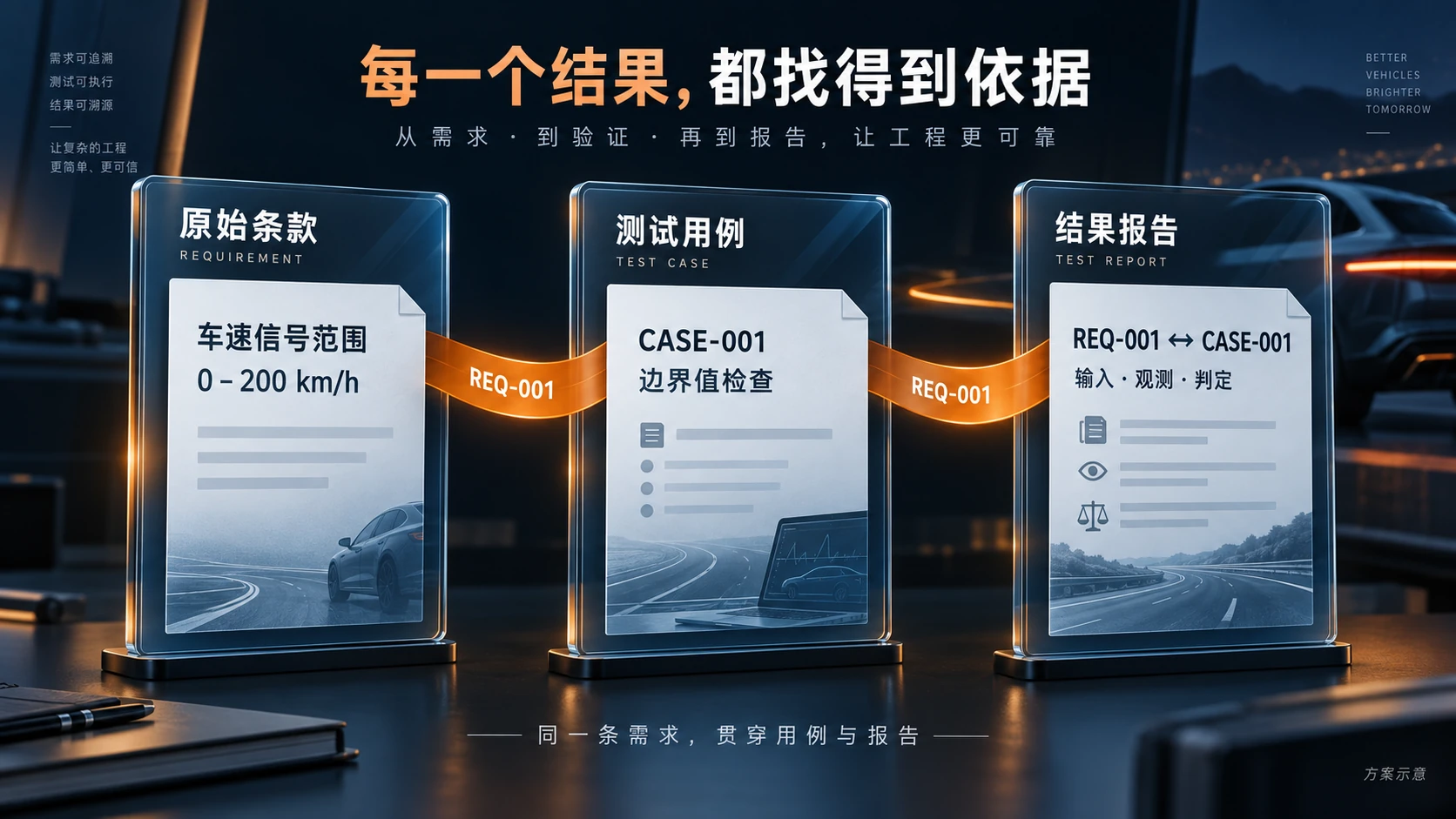
Source requirements, executable cases, and result reports remain connected.
For clearly specified communication and diagnostic cases that can be generated in batches, how ambitious could the productivity target be? Imagine reducing two months of document, test-case, and script preparation by a five-person team to one week with a single engineer and AI working together.
AI uses BMCLI to handle bulk generation and revision. The engineer reviews rules, checks coverage, and organizes bench validation. This division of work is changing how teams estimate staffing and schedules.
The same method applies to complex script-based tools. For a new project’s bootloader flashing tool, provide the flashing specification, firmware, and security-access requirements. Let AI organize the flashing workflow with BMCLI, produce logs and results, and connect the tool to CI/CD. The next build can then be downloaded to the ECU through the project workflow before bench testing continues.
With complete specifications and interface information, AI can generate a first flashing-tool version in 15 minutes, followed by verification and refinement against the actual ECU. Engineers can spend more time on the product itself.
Customer specifications, product-specific tools, and automated test workflows become connected parts of one process.
Automated testing tutorial · Bootloader flashing tutorial
Scenario 2: a custom interface for every product
Section titled “Scenario 2: a custom interface for every product”Need a vehicle instrument-bench panel? Traditionally, a dedicated application developer might first choose a language and controls, spend time building the interface, and then invest more effort in completing functions, checking interactions, and fixing problems. Now such tools can be created for a day’s work or maintained over the long term. Start by describing what you need:
Use BMCLI to build a web interface for my vehicle instrument bench. The DBC and wiring information are in the project directory. Show vehicle speed as a numeric gauge, steering angle as a rotating steering wheel, and only the current gear and turn-indicator states. Add a graph of the last 60 seconds of vehicle speed. Start with a read-only version. List missing signal definitions and clearly label simulated data.
AI can organize the page, connect data, inspect it in a browser, test it, and iterate until there is a working, editable tool for you to accept. This can be a 15-minute workflow.
The digital cockpit below shows what such an interface can look like.
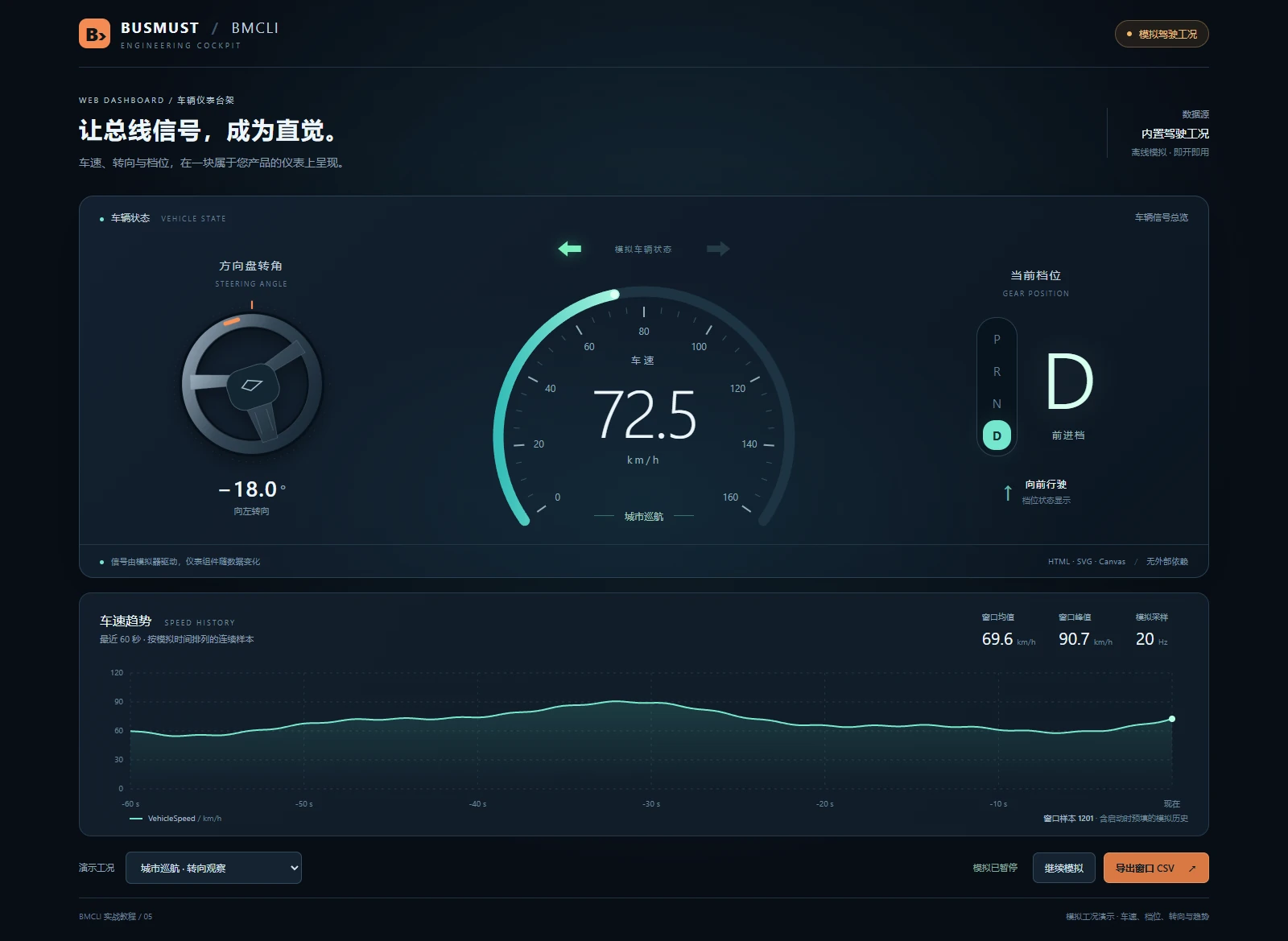
A real browser screenshot with simulated driving data.
Not happy with the result? You are now the person directing the work. Get a drink, clear your throat, and speak into the microphone:
“Make the steering wheel bigger.”
“Add a frame list.”
“Put the common actions in a toolbar.”
“Let’s get ambitious: I want a colorful shade of black!”
These changes can all be requested in natural language.
A simple version is a panel. Add more information and it becomes a dashboard. Add pages, menus, and experiment records, and it becomes a product-specific engineering application. Need colleagues to install it? Build a desktop edition. Need to view field equipment remotely? Deploy a web service.
And BMCLI need not be the system’s only backend. Other web services can handle authentication, users, databases, and business integrations. BMCLI connects the bus; AI can build the rest of the interface and application around your product’s needs.
Web interface tutorial and source code
Scenario 3: combine simulation and hardware-in-the-loop for ADAS benches
Section titled “Scenario 3: combine simulation and hardware-in-the-loop for ADAS benches”ADAS development and validation must repeatedly expose controllers to abnormal operating conditions, communication failures, and other problems encountered in the field. Building the bus environment and reproducing those conditions is detailed, ongoing work.
An ADAS sensor under test may depend on other nodes for vehicle speed, gear, steering, and related states. Moving all those communication partners into the laboratory can be expensive. Node simulation can establish the required bus environment first.
AI can use BMCLI and the project’s communication definitions to configure simulated nodes and supply the ECU’s required communication environment. This is restbus simulation: the real ECU operates on the bench while virtual nodes stand in for its absent communication partners.
Add communication fault injection: pause a particular message, or introduce a jump in an Alive Counter, and observe how the ECU responds. Simulation and fault injection can provide both the normal environment and deliberately challenging test conditions.
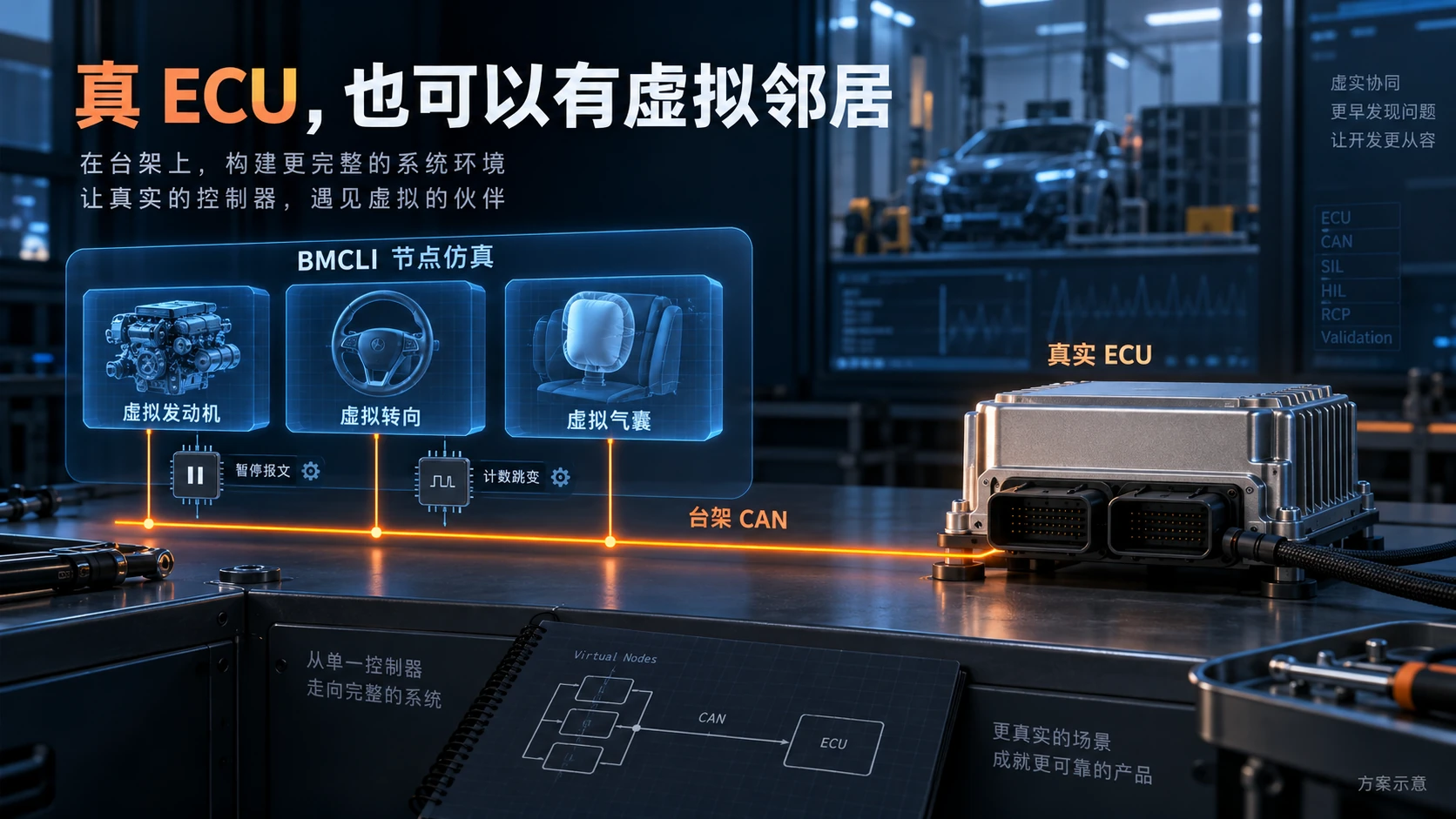
Virtual communication partners and configurable faults around a real ECU.
Intermittent field problems and rare algorithm failures suggest another workflow: record the traffic, return to the lab, and replay selected segments to the real DUT while recording its responses. Check whether the problem can be reproduced and whether the fix works.
This record-and-replay form of hardware-in-the-loop validation turns “there may have been a false alarm on the road” into a repeatable bench input.
Node simulation tutorial · Hardware-in-the-loop tutorial
Scenario 4: cross bus boundaries with a unified signal gateway
Section titled “Scenario 4: cross bus boundaries with a unified signal gateway”Exchanging the required data between protocols and ports with minimal development effort and low runtime latency is the direction of BUSMUST’s unified signal gateway. BMCLI uses a unified signal model to bring supported resources such as CAN, CAN FD, and Modbus into a common mapping approach.
Consider a practical CAN FD gateway requirement. A development ECU needs the chassis vehicle-speed signal, but connecting an unfinished device directly to the chassis CAN network would create unwanted risk. A separate CAN network and one-way signal mapping can deliver only the required information, reducing the risk of unintended transmissions toward the chassis network.
Previously, this might require dedicated routing equipment and custom code. Now it can be assigned to the BMCLI unified signal gateway:
Use these two DBC files to map vehicle speed from port A into the target message on port B. Convert the units and configure the transmission period according to the target definition. Map only from A to B; do not forward other signals. Configure protection using the E2E rules I provide and generate a gateway configuration file.
BMCLI can run the configuration AI produces. With complete signal definitions and conversion rules, you can create a first gateway configuration in five minutes, then inspect the mapping and runtime behavior. A forwarding program that once took a specialist several days can now begin with a description of the requirement.
The configuration says which signals to select, how to convert them, and where to send them. Supported E2E rules can be configured from the project documents as well, avoiding repeated implementation of counter and checksum processing.
Throughout this process, the work can run from an AI-created configuration file without writing a line of code. A small computer such as a Raspberry Pi running a supported Linux system can then host the gateway in the field.
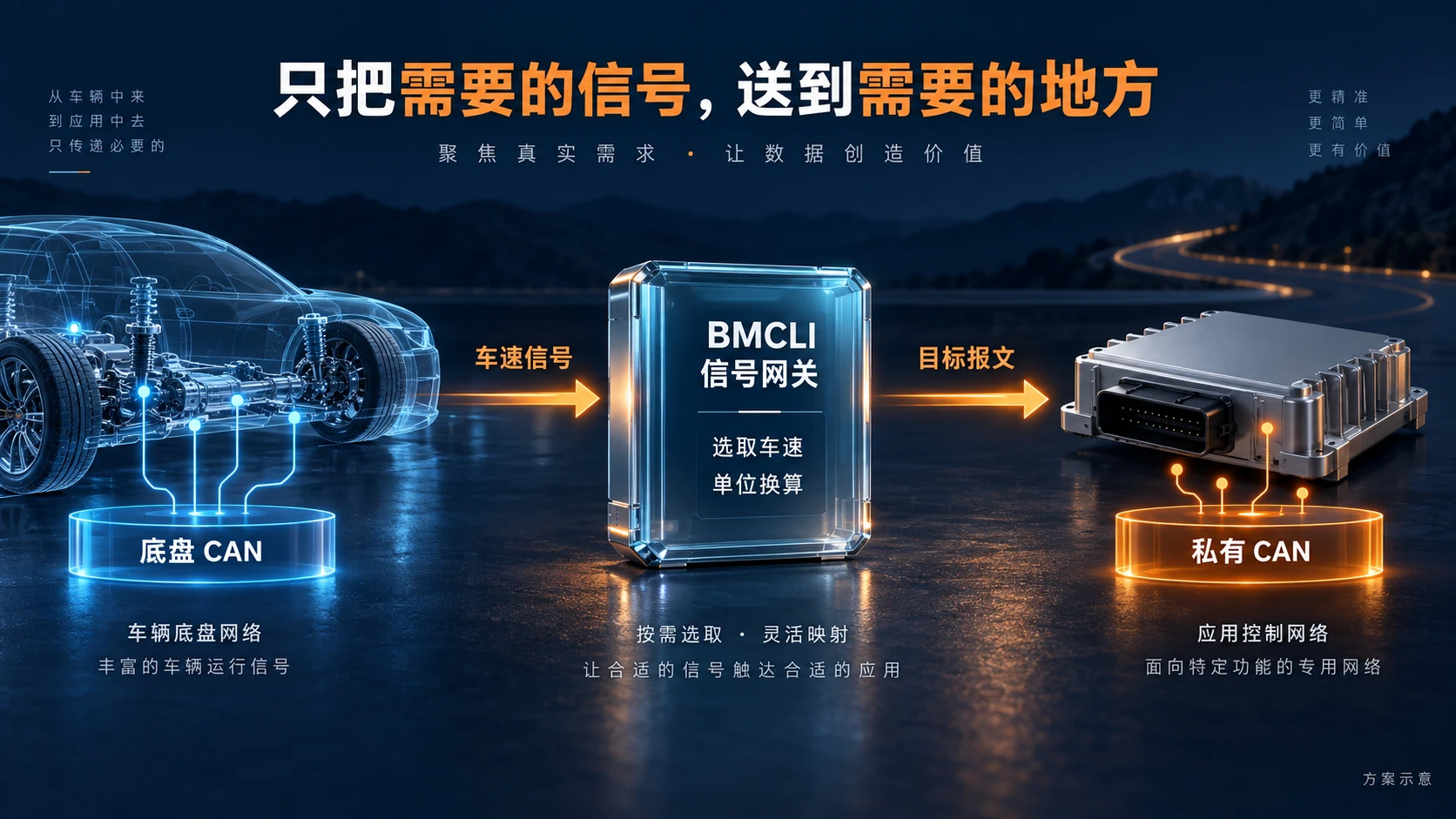
One-way signal mapping separates the development network from chassis CAN.
The unified signal model can organize CAN FD-to-CAN and CAN-to-Modbus mappings, and also connect industrial I/O so that temperatures, analog values, and relays become part of the same bench system.
The underlying idea is to represent decodable information as signals, then map and transform those signals across supported communication resources. Modbus and CAN signals can consequently work together in one environment, opening up practical sensor and actuator choices for automotive projects.
General-purpose Modbus acquisition and relay modules are widely available, often at very low prices. Select modules for the required measurement range, isolation, and load capacity. Once connected through BMCLI, temperature and CAN signals can appear on the same page. Relays can power bench ECUs on and off, with linked behavior configured around test conditions.
Mature industrial modules become part of an automotive test environment. One signal model connects capabilities that previously lived in separate systems.
Using these ready-made modules can sometimes avoid a custom hardware development effort—and a month of an engineer’s time—so that a bench becomes useful sooner.
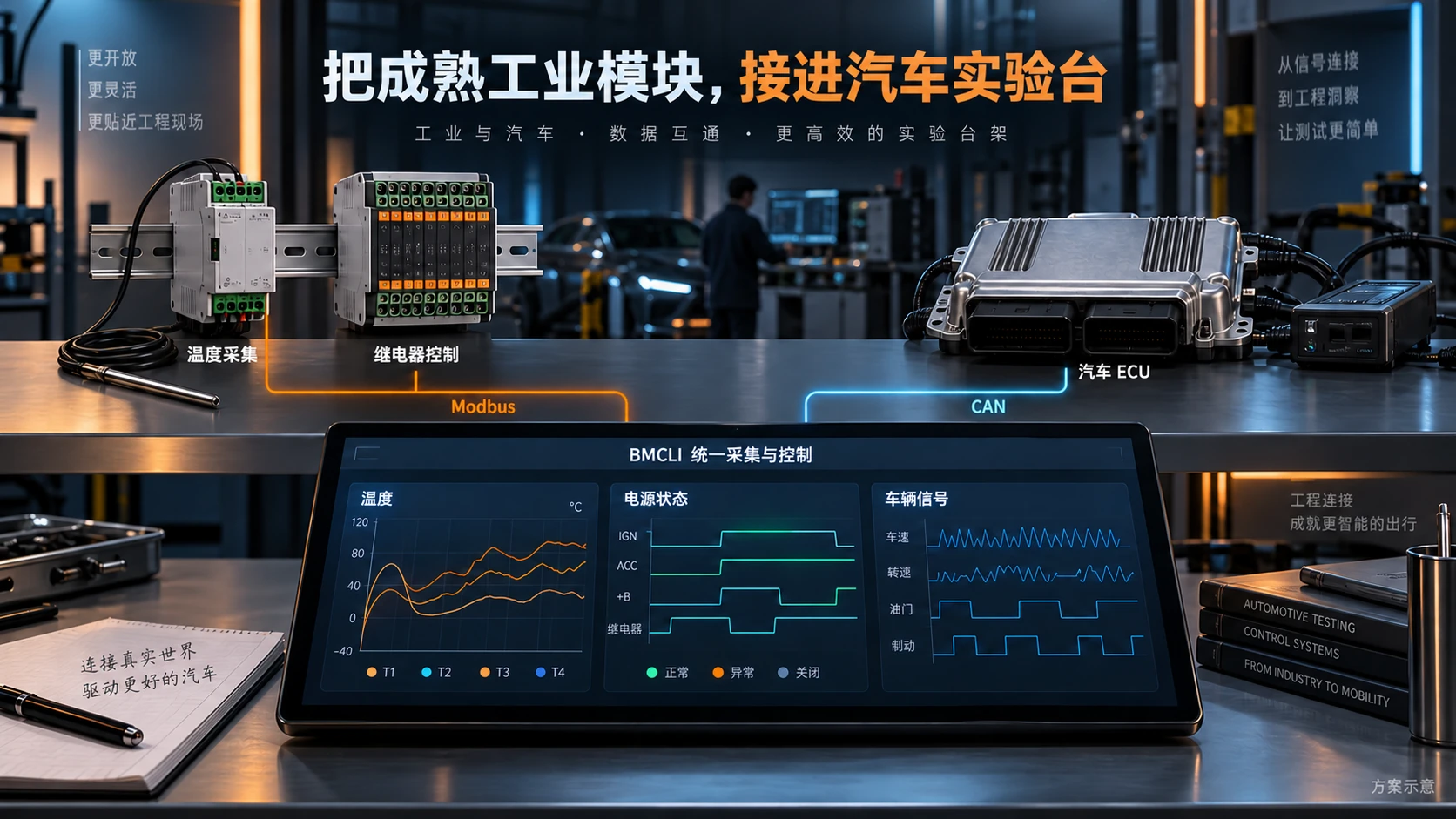
Industrial acquisition and control modules join vehicle signals in one bench environment.
Unified signal gateway tutorial · Industrial module integration tutorial
03 — Let AI connect to your bus
Section titled “03 — Let AI connect to your bus”BMCLI 1.6.3 is now available for Windows and Linux, including ARM platforms. Use the BMCLI download page to obtain the package for your platform, or install online with a single command.
Windows users can run the official installer in PowerShell:
irm https://download.busmust.com/bmcli/install.ps1 | iexLinux users can run:
curl -fsSL https://download.busmust.com/bmcli/install.sh | shAfter installation, open a new terminal, prepare the device driver or USB permissions as described in the instructions, and check that the accompanying AI Skill is ready. See the installation and getting-started tutorial.
Connect your BUSMUST analyzer and ECU environment, then open an AI coding assistant such as Claude Code or Codex. The first task need not be a large project. Start with:
BMCLI is installed and a BUSMUST analyzer is connected. First check the environment, AI Skill, and device connection. Confirm the wiring and bus parameters, then listen for 10 seconds without transmitting. Summarize the received frames and decodable signals, and tell me which information is missing.
When AI returns the first frame analysis, you have a clear starting point. Then ask it to draw a graph, build a panel, or work through the test requirements already on your desk.
The BUSMUST team has prepared a hands-on tutorial series introducing this working method. It covers installation and initial bus analysis, product-specific tools, and engineering system integration. Engineers can read it themselves or give it to AI as reference material. The series is available in both Chinese and English.
Each chapter includes a requirement description, a demonstration of the deliverable, ideas for further development, and relevant teaching databases, configurations, reports, or source code. Beyond the examples above, the series covers LIN schedules, XCP measurement and calibration, CANopen node debugging, LabVIEW, and automated stations.
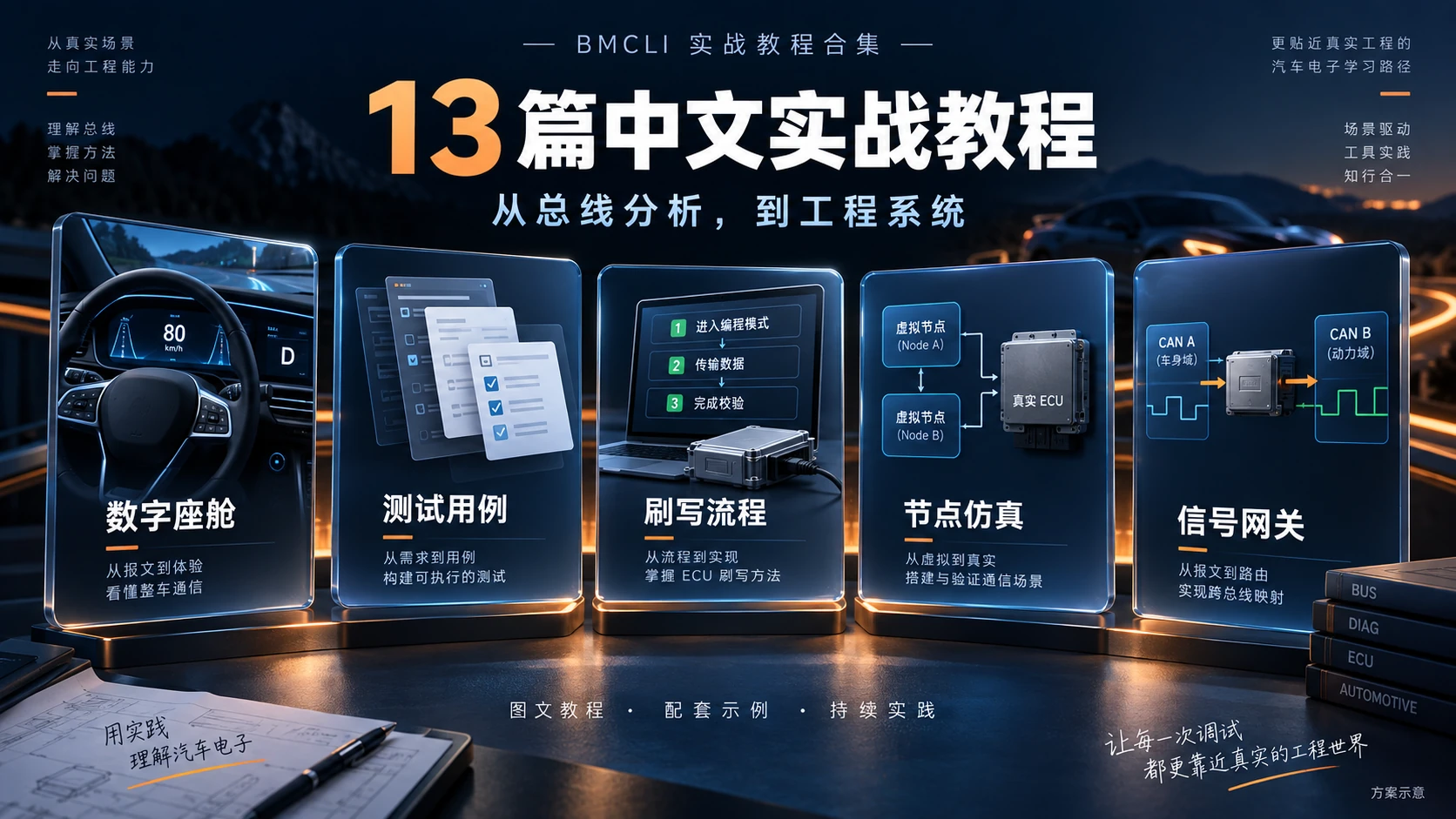
Thirteen practical chapters connecting individual tasks to complete engineering systems.
Engineers in a time of change: we are people, too
Section titled “Engineers in a time of change: we are people, too”Technological progress should ultimately improve people’s lives. When productivity rises, some of that benefit should return to engineers themselves: fewer late nights chasing deadlines, and more time to think, rest, and be with family.
If there is something to look forward to in the AI era, surely that belongs near the top of the list.
We want BMCLI to become a useful instrument in engineers’ hands—something that brings confidence during change and a little more room to breathe outside work.
Do the project well. Build the product well. Build the car well. And live your own life well, too.
Download BMCLI, try it, and tell us about the problems you encounter or the scenarios you want to build. Contact customer service or use the website feedback form.
Start with one real task, pick up a cup of coffee, and join us in experiencing and shaping this AI transformation in automotive electronics.